Don't miss your chance to take the Fabric Data Engineer (DP-700) exam on us!
Learn moreWe've captured the moments from FabCon & SQLCon that everyone is talking about, and we are bringing them to the community, live and on-demand. Starts on April 14th. Register now
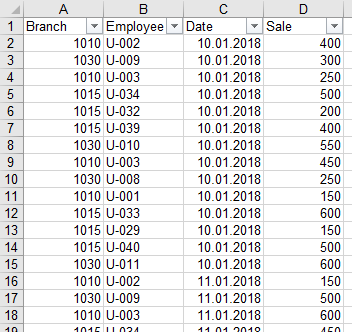
This is my Table in Power BI Desktop and the according Data Sheet:
How can I show the Name-Code of the Employee in the Power BI Table, next to the Quick Measure with his Sales?
Solved! Go to Solution.
Hi, Please try with this measure:
EmployeeCode =
VAR SALEMAX = [Sale max per Employee]
VAR TABLEEMPLOYEE =
SUMMARIZE (
Table1;
Table1[Employee];
"SALES"; CALCULATE ( SUM ( Table1[Sale] ) )
)
RETURN
CALCULATE (
VALUES ( Table1[Employee] );
FILTER ( TABLEEMPLOYEE; [SALES] = SALEMAX )
)Regards
Victor
Lima - Peru
Hi, Please try with this measure:
EmployeeCode =
VAR SALEMAX = [Sale max per Employee]
VAR TABLEEMPLOYEE =
SUMMARIZE (
Table1;
Table1[Employee];
"SALES"; CALCULATE ( SUM ( Table1[Sale] ) )
)
RETURN
CALCULATE (
VALUES ( Table1[Employee] );
FILTER ( TABLEEMPLOYEE; [SALES] = SALEMAX )
)Regards
Victor
Lima - Peru
I don't understand exactly, how your solution works, but it does work perfectly, thx for that!
Hi, The measure work in this way:
First i declare two variables :
1. With the MaxSale (Your measure)
2 A variable to store a "temporal table" with the summarize of employees and his sales.
After that create a 1 column table (in this case with Values) of the employee where the sales are equal to MaxSale
The issue is when 2 employees had the MaxSale. In this case you should evaluate what desire to show. Only One Employee or Both.
Regards
Victor
Lima - Peru
@VvelardeThank you for the explanation.
Unfortunately I just figured out, that this solution doesn't work, when I use the date-slicer. Do you have an idea?
anybody?
If you have recently started exploring Fabric, we'd love to hear how it's going. Your feedback can help with product improvements.
A new Power BI DataViz World Championship is coming this June! Don't miss out on submitting your entry.
Share feedback directly with Fabric product managers, participate in targeted research studies and influence the Fabric roadmap.
| User | Count |
|---|---|
| 57 | |
| 40 | |
| 36 | |
| 19 | |
| 18 |
| User | Count |
|---|---|
| 70 | |
| 69 | |
| 38 | |
| 35 | |
| 23 |