Get certified for free when you join Fabric Data Days 2026 and dive into Fabric, Power BI, SQL, AI, and other essential data skills.
Join nowData Days is here! Join us now for 60+ days of learning, challenges, and connection. Learn more
Hi,
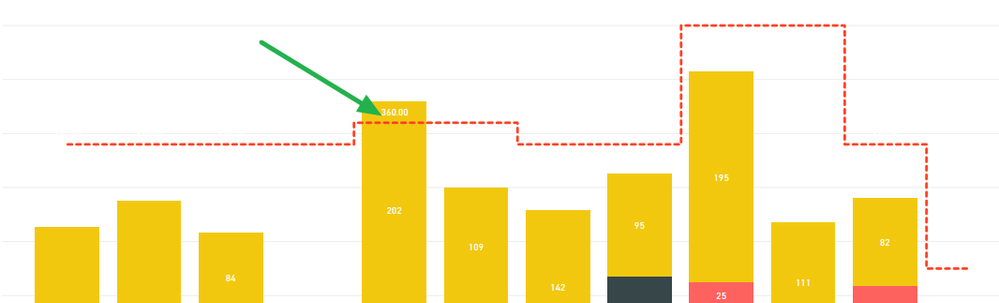
I have an issue with a line and stacked column chart.
I am showing data labels for the columns and have them turned off for the line.
This works as intended in Power BI Desktop but when I publish to my workspace I get the below issue where it shows the data labels for the line, it shouldn't be.
I have tried editing the report on the website (instead of Desktop) and when turning off the data labels for the Capacity line it turns itself back on again.
I've tried workarounds like adding a bogus (negative) series to the line values and then setting the axis start to zero but then I'm stuck with the bogus series in the legend.
Is this a known bug?
Any help appreciated.
| Have I solved your problem? Please click Accept as Solution so I don't keep coming back to this post, oh yeah, others may find it useful also ;). |
Solved! Go to Solution.
Hi @KNP ,
By my tests, I could reproduce your issue with the latest version of Power BI Desktop.
This is an issue which has been reported interanlly CRI:116657417and I will update here if I get any reponse.
In addition, please refer to this similar issue.
Best Regards,
Cherry
Hi @KNP ,
By my tests, I could reproduce your issue with the latest version of Power BI Desktop.
This is an issue which has been reported interanlly CRI:116657417and I will update here if I get any reponse.
In addition, please refer to this similar issue.
Best Regards,
Cherry
Don't miss out on Data Days, June 15 through August 7. Learn Fabric, Power BI, SQL, AI and more.
Check out the May 2026 Power BI update to learn about new features.
| User | Count |
|---|---|
| 23 | |
| 21 | |
| 20 | |
| 19 | |
| 13 |
| User | Count |
|---|---|
| 58 | |
| 52 | |
| 37 | |
| 31 | |
| 27 |