cancel
Showing results for 
Search instead for 
Did you mean: 

The Power BI Data Visualization World Championships is back! Get ahead of the game and start preparing now! Learn more

Reply
KNP
Super User
Super User

Data Labels Show When Published

Hi,


I have an issue with a line and stacked column chart. 

I am showing data labels for the columns and have them turned off for the line.


DataLabels_1.png


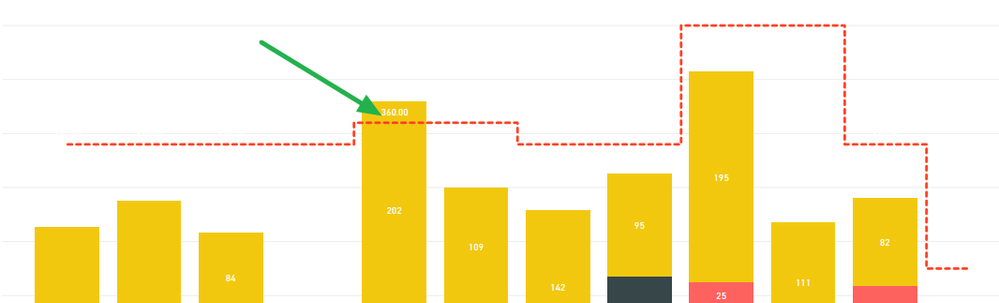
This works as intended in Power BI Desktop but when I publish to my workspace I get the below issue where it shows the data labels for the line, it shouldn't be.

DataLabels_2.png


I have tried editing the report on the website (instead of Desktop) and when turning off the data labels for the Capacity line it turns itself back on again.


I've tried workarounds like adding a bogus (negative) series to the line values and then setting the axis start to zero but then I'm stuck with the bogus series in the legend.


Is this a known bug?

Any help appreciated.

Have I solved your problem?
Please click Accept as Solution so I don't keep coming back to this post, oh yeah, others may find it useful also ;).
xOIEmaj

If you found this post helpful, please give Kudos.
It gives me a sense of instant gratification and, if you give me Kudos enough times, magical unicorns will appear on your screen.
If you find my signature vaguely amusing, please give Kudos.
image
fabric-SUbadge
Proud to be a Super User!
1 ACCEPTED SOLUTION
v-piga-msft
Resident Rockstar
Resident Rockstar

Hi @KNP ,

By my tests, I could reproduce your issue with the latest version of Power BI Desktop.

This is an issue which has been reported interanlly CRI:116657417and I will update here if I get any reponse.

In addition, please refer to this similar issue.

Best  Regards,

Cherry


Community Support Team _ Cherry Gao
If this post helps, then please consider Accept it as the solution to help the other members find it more quickly.

View solution in original post

1 REPLY 1
v-piga-msft
Resident Rockstar
Resident Rockstar

Hi @KNP ,

By my tests, I could reproduce your issue with the latest version of Power BI Desktop.

This is an issue which has been reported interanlly CRI:116657417and I will update here if I get any reponse.

In addition, please refer to this similar issue.

Best  Regards,

Cherry


Community Support Team _ Cherry Gao
If this post helps, then please consider Accept it as the solution to help the other members find it more quickly.

Helpful resources

Announcements
Power BI DataViz World Championships

Power BI Dataviz World Championships

The Power BI Data Visualization World Championships is back! Get ahead of the game and start preparing now!

December 2025 Power BI Update Carousel

Power BI Monthly Update - December 2025

Check out the December 2025 Power BI Holiday Recap!

FabCon Atlanta 2026 carousel

FabCon Atlanta 2026

Join us at FabCon Atlanta, March 16-20, for the ultimate Fabric, Power BI, AI and SQL community-led event. Save $200 with code FABCOMM.