Share feedback directly with Fabric product managers, participate in targeted research studies and influence the Fabric roadmap.
Sign up nowGet Fabric certified for FREE! Don't miss your chance! Learn more
Hi Team,
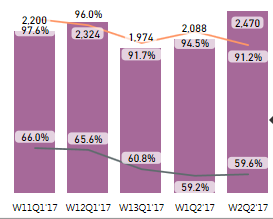
Please assist me on removal of backgroung color for data label in the "Line and Column Stacked Chart". Need only data labels without backgroung color.
Thank you in advance for the help.
Hello @SatyaSunitha1_ I am not sure which version of Power BI Desktop you are using. If your version is after November 2022 then you can turnoff that backgroud as per below screen shot:
If this post helps, then please consider accepting it as the solution to help other members find it more quickly. Thank You!!
This is for the new visitors,
You can download latest version of PBI and you can able to hide or set background colors to the data labels in graph visuals, Thanks for those who are all vote to this idea!
Hi @SatyaSunitha1_,
As far as I know, it is not allowed to customize the background color of data labels right now. So, we cannot remove the default background color of data label in the "Line and Stacked Column Chart". You can submit your idea at this page. Your feedback is valuable for us to improve the level of our products and service.
Best regards,
Yuliana Gu
If you love stickers, then you will definitely want to check out our Community Sticker Challenge!
Check out the January 2026 Power BI update to learn about new features.
| User | Count |
|---|---|
| 62 | |
| 58 | |
| 45 | |
| 21 | |
| 18 |
| User | Count |
|---|---|
| 121 | |
| 116 | |
| 37 | |
| 34 | |
| 30 |