cancel
Showing results for 
Search instead for 
Did you mean: 

Get Fabric certified for FREE! Don't miss your chance! Learn more

Reply
skorpionaa
Helper I
Helper I

Data From API to PowerBI

0

I have API link which i want to b in power bi but i need to separate header name from data how can i do that in power bi

you can see the picture

https://coronavirus-19-api.herokuapp.com/countries
i tried split columns function in but still not working please anyone can help me on this ASAP

country , death and so on they are header



 Capture.PNG


1 ACCEPTED SOLUTION
sturlaws
Resident Rockstar
Resident Rockstar

Hi, @skorpionaa,


try this:

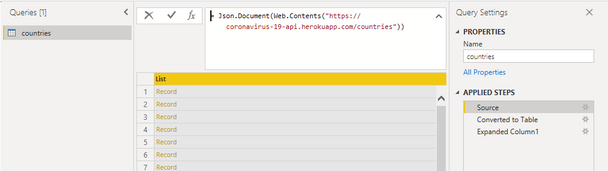
step 1 - import data using the Web connector, this should result in this:
image.png

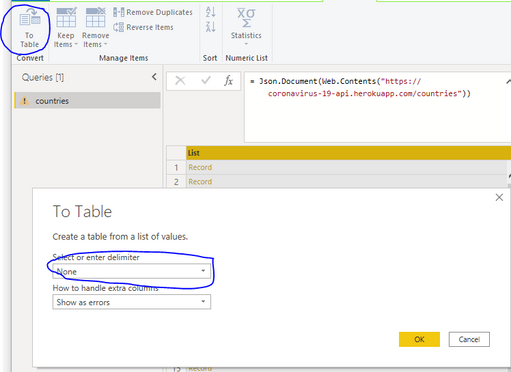
step 2 - Click the 'Convert to table'-button, and choose separator = None:
image.png


which should result in this:
image.png


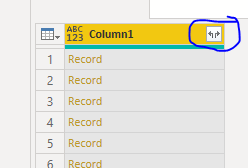
Step 3 - Click on the expand button encircled in blue in screenshot above. This should yield this:
image.png


All column names are prefixed with Column1., but it will be a onetime operation to change the column names.

Cheers,
Sturla

If this post helps, then please consider Accepting it as the solution. Kudos are nice too.

View solution in original post

1 REPLY 1
sturlaws
Resident Rockstar
Resident Rockstar

Hi, @skorpionaa,


try this:

step 1 - import data using the Web connector, this should result in this:
image.png

step 2 - Click the 'Convert to table'-button, and choose separator = None:
image.png


which should result in this:
image.png


Step 3 - Click on the expand button encircled in blue in screenshot above. This should yield this:
image.png


All column names are prefixed with Column1., but it will be a onetime operation to change the column names.

Cheers,
Sturla

If this post helps, then please consider Accepting it as the solution. Kudos are nice too.

Helpful resources

Announcements
Sticker Challenge 2026 Carousel

Join our Community Sticker Challenge 2026

If you love stickers, then you will definitely want to check out our Community Sticker Challenge!

January Power BI Update Carousel

Power BI Monthly Update - January 2026

Check out the January 2026 Power BI update to learn about new features.

FabCon Atlanta 2026 carousel

FabCon Atlanta 2026

Join us at FabCon Atlanta, March 16-20, for the ultimate Fabric, Power BI, AI and SQL community-led event. Save $200 with code FABCOMM.