Hello All - Need some HELP!!!!!
What I am trying to do is when I select Company, i want the Department slicer to filter only based on the data that is there, and the charts to reflect the selection.
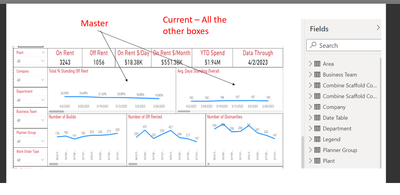
The issue is when I apply the Comapny from the Current table it only chnages those graphs (Current) and vise vera for the Master.
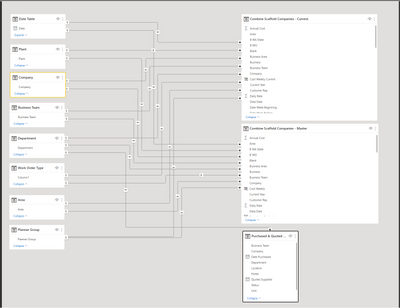
What I have is two spreadsheets
1. Master - Holds multple weeks of data
2. Current - Is a copy of the (Master) but have set a filter to it to just show me the data from the most current week ending date.
I have a sheet that has multiple charts on it. Most of the charts are based on the "Current" table. But there are also some charts that are based on the Master table.
I have included multiple slicers to sort through data. (Company, Department, Area, Team)
The issue is when I apply the Comapny from the Current table it only chnages those graphs (Current) and vise vera for the Master.
I haver also created a "Company" table of its own, and then linked "Company" to both the Master file and Current. That dont work either......
Looking for suggestions!