@sunilvs24
I have a table with some information, based on Months. Now I need a way to find out what is different from each month (which information was added and which was removed).
According to your description, you can create a measure to get the new added or moved out employees for each month.
Assume you have a table called EmployeeDetails like below:
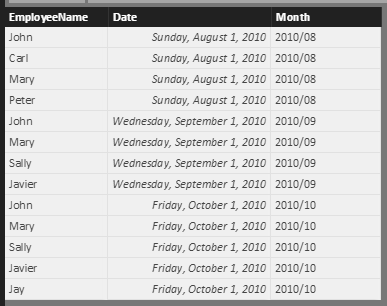
You can use the formula below to get new added Employees for each month:
New Added Employee =
IF (
    HASONEVALUE ( EmployeeDetails[Month] ),
    IF (
        DATEADD ( VALUES ( EmployeeDetails[Date] ), -1, MONTH ) <> BLANK (),
        IF (
            CALCULATE (
                COUNTROWS ( VALUES ( EmployeeDetails[EmployeeName] ) ),
                FILTER (
                    VALUES ( EmployeeDetails[EmployeeName] ),
                    EmployeeDetails[EmployeeName]
                        <> CALCULATETABLE (
                            VALUES ( EmployeeDetails[EmployeeName] ),
                            FILTER (
                                ALL ( EmployeeDetails[date] ),
                                EmployeeDetails[Date] = DATEADD ( VALUES ( EmployeeDetails[Date] ), -1, MONTH )
                            ),
                            ALL ( EmployeeDetails[Month] )
                        )
                )
            )
                > 0,
            "Added"
        )
    )
)
And the moved out employees:
Moved Out Employee =
IF (
    HASONEVALUE ( EmployeeDetails[Month] ),
    IF (
        DATEADD ( VALUES ( EmployeeDetails[Date] ), 1, MONTH ) <> BLANK (),
        IF (
            CALCULATE (
                COUNTROWS ( VALUES ( EmployeeDetails[EmployeeName] ) ),
                FILTER (
                    VALUES ( EmployeeDetails[EmployeeName] ),
                    EmployeeDetails[EmployeeName]
                        <> CALCULATETABLE (
                            VALUES ( EmployeeDetails[EmployeeName] ),
                            FILTER (
                                ALL ( EmployeeDetails[date] ),
                                EmployeeDetails[Date] = DATEADD ( VALUES ( EmployeeDetails[Date] ), 1, MONTH )
                            ),
                            ALL ( EmployeeDetails[Month] )
                        )
                )
            )
                > 0,
            "Moved Out"
        )
    )
)
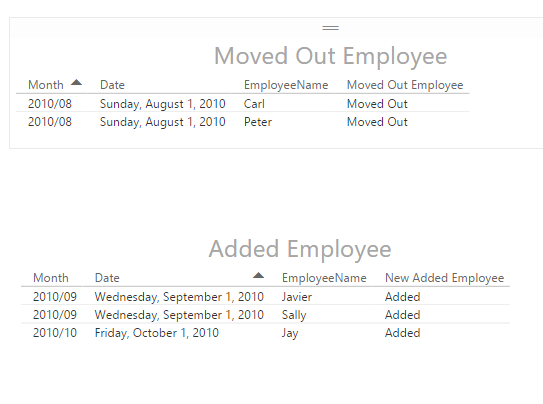
Then you can use these measures to show the result you want in the report:
Regards


