Join us in Barcelona for FabCon and SQLCon, September 28 - October 1, 2026.
This is best Fabric, Power BI, SQL and AI community event. How do we know? The last event sold out! Save €200 with code FABCMTY200.
Register now- Power BI forums
- Get Help with Power BI
- Desktop
- Service
- Report Server
- Power Query
- Mobile Apps
- Developer
- DAX Commands and Tips
- Custom Visuals Development Discussion
- Health and Life Sciences
- Power BI Spanish forums
- Translated Spanish Desktop
- Training and Consulting
- Instructor Led Training
- Dashboard in a Day for Women, by Women
- Galleries
- Data Stories Gallery
- Themes Gallery
- Contests Gallery
- QuickViz Gallery
- Quick Measures Gallery
- Visual Calculations Gallery
- Fabric Apps Gallery
- Notebook Gallery
- Translytical Task Flow Gallery
- TMDL Gallery
- R Script Showcase
- Webinars and Video Gallery
- Ideas
- Custom Visuals Ideas (read-only)
- Issues
- Issues
- Events
- Upcoming Events
July 28 - August 9 | Final Round of the Power BI Dataviz World Championships. This is your chance. Learn more
- Power BI forums
- Forums
- Get Help with Power BI
- Desktop
- Re: Data Calculation
- Subscribe to RSS Feed
- Mark Topic as New
- Mark Topic as Read
- Float this Topic for Current User
- Bookmark
- Subscribe
- Printer Friendly Page


- Mark as New
- Bookmark
- Subscribe
- Mute
- Subscribe to RSS Feed
- Permalink
- Report Inappropriate Content
Data Calculation
Hi Everyone, hope someone helps me with this.
I have few columns like
Date,
Currency,
SPVar,
SHVar,
Xvar,
X_LVar. All the variances are in percentages.
So what I need is, I want to calculate
(Number of days SPVar has crossed (+5% or -5%) for each currency)/(Total Number of days)--->in last two months.
The same for last 4 months.
For example: SPVar might be more than (+5% or -5%) in last two months = 12 days(For currency1)
Total number of days in last two months is = 60 days(assumption)
SPVar might be more than (+5% or -5%)in last two months = 8 days(For currency2)
Total number of days in last two months is = 60 days(assumption)
And I need to calulate this for SPVar, SHVar,XVar,X_LVar as rows.
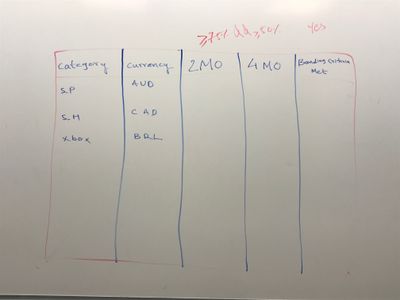
So my table would have columns like
1.category(Which is SPVar,SHVar,XVar,X_LVar)
2.Currency
3.Last 2 Months
4.Last 4 Months
This is really an important work for me.
I have attached an image which shows the existing data for last 2 months. But I snipped it to only few rows.
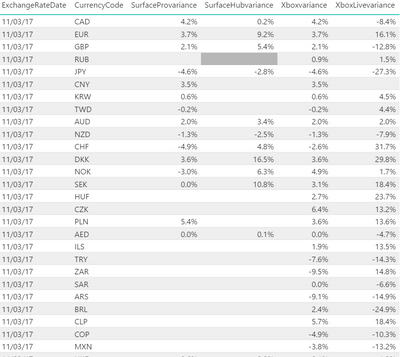
Thank you.


- Mark as New
- Bookmark
- Subscribe
- Mute
- Subscribe to RSS Feed
- Permalink
- Report Inappropriate Content
Hi @pxg08680,
Please share a dummy sample. For example, you can replace the currency code with "ABCD...". We need the data and its structure to write a DAX formula. You can upload it to a cloud drive and share the download link here.
Please mask the confidential parts.
Best Regards,
Dale
If this post helps, then please consider Accept it as the solution to help the other members find it more quickly.
- Mark as New
- Bookmark
- Subscribe
- Mute
- Subscribe to RSS Feed
- Permalink
- Report Inappropriate Content


- Mark as New
- Bookmark
- Subscribe
- Mute
- Subscribe to RSS Feed
- Permalink
- Report Inappropriate Content
@pxg08680 define last two months, last 60 days from exchange date, or if exchange date is in Jan 2018, last two months are Nov/Dec 2017?
Subscribe to the @PowerBIHowTo YT channel for an upcoming video on List and Record functions in Power Query!!
Learn Power BI and Fabric - subscribe to our YT channel - Click here: @PowerBIHowTo
If my solution proved useful, I'd be delighted to receive Kudos. When you put effort into asking a question, it's equally thoughtful to acknowledge and give Kudos to the individual who helped you solve the problem. It's a small gesture that shows appreciation and encouragement! ❤
Did I answer your question? Mark my post as a solution. Proud to be a Super User! Appreciate your Kudos 🙂
Feel free to email me with any of your BI needs.
- Mark as New
- Bookmark
- Subscribe
- Mute
- Subscribe to RSS Feed
- Permalink
- Report Inappropriate Content
@parry2k wrote:@pxg08680 define last two months, last 60 days from exchange date, or if exchange date is in Jan 2018, last two months are Nov/Dec 2017?
***ExchangeRateDate > DATEADD(Month,-2,(select max(ExchangeRateDate)from [dbo].[vw_ConsumerFXVar])**
This is what I was using to validate my data back in SQL. The abouve where query gives me all the dates from Today to begining of Nov.
In the same way Last 4 Months would be from today to begining of September.
- Mark as New
- Bookmark
- Subscribe
- Mute
- Subscribe to RSS Feed
- Permalink
- Report Inappropriate Content
SPVar Crossed Limit in Last 2 Months =
var dt = MAX(Sheet1[ExchangeRateDate]) - 1
var lastNumberofDays = 2
return
  Calculate(CountRows(Sheet1),
    Filter(ALLEXCEPT(Sheet1, Sheet1[CurrencyCode]),
            (Sheet1[SurfaceProvariance] >= 0.05 || Sheet1[SurfaceProvariance] <= -0.05)
    ),
  DATESINPERIOD(Sheet1[ExchangeRateDate], dt, -lastNumberofDays, month)

)
make highlighted changes and that will do it.
Subscribe to the @PowerBIHowTo YT channel for an upcoming video on List and Record functions in Power Query!!
Learn Power BI and Fabric - subscribe to our YT channel - Click here: @PowerBIHowTo
If my solution proved useful, I'd be delighted to receive Kudos. When you put effort into asking a question, it's equally thoughtful to acknowledge and give Kudos to the individual who helped you solve the problem. It's a small gesture that shows appreciation and encouragement! ❤
Did I answer your question? Mark my post as a solution. Proud to be a Super User! Appreciate your Kudos 🙂
Feel free to email me with any of your BI needs.
- Mark as New
- Bookmark
- Subscribe
- Mute
- Subscribe to RSS Feed
- Permalink
- Report Inappropriate Content
Is this a measure...??
Second thing is I need SPvar as a row not a column. Unpivoting could be used here.
Thanks Parry2k
- Mark as New
- Bookmark
- Subscribe
- Mute
- Subscribe to RSS Feed
- Permalink
- Report Inappropriate Content
yes it is a measure. what output you are looking for?
Subscribe to the @PowerBIHowTo YT channel for an upcoming video on List and Record functions in Power Query!!
Learn Power BI and Fabric - subscribe to our YT channel - Click here: @PowerBIHowTo
If my solution proved useful, I'd be delighted to receive Kudos. When you put effort into asking a question, it's equally thoughtful to acknowledge and give Kudos to the individual who helped you solve the problem. It's a small gesture that shows appreciation and encouragement! ❤
Did I answer your question? Mark my post as a solution. Proud to be a Super User! Appreciate your Kudos 🙂
Feel free to email me with any of your BI needs.
- Mark as New
- Bookmark
- Subscribe
- Mute
- Subscribe to RSS Feed
- Permalink
- Report Inappropriate Content
- Mark as New
- Bookmark
- Subscribe
- Mute
- Subscribe to RSS Feed
- Permalink
- Report Inappropriate Content
yes, do it, add table visual, drop currency, exchange rate and two measures i gave you and should do what you are lookign for, not sure what i'm missing here.
Subscribe to the @PowerBIHowTo YT channel for an upcoming video on List and Record functions in Power Query!!
Learn Power BI and Fabric - subscribe to our YT channel - Click here: @PowerBIHowTo
If my solution proved useful, I'd be delighted to receive Kudos. When you put effort into asking a question, it's equally thoughtful to acknowledge and give Kudos to the individual who helped you solve the problem. It's a small gesture that shows appreciation and encouragement! ❤
Did I answer your question? Mark my post as a solution. Proud to be a Super User! Appreciate your Kudos 🙂
Feel free to email me with any of your BI needs.
- Mark as New
- Bookmark
- Subscribe
- Mute
- Subscribe to RSS Feed
- Permalink
- Report Inappropriate Content
SP Var % Crossed in Last 2 months = Divide([SPVar Crossed Limit in Last 2 Months], 60, 0)*** This can be used as a column not as a row.
But according to the image,
SP
SH
X
XL are rows and
last 2 Months
last 4 Months are columns.
- Mark as New
- Bookmark
- Subscribe
- Mute
- Subscribe to RSS Feed
- Permalink
- Report Inappropriate Content
I'm still not sure, but you can create matrix visual and in format, values -> turn on "shown on rows"


Subscribe to the @PowerBIHowTo YT channel for an upcoming video on List and Record functions in Power Query!!
Learn Power BI and Fabric - subscribe to our YT channel - Click here: @PowerBIHowTo
If my solution proved useful, I'd be delighted to receive Kudos. When you put effort into asking a question, it's equally thoughtful to acknowledge and give Kudos to the individual who helped you solve the problem. It's a small gesture that shows appreciation and encouragement! ❤
Did I answer your question? Mark my post as a solution. Proud to be a Super User! Appreciate your Kudos 🙂
Feel free to email me with any of your BI needs.
- Mark as New
- Bookmark
- Subscribe
- Mute
- Subscribe to RSS Feed
- Permalink
- Report Inappropriate Content
here is the measure assuming last 60 days (excluding current date)
SPVar Crossed Limit in Last 2 Months =
var dt = MAX(Sheet1[ExchangeRateDate]) - 1
var lastNumberofDays = 60
return
  Calculate(CountRows(Sheet1),
    Filter(ALLEXCEPT(Sheet1, Sheet1[CurrencyCode]),
            (Sheet1[SurfaceProvariance] >= 0.05 || Sheet1[SurfaceProvariance] <= -0.05)
    ),
  DATESINPERIOD(Sheet1[ExchangeRateDate], dt, -lastNumberofDays, day)

)
Another measure to get %
SP Var % Crossed in Last 2 months = Divide([SPVar Crossed Limit in Last 2 Months], 60, 0)
Drop table visual, add currency, exchange date and above two measures, take a look at the result. You can tweak it as you see fit.
Subscribe to the @PowerBIHowTo YT channel for an upcoming video on List and Record functions in Power Query!!
Learn Power BI and Fabric - subscribe to our YT channel - Click here: @PowerBIHowTo
If my solution proved useful, I'd be delighted to receive Kudos. When you put effort into asking a question, it's equally thoughtful to acknowledge and give Kudos to the individual who helped you solve the problem. It's a small gesture that shows appreciation and encouragement! ❤
Did I answer your question? Mark my post as a solution. Proud to be a Super User! Appreciate your Kudos 🙂
Feel free to email me with any of your BI needs.


- Mark as New
- Bookmark
- Subscribe
- Mute
- Subscribe to RSS Feed
- Permalink
- Report Inappropriate Content
Can you post some of your original data or a sample of it? But I would think that you would want to use something like:
https://msdn.microsoft.com/en-us/library/ee634539.aspx
Follow on LinkedIn
@ me in replies or I'll lose your thread!!!
Instead of a Kudo, please vote for this idea
Become an expert!: Enterprise DNA
External Tools: MSHGQM
YouTube Channel!: Microsoft Hates Greg
Latest book!: DAX For Humans
DAX is easy, CALCULATE makes DAX hard...

Helpful resources

FabCon & SQLCon – Barcelona 2026
Join us in Barcelona for FabCon and SQLCon, the Fabric, Power BI, SQL, and AI community event. Save €200 with code FABCMTY200.

Power BI Monthly Update - July 2026
Check out the July 2026 Power BI update to learn about new features.

Power BI DataViz World Championships - June 2026
A new Power BI DataViz World Championship is coming this June! Don't miss out on submitting your entry.

| User | Count |
|---|---|
| 25 | |
| 23 | |
| 20 | |
| 18 | |
| 14 |


| User | Count |
|---|---|
| 22 | |
| 20 | |
| 20 | |
| 20 | |
| 20 |


