cancel
Showing results for 
Search instead for 
Did you mean: 

Level up your Power BI skills this month - build one visual each week and tell better stories with data! Get started

Reply
ukhan2020TO
Frequent Visitor

Daily Sales Run Rate/Projection Measure

Hello,


I need to create a measure where by the formula takes my daily sales and then gives me a projection until the end of the month based on the remaining days left in the month e.g. (MTD sales/number of days of sales*number of days in month). The data is pretty straightforward and Calendar table is already linked to sales data table. Any help is much appreciated.


Snag_16deeca8.png

1 ACCEPTED SOLUTION

Hi, @ukhan2020TO 


Here is a sample .

pbxi attached 


Try measures as below if it works:

Today = DATE(2020,05,24)
_bussiness_days = CALCULATE(COUNT('Table'[Date]),FILTER('Table',WEEKDAY('Table'[Date],2)<=5))
_fact_bussiness_days = 
CALCULATE (
    COUNT ( 'Date'[Date] ),
    FILTER (
        'Date',
        ( WEEKDAY ( 'Date'[Date], 2 ) <= 5 )
            && 'Date'[Date] >= DATE ( YEAR ( [Today] ), MONTH ( [Today] ), 1 )
            && 'Date'[Date]
                <= DATE ( YEAR ( [Today] ), MONTH ( [Today] ) + 1, 1 ) - 1
    )
)
result = SUM('Table'[Daily Days])/[_bussiness_days]*[_fact_bussiness_days]


Best Regards,
Community Support Team _ Eason


View solution in original post

5 REPLIES 5
amitchandak
Super User
Super User

@ukhan2020TO , With help from a date Table.

You may have do +/- one date diff. so check that seprataely

MTD Sales = CALCULATE(SUM(Sales[Sales Amount]),DATESMTD('Date'[Date]))

MTD Date = 
Var  _max = CALCULATE(SUM(Sales[Date]),DATESMTD('Date'[Date]))
var  _eod = EOD(_max,0)
var  _start = EOD(_max,-1)+1
return  divide([MTD Sales], datediff(_start,_max,Day))*datediff(_start,_eod,Day)


Please Watch/Like/Share My webinar on Time Intelligence: https://community.powerbi.com/t5/Webinars-and-Video-Gallery/PowerBI-Time-Intelligence-Calendar-WTD-Y...
My Youtube Tips at: https://www.youtube.com/playlist?list=PLPaNVDMhUXGYrm5rm6ME6rjzKGSvT9Jmy
Appreciate your Kudos.

Share with Power BI Enthusiasts: Full Power BI Video (20 Hours) YouTube
Microsoft Fabric Series 60+ Videos YouTube
Microsoft Fabric Hindi End to End YouTube

Hi Amit,


Is "eod" coming from a date table....see my response in the thread with more detailed data and description of what i am looking for...


Thank you!

Hi, @ukhan2020TO 


Here is a sample .

pbxi attached 


Try measures as below if it works:

Today = DATE(2020,05,24)
_bussiness_days = CALCULATE(COUNT('Table'[Date]),FILTER('Table',WEEKDAY('Table'[Date],2)<=5))
_fact_bussiness_days = 
CALCULATE (
    COUNT ( 'Date'[Date] ),
    FILTER (
        'Date',
        ( WEEKDAY ( 'Date'[Date], 2 ) <= 5 )
            && 'Date'[Date] >= DATE ( YEAR ( [Today] ), MONTH ( [Today] ), 1 )
            && 'Date'[Date]
                <= DATE ( YEAR ( [Today] ), MONTH ( [Today] ) + 1, 1 ) - 1
    )
)
result = SUM('Table'[Daily Days])/[_bussiness_days]*[_fact_bussiness_days]


Best Regards,
Community Support Team _ Eason


Greg_Deckler
Community Champion
Community Champion

@ukhan2020TO  - Seems like you would need a date column in there so just going to assume you have one.


Maybe something along the lines of:


Measure =
  VAR __Date = MAX('Table'[Date])
  VAR __Month = MONTH(__Date)
  VAR __Year = YEAR(__Date)
  VAR __Table = FILTER('Table',MONTH('Table'[Date]) = __Month && YEAR('Table'[Date]) = __Year)
  VAR __DaysInMonth = ( EOMONTH(__Date,0) - DATE(YEAR(__Date),MONTH(__Date),1) ) * 1.
RETURN
  AVERAGEX(__Table,[Total Sales]) * __DaysInMonth


But really, this is a pure guess because the information provided is spotty. Please see this post regarding How to Get Your Question Answered Quickly: https://community.powerbi.com/t5/Community-Blog/How-to-Get-Your-Question-Answered-Quickly/ba-p/38490

The most important parts are:
1. Sample data as text, use the table tool in the editing bar
2. Expected output from sample data
3. Explanation in words of how to get from 1. to 2.


Follow on LinkedIn
@ me in replies or I'll lose your thread!!!
Instead of a Kudo, please vote for this idea
Become an expert!: Enterprise DNA
External Tools: MSHGQM
YouTube Channel!: Microsoft Hates Greg
Latest book!:
DAX For Humans

DAX is easy, CALCULATE makes DAX hard...

Hi Greg,


Apologies for the spotty data. Im a newbie to PowerBi. Let me try this again...


Required: Sales Run Rate for the Month using Daily Sales to date


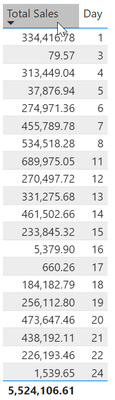
Example:  May: I have daily sales up May 24, 2020 in the table below. 

What Output Should be: Total Sales MTD = $5,524,106.61. Number of Business Days Until 24th = 16. Therefore, run rate should be = (Totals Sales MTD/16 business Days) * 21 Buisness Days in May = $7,250,389.93


Daily DaysDay of Month
  334,416.781
            79.573
  313,449.044
    37,876.945
  274,971.366
  455,789.787
  534,518.288
  689,975.0511
  270,497.7212
  331,275.6813
  461,502.6614
  233,845.3215
      5,379.9016
         660.2617
  184,182.7918
  256,112.8019
  473,647.4620
  438,192.1121
  226,193.4622
      1,539.6524


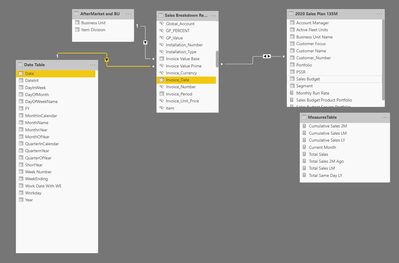
My relationships are as follows: The date column also has a hierarchy of Year/Quarter/Month/Day


Snag_171f4129.png


I hope this makes it clearer....


Thanks again, much appreciated. 

Helpful resources

Announcements
April Power BI Update Carousel

Power BI Monthly Update - April 2026

Check out the April 2026 Power BI update to learn about new features.

Fabric SQL PBI Data Days

Data Days 2026 coming soon!

Sign up to receive a private message when registration opens and key events begin.

New to Fabric survey Carousel

New to Fabric Survey

If you have recently started exploring Fabric, we'd love to hear how it's going. Your feedback can help with product improvements.

Power BI DataViz World Championships carousel

Power BI DataViz World Championships - June 2026

A new Power BI DataViz World Championship is coming this June! Don't miss out on submitting your entry.