cancel
Showing results for 
Search instead for 
Did you mean: 

The Power BI Data Visualization World Championships is back! Get ahead of the game and start preparing now! Learn more

Reply
jericsinger
New Member

DISTINCTCOUNT of Transactions given FILTERS

I have a column of sales transaction where each row is unique on a customer-invoice-sku basis. It looks like this:


InvoiceDate  InvoicePeriod  InvoiceNo  CustomerID  SKU  Qty  Total

------------------------------------------------------------------

05/01/2018   05/31/2018     I001       C001        RI   10   $100

05/01/2018   05/31/2018     I001       C001        SW   20   $150

05/01/2018   05/31/2018     I003       C002        RI   20   $200

05/01/2018   05/31/2018     I004       C003        SW   30   $300

04/14/2018   04/30/2018     I003       C001        RI   10   $100

04/14/2018   05/31/2018     I004       C002        SW   20   $300


I'm trying to create a visualization that counts number of unique customers by InvoicePeriod, filtered by SKU (or not in the case of totaling). The resulting visualization table should look something like this:


Count of customers by InvoicePeriod

SKU    04/30/2018  05/31/2018

RI     1           2

SW     1           2

All    2           3


The idea is that this table should update based on Slicer selections. I know this requires a measure, but everything I write ignores filters and just repeats the same value in every cell.


Apologize for being such a newbie. Any pointers would be sincerely appreciated. Thanks much.


2 REPLIES 2
dearwatson
Continued Contributor

I presume you tried this measure?


Customers = DISTINCTCOUNT(Table1[CustomerID])


I can't see why this wouldn't work and give you a correct result no matter which way you slice it.


Anonymous
Not applicable

Not sure if I understand your requirement correcntly.


You can use the following DAX to get the unique count of customers filtered by SKU 


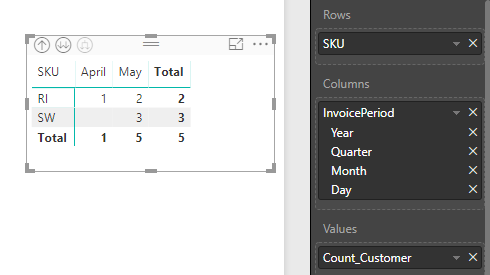
Count_Customer = COUNTROWS(GROUPBY(invoice,invoice[CustomerID],invoice[SKU]))

And then create a Matrix to get the following table:

2018-06-08_11-14-55.png


Helpful resources

Announcements
Power BI DataViz World Championships

Power BI Dataviz World Championships

The Power BI Data Visualization World Championships is back! Get ahead of the game and start preparing now!

December 2025 Power BI Update Carousel

Power BI Monthly Update - December 2025

Check out the December 2025 Power BI Holiday Recap!

FabCon Atlanta 2026 carousel

FabCon Atlanta 2026

Join us at FabCon Atlanta, March 16-20, for the ultimate Fabric, Power BI, AI and SQL community-led event. Save $200 with code FABCOMM.