Join us at FabCon Atlanta from March 16 - 20, 2026, for the ultimate Fabric, Power BI, AI and SQL community-led event. Save $200 with code FABCOMM.
Register now!The Power BI Data Visualization World Championships is back! It's time to submit your entry. Live now!
Hi, I am trying to create a backlog column for my monthly volume of tickets. I have an open measure and a closed measure. Their formulas to create these measures are:
Opened = CALCULATE(COUNT(VolumeForRitmOpenandClosedTickets[RitmSysCreatedOn - Without Time]), USERELATIONSHIP(VolumeForRitmOpenandClosedTickets[RitmSysCreatedOn - Without Time], 'VolumeCalendar'[Date]))
Closed = CALCULATE(COUNT([RitmClosedAt - Without Time] ), FILTER(VolumeForRitmOpenandClosedTickets,VolumeForRitmOpenandClosedTickets[RitmState]="Closed Complete") ,USERELATIONSHIP(VolumeForRitmOpenandClosedTickets[RitmClosedAt - Without Time],'VolumeCalendar'[Date]))
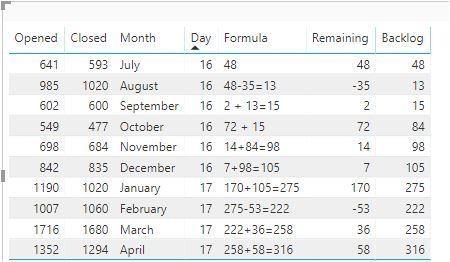
What I would like to do is take the Backlog from the previous month and add (subtract) from the remainder (result of open – closed) for the current month. So for Oct 16…. Open - Close is 549 - 477 which leave a remainder of 72. I then want to take the backlog from last month (Sept 2016) and add it to the remainder to get the backlog for this Oct (72 +15) =84 backlog
The only exception would be for the first month - the formula would be a little bit different to kick it off. For July 2016 only, I would like to take the remaining column and put this value in the backlog field.
I included a picture, which may help explain easier what I am trying to say. I hope I was clear enough.
If you would like the PBIX file, I can send it to your email. Thank you in advance.
Solved! Go to Solution.
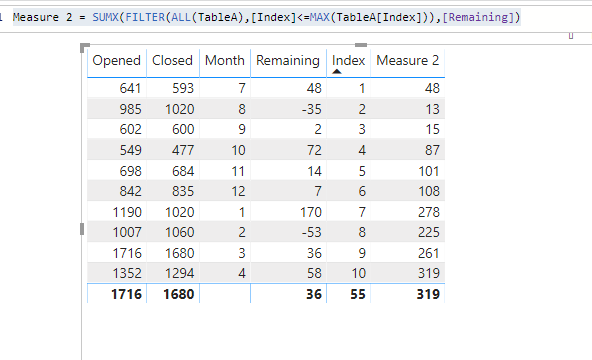
Please kindly check whether you'd like to get below results: (It's will be much helpful if you can attach the copyable table next time)
1. Insert an index column in power query to keep the data sequence
2. Use below measure:
Measure 2 = SUMX(FILTER(ALL(TableA),[Index]<=MAX(TableA[Index])),[Remaining])
Note there're miscalculation in your previous capture.
Please kindly check whether you'd like to get below results: (It's will be much helpful if you can attach the copyable table next time)
1. Insert an index column in power query to keep the data sequence
2. Use below measure:
Measure 2 = SUMX(FILTER(ALL(TableA),[Index]<=MAX(TableA[Index])),[Remaining])
Note there're miscalculation in your previous capture.
Please kindly paste your excel data here that I can copy it, or preferable a pbix that I can draw it up for you.
Hi,
My file is from SQL Server. I do not know how to attach a PBIX to this message. Is there a place where I put it on your one drive?
Thanks.
1. You can upload your file to Onedrive/Dropbox, and share the link here. (Make sure the connection mode is Import, I can't view it on my side if it is in Direct query mode.
2. Alternatively, copy the table shown in the previous table, and paste it here with table format. that I can copy it.
Just to clarify - the day column should be a year column in the picture
The Power BI Data Visualization World Championships is back! It's time to submit your entry.
Check out the January 2026 Power BI update to learn about new features.
| User | Count |
|---|---|
| 60 | |
| 49 | |
| 30 | |
| 25 | |
| 23 |
| User | Count |
|---|---|
| 131 | |
| 103 | |
| 58 | |
| 39 | |
| 31 |