Share feedback directly with Fabric product managers, participate in targeted research studies and influence the Fabric roadmap.
Sign up nowGet Fabric certified for FREE! Don't miss your chance! Learn more
How to write the formula in DAX
Sum(Case When (columnname) < 10 Then 1 Else 0 End) Over (Partition By ColumnName)
Solved! Go to Solution.
Hi @kalavala,
You can refer to below formual about the if statement:
1. Dax.
Calculate column:
Result =IF([columnname]<10,1,0)
2. Power Query.
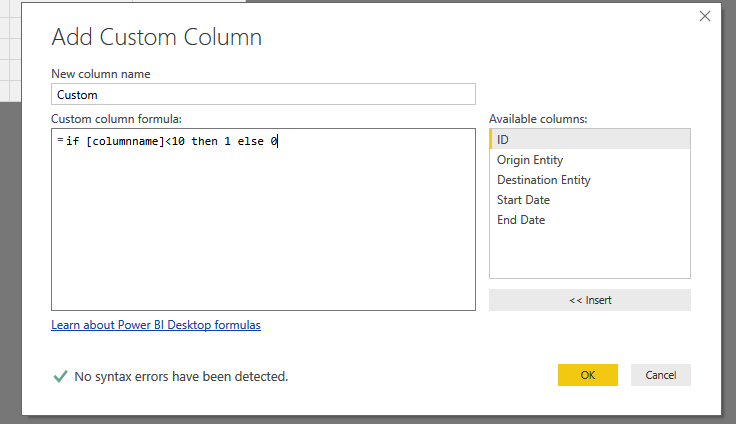
if [columnname]<10 then 1 else 0
Full query:
#"Added Custom" = Table.AddColumn(#"Changed Type", "Custom", each if [ID] <10 then 1 else 0)
Regards,
Xiaoxin Sheng
Hi @kalavala,
You can refer to below formual about the if statement:
1. Dax.
Calculate column:
Result =IF([columnname]<10,1,0)
2. Power Query.
if [columnname]<10 then 1 else 0
Full query:
#"Added Custom" = Table.AddColumn(#"Changed Type", "Custom", each if [ID] <10 then 1 else 0)
Regards,
Xiaoxin Sheng
Hopefully I am answering your question. I think you are looking for a column not a measure.
In the Data section select the appropriate table, and add a column with an IF statement similar to:
Tst_LT10 = IF(columnname<10, 1,0)
Now add a Table to a Report. Add the field you want to partition, the Tst_LT10 field you built, and some other extra field.
in the visualizations Section use the drop button next to Tst_LT10, and select Sum. Similarly use the Drop button on the extra field and select count. You should now have the count of rows that are less than 10 vs the count of rows in general.
If this is not what you are looking for please give a bit more detail.
Edit (Spell check)
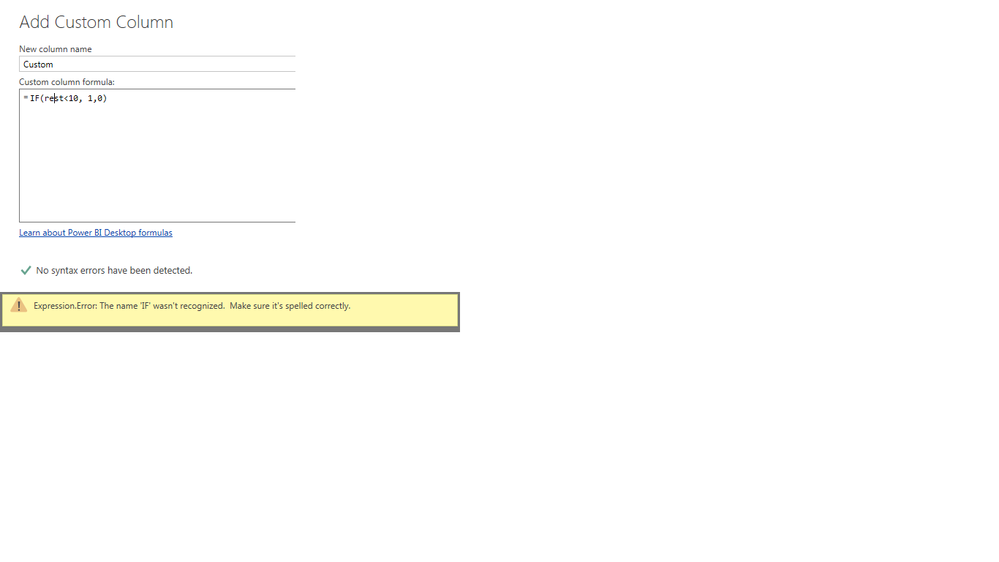
I am writing the if condition in queryeditior facing the below error can please help
Share feedback directly with Fabric product managers, participate in targeted research studies and influence the Fabric roadmap.
If you love stickers, then you will definitely want to check out our Community Sticker Challenge!
Check out the January 2026 Power BI update to learn about new features.
| User | Count |
|---|---|
| 63 | |
| 62 | |
| 42 | |
| 20 | |
| 18 |
| User | Count |
|---|---|
| 123 | |
| 114 | |
| 36 | |
| 29 | |
| 28 |