cancel
Showing results for 
Search instead for 
Did you mean: 

A new Data Days event is coming soon! This time we’re going bigger than ever. Fabric, Power BI, SQL, AI and more. Don't miss out.

Reply
kalavala
Frequent Visitor

DAX

How to write the formula  in DAX

Sum(Case When (columnname) < 10 Then 1 Else 0 End) Over (Partition By ColumnName)

1 ACCEPTED SOLUTION
Anonymous
Not applicable

Hi @kalavala,


You can refer to below formual about the if statement:

1. Dax.

Calculate column:

Result =IF([columnname]<10,1,0) 


2. Power Query.

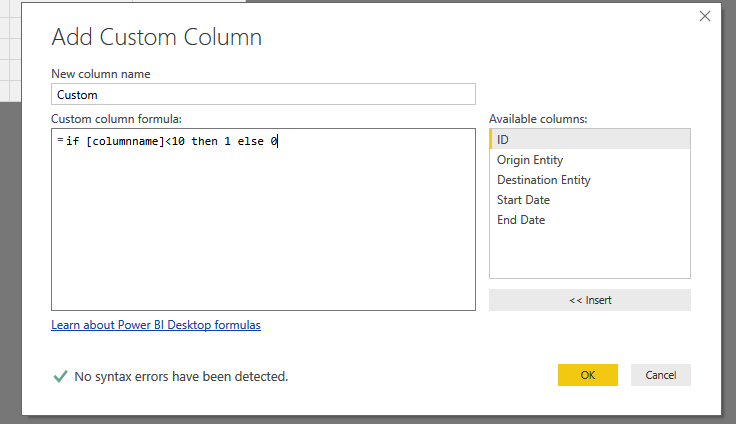
 if [columnname]<10 then 1 else 0

Full query:
    #"Added Custom" = Table.AddColumn(#"Changed Type", "Custom", each if [ID] <10 then 1 else 0)


3.PNG


Regards,

Xiaoxin Sheng

View solution in original post

3 REPLIES 3
Anonymous
Not applicable

Hi @kalavala,


You can refer to below formual about the if statement:

1. Dax.

Calculate column:

Result =IF([columnname]<10,1,0) 


2. Power Query.

 if [columnname]<10 then 1 else 0

Full query:
    #"Added Custom" = Table.AddColumn(#"Changed Type", "Custom", each if [ID] <10 then 1 else 0)


3.PNG


Regards,

Xiaoxin Sheng

I_Like_Pi
Resolver II
Resolver II

Hopefully I am answering your question. I think you are looking for a column not a measure.

In the Data section select the appropriate table, and add a column with an IF statement similar to:

Tst_LT10 = IF(columnname<10, 1,0)


Now add a Table to a Report. Add the field you want to partition, the Tst_LT10 field you built, and some other extra field.

in the visualizations Section use the drop button next to Tst_LT10, and select Sum. Similarly use the Drop button on the extra field and select count. You should now have the count of rows that are less than 10 vs the count of rows in general.


If this is not what you are looking for please give a bit more detail.

Edit (Spell check)


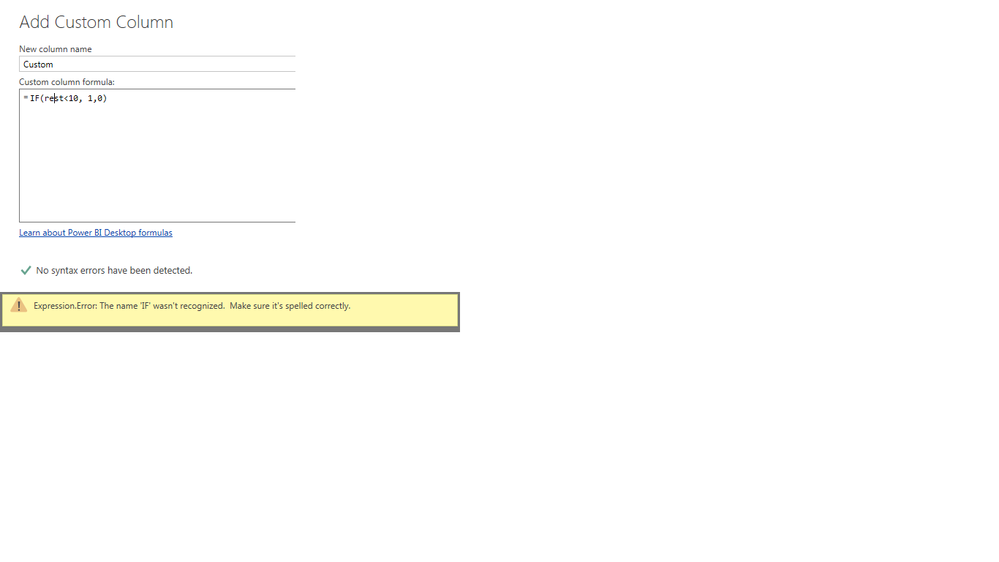
I am writing the if condition in queryeditior facing the below error can please help error.png


Helpful resources

Announcements
May Power BI Update Carousel

Power BI Monthly Update - May 2026

Check out the May 2026 Power BI update to learn about new features.

Fabric SQL PBI Data Days

Data Days 2026 coming soon!

Sign up to receive a private message when registration opens and key events begin.

New to Fabric survey Carousel

New to Fabric Survey

If you have recently started exploring Fabric, we'd love to hear how it's going. Your feedback can help with product improvements.

Power BI DataViz World Championships carousel

Power BI DataViz World Championships - June 2026

A new Power BI DataViz World Championship is coming this June! Don't miss out on submitting your entry.