Hi Community,
Power Bi Sample file
I need help with this measure. I got a dataset, with Items sold(ItemID), with quantity(quantity) sold for each item.
we also got a weightage(product weightage) of each itemID.
I am trying to calculate a mix indicator for all these itemIDs based upon the QTY sold and the weightage for each item.
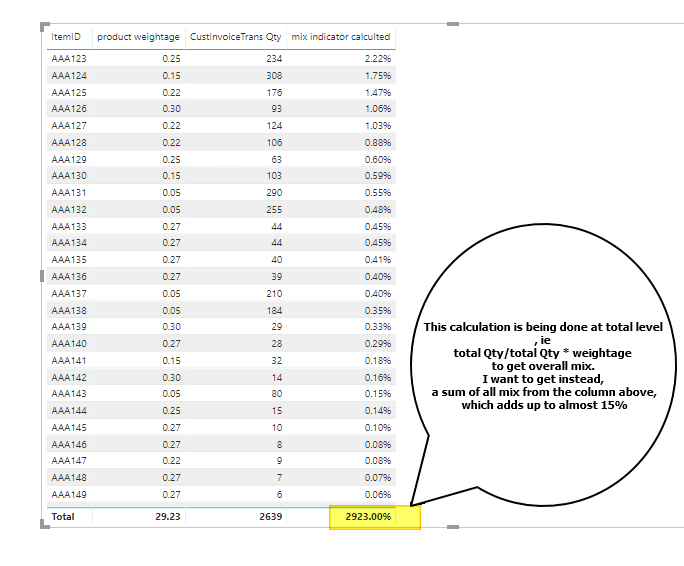
I am calculating the values based on following formula
mix indicator calculted =
VAR item_sum =
   SUM ( 'dump data test01'[Quantity] )
VAR total_sum =
    CALCULATE (
        SUM ('dump data test01'[Quantity]  ),
        ALL ( 'dump data test01'[ItemID] )
    )
var result =
     DIVIDE ( item_sum, total_sum )*SUM('dump data test01'[product weightage])

RETURN
result
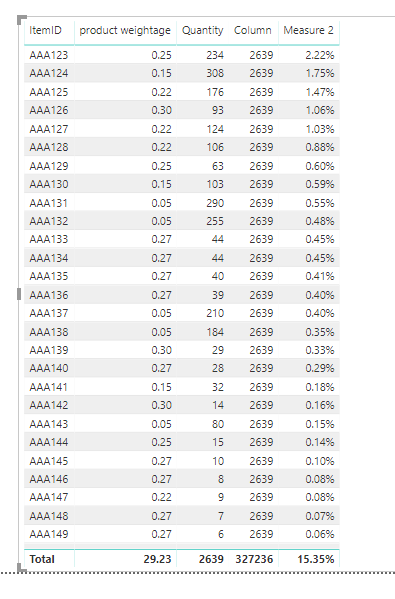
This gives me a value, which is working fine on row level. Though on the totals line, it is again calculating the mix. I on the other hand, want the total to show the sum of mix for all values, which in this example should be around 15% and not 2923%.
Report attached here with sample data and formula.
Any direction in this regard would be a great help.
Regards
emudria