Don't miss your chance to take the Fabric Data Engineer (DP-600) exam for FREE! Find out how by attending the DP-600 session on April 23rd (pacific time), live or on-demand.
Learn moreNext up in the FabCon + SQLCon recap series: The roadmap for Microsoft SQL and Maximizing Developer experiences in Fabric. All sessions are available on-demand after the live show. Register now
Hi Community,
I need help with this measure. I got a dataset, with Items sold(ItemID), with quantity(quantity) sold for each item.
we also got a weightage(product weightage) of each itemID.
I am trying to calculate a mix indicator for all these itemIDs based upon the QTY sold and the weightage for each item.
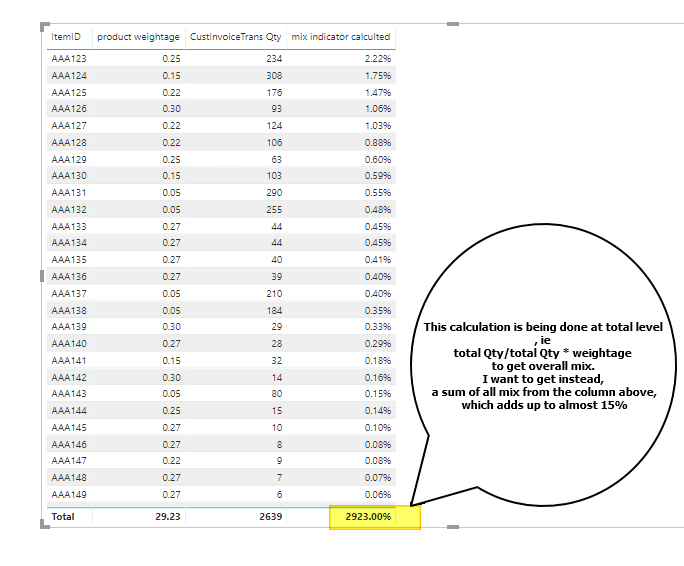
I am calculating the values based on following formula
mix indicator calculted =
VAR item_sum =
SUM ( 'dump data test01'[Quantity] )
VAR total_sum =
CALCULATE (
SUM ('dump data test01'[Quantity] ),
ALL ( 'dump data test01'[ItemID] )
)
var result =
DIVIDE ( item_sum, total_sum )*SUM('dump data test01'[product weightage])
RETURN
resultThis gives me a value, which is working fine on row level. Though on the totals line, it is again calculating the mix. I on the other hand, want the total to show the sum of mix for all values, which in this example should be around 15% and not 2923%.
Report attached here with sample data and formula.
Any direction in this regard would be a great help.
Regards
emudria
Solved! Go to Solution.
Hi @Anonymous
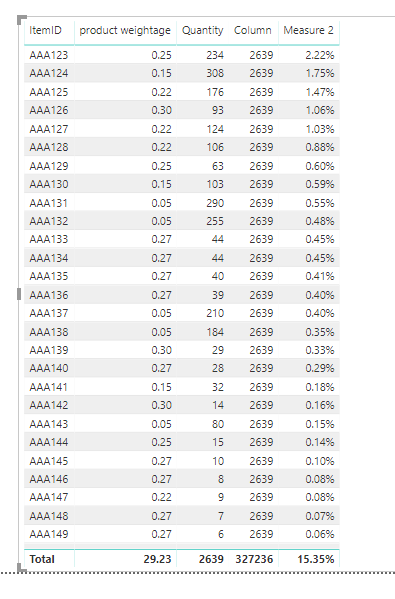
You can add a new measure:
Measure 2 = SUMX(VALUES('dump data test01'[ItemID]),[mix indicator calculted])Best regards,
Dina Ye
Hi @Anonymous
You can add a new measure:
Measure 2 = SUMX(VALUES('dump data test01'[ItemID]),[mix indicator calculted])Best regards,
Dina Ye
Hi , If i want add more columns in that measure how should i do?
what if I have another field along with item such as "X", will this formula still work?
THANK YOU so much Dina. works perfectly. I had spent so many hours trying to do that. Thanks again.
Can I please ask two things:
1 - what is happening in this formula
2 - why doesnt it work if instead of creating a new measure, I put the returned variable 'result' in this formula in same measure
ie
measure =
SUMX(VALUES('dump data test01'[ItemID]),result)
awesome
If you have recently started exploring Fabric, we'd love to hear how it's going. Your feedback can help with product improvements.
A new Power BI DataViz World Championship is coming this June! Don't miss out on submitting your entry.
Share feedback directly with Fabric product managers, participate in targeted research studies and influence the Fabric roadmap.
| User | Count |
|---|---|
| 48 | |
| 45 | |
| 41 | |
| 20 | |
| 17 |
| User | Count |
|---|---|
| 69 | |
| 64 | |
| 32 | |
| 31 | |
| 27 |