This time we’re going bigger than ever. Fabric, Power BI, SQL, AI and more. We're covering it all. You won't want to miss it.
Learn moreLevel up your Power BI skills this month - build one visual each week and tell better stories with data! Get started
Hi all,
I have one scenario where i have to find the maximum date and when there is no maximum date, it has to consider previous max date.
| Date | Date2 | Max date |
| 12-01-2021 | 10-14-2021 | 12-16-2021 |
| 12-01-2021 | 10-15-2021 | 12-16-2021 |
| 12-01-2021 | 11-16-2021 | 12-16-2021 |
| 12-01-2021 | 12-15-2021 | 12-16-2021 |
| 12-01-2021 | 12-16-2021 | 12-16-2021 |
| 12-01-2021 | 02-15-2022 | 12-16-2021 |
| 01-01-2022 | 10-14-2021 | 12-15-2021 |
| 01-01-2022 | 10-15-2021 | 12-15-2021 |
| 01-01-2022 | 11-16-2021 | 12-15-2021 |
| 01-01-2022 | 12-15-2021 | 12-15-2021 |
| 01-01-2022 | 02-14-2022 | 12-15-2021 |
| 01-01-2022 | 02-15-2022 | 12-15-2021 |
| 02-01-2022 | 10-14-2021 | 02-15-2022 |
| 02-01-2022 | 10-15-2021 | 02-15-2022 |
| 02-01-2022 | 11-16-2021 | 02-15-2022 |
| 02-01-2022 | 12-15-2021 | 02-15-2022 |
| 02-01-2022 | 01-16-2022 | 02-15-2022 |
| 02-01-2022 | 02-15-2022 | 02-15-2022 |
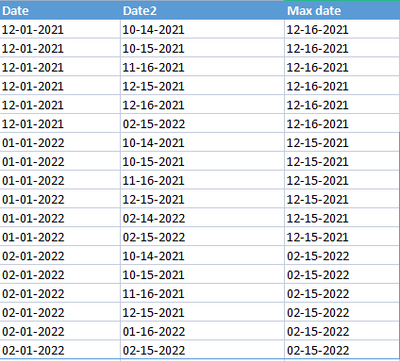
I have two dates, Date and Date2. I will be using Date column as a filter and the max date value has to be calculated from Date 2.
So when i select December month from Date filter, the max date value should be the december month max date from Date 2.
When i select january and since there is no january date in Date 2 column, it has to consider previous max date which is december max date.
Then when February is selected, the max date should be feb month max date from Date 2 column.
Kindly help me with this. This can be achieved either in a measure or a calculated column.
Solved! Go to Solution.
Hi @AishwariyaV ,
Test the measure like the below:
outputvalue =
var test=MAXX (
FILTER (
ALL ( Sheet1 ),
Sheet1[Date]= max(Sheet1[Date])
&& format(Sheet1[Date],"YYYYMM")>=format(Sheet1[Date2],"YYYYMM")
),
Sheet1[Date2]
) return CALCULATE(MAX(Sheet1[Value]),Sheet1[Date2]=test)
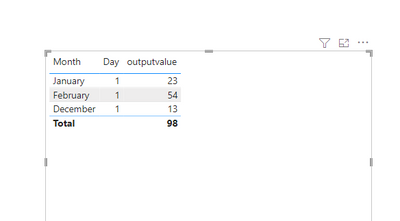
Output:
Did I answer your question? Mark my post as a solution!
Best Regards
Lucien
Hi @AishwariyaV ,
Test the measure like the below:
outputvalue =
var test=MAXX (
FILTER (
ALL ( Sheet1 ),
Sheet1[Date]= max(Sheet1[Date])
&& format(Sheet1[Date],"YYYYMM")>=format(Sheet1[Date2],"YYYYMM")
),
Sheet1[Date2]
) return CALCULATE(MAX(Sheet1[Value]),Sheet1[Date2]=test)
Output:
Did I answer your question? Mark my post as a solution!
Best Regards
Lucien
Can you keep only date1 and date2 and provide sample required result in an excel and provide ?
Regards,
DI
Sample data :
| Date | Date2 | Value |
| 12-01-2021 | 10-14-2021 | 12 |
| 12-01-2021 | 10-15-2021 | 34 |
| 12-01-2021 | 11-16-2021 | 38 |
| 12-01-2021 | 12-15-2021 | 63 |
| 12-01-2021 | 12-16-2021 | 13 |
| 12-01-2021 | 02-15-2022 | 98 |
| 01-01-2022 | 10-14-2021 | 34 |
| 01-01-2022 | 10-15-2021 | 65 |
| 01-01-2022 | 11-16-2021 | 77 |
| 01-01-2022 | 12-15-2021 | 23 |
| 01-01-2022 | 02-14-2022 | 45 |
| 01-01-2022 | 02-15-2022 | 60 |
| 02-01-2022 | 10-14-2021 | 20 |
| 02-01-2022 | 10-15-2021 | 39 |
| 02-01-2022 | 11-16-2021 | 88 |
| 02-01-2022 | 12-15-2021 | 43 |
| 02-01-2022 | 01-16-2022 | 90 |
| 02-01-2022 | 02-15-2022 | 54 |
Result :
| Month from Date column | Value |
| Dec21 | 13 |
| Jan22 | 23 |
| Feb22 | 54 |
@AishwariyaV Create below calculated column and add to the table. Hope you get your answer.
MaxDate2withrespecttoDate =
VAR cDate = Sheet1[Date].[Date]
RETURN
MAXX (
FILTER (
ALL ( Sheet1 ),
Sheet1[Date].[Date] = cDate
&& Sheet1[Date2].[Date] < Sheet1[Date].[Date]
),
Sheet1[Date2].[Date]
)
Regards
DI
Check out the April 2026 Power BI update to learn about new features.
Sign up to receive a private message when registration opens and key events begin.
If you have recently started exploring Fabric, we'd love to hear how it's going. Your feedback can help with product improvements.
| User | Count |
|---|---|
| 36 | |
| 28 | |
| 28 | |
| 20 | |
| 18 |
| User | Count |
|---|---|
| 65 | |
| 35 | |
| 33 | |
| 25 | |
| 24 |