Join us at FabCon Atlanta from March 16 - 20, 2026, for the ultimate Fabric, Power BI, AI and SQL community-led event. Save $200 with code FABCOMM.
Register now!The Power BI Data Visualization World Championships is back! It's time to submit your entry. Live now!
I have data that looks like this
Credit Unions
Credit union key credit union name Membership size
1 ABC CU 20000
2 ABC CU 20000
3 ABC CU 20000
5 XXX CU 10000
Activations
Credit Union Key Customer Key Activation date
1 1 10/31/18
1 2 10/31/18
2 3 11/01/18
3 4 02/02/19
5 5 01/03/19
5 6 02/01/19
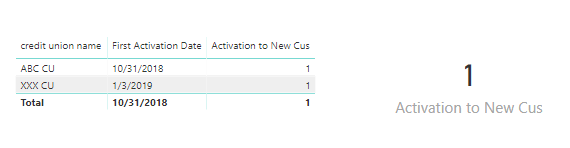
I want to find the first date a customer activated at the Credit union
I am using this and it works until I put a page filter of 2019 onto my report
First Activation Date =
MINX(DISTINCT('Credit Unions'[Credit Union Name]),CALCULATE(min('Activations'[Activation Date])
, ALL(Dates[FullDate]))
I am also trying to get the count of activations in 2019 by doing this
Activation to New Cus =
CALCULATE([Total Activations],Filter('Credit Unions',[First Activation Date] >DATEVALUE("12/31/18")),all(Dates[FullDate]))
Lastly I need a year to date total as well
Thank you in advance.
Linda
Hi @Anonymous ,
First Activation Date =
MINX (
DISTINCT ( 'Credit Unions'[Credit Union Name] ),
CALCULATE ( MIN ( 'Activations'[Activation Date] ) )
)
Activation to New Cus =
CALCULATE (
DISTINCTCOUNT ( 'Credit Unions'[credit union name] ),
FILTER (
ALLSELECTED ( 'Credit Unions'[credit union name] ),
YEAR ( [First Activation Date] ) = YEAR ( TODAY () )
)
)
Best regards,
Yuliana Gu
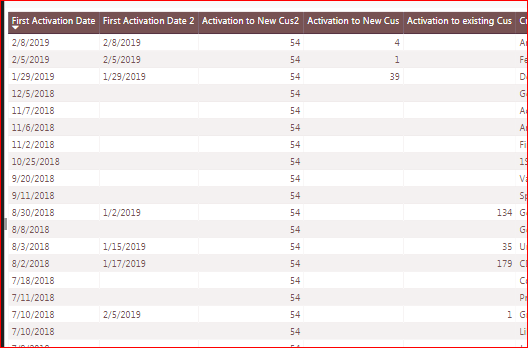
Thank you so much - but your solution did not work - see screen shot below. I renamed your formulas to First Activation Date 2 and Activation to New CU2. You can see the results next to the correct ones that I did in SQL prior to loading the data.
This Visual is filtered to 2019
oh man - this is driving me crazy.
I put an indicator in to give me a yes or no and this works
I gave up and ended up doing the logic in SQL but I would love to know the answer.
ok - I figured out the first activation peice
the new code is
The Power BI Data Visualization World Championships is back! It's time to submit your entry.
Check out the January 2026 Power BI update to learn about new features.
| User | Count |
|---|---|
| 56 | |
| 40 | |
| 38 | |
| 21 | |
| 20 |
| User | Count |
|---|---|
| 142 | |
| 105 | |
| 63 | |
| 36 | |
| 35 |