cancel
Showing results for 
Search instead for 
Did you mean: 

The Power BI Data Visualization World Championships is back! Get ahead of the game and start preparing now! Learn more

Reply
bdaodu
New Member

DAX formulas

Please help. I have a table that looks like this and woud like to calculate the following:


1. DAX formula to calculate $ for AA as % of total $ for each project.

2. DAX formula to calculate $ for AA as % of $ for BB for each project

3. DAX formula to calculate $ for AA as % of $s for AA+BB for each prpject


ProjectWBS Level 2WBS Level 3$
X/9999AAAA_001100
X/9999AAAA_00270
X/9999AAAA_00370
X/9999AAAA_00470
X/9999AAAA_00569
X/9999BBBB_00150
X/9999BBBB_00269
X/9999BBBB_00370
X/9999BBBB_00420
X/9999CCCC_0010
X/9999CCCC_0020
X/9999CCCC_0030
X/9999DDDD_001-50
X/10000AAAA_00190
X/10000AAAA_00290
X/10000AAAA_00390
X/10000BBBB_001100
X/10000BBBB_00230
X/10000BBBB_00380
X/10000BBBB_00490
X/10000BBBB_00570
X/10000CCCC_00180
X/10000DDDD_001100
X/10000EEEE_001300
1 ACCEPTED SOLUTION

Hey @bdaodu ,


this measure

Measure 1 = 
DIVIDE(
     SUM('Table'[$] )
     , CALCULATE(
         SUM( 'Table'[$] )
         , ALL( 'Table'[WBS Level 2] )
     )
)

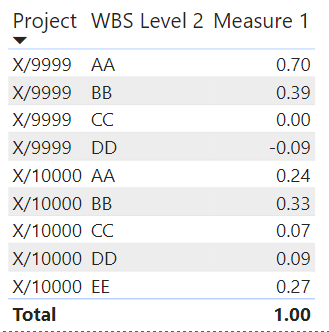
returns what you are looking for, for the 1st formula:
image.png
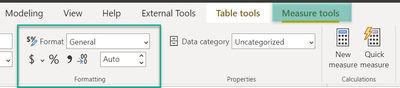
Use the formatting option
image.png


Hopefully, this provides what you are looking for.


Regards,

Tom


Did I answer your question? Mark my post as a solution, this will help others!

Proud to be a Super User!
I accept Kudos 😉
Hamburg, Germany

View solution in original post

5 REPLIES 5
bdaodu
New Member

For 1. DAX formula to calculate $ for AA as % of total $ for each project.;


the expected result would be a table like this: using the followibg formula:


sum of AAs for project x/ sum of project x total


ProjectWBS Level 2%
X/9999AA70%
X/9999BB39%
X/9999CC0%
X/9999DD-9%
X/10000AA24%
X/10000BB33%
X/10000CC7%
X/10000DD9%
X/10000EE27%

Hey @bdaodu ,


this measure

Measure 1 = 
DIVIDE(
     SUM('Table'[$] )
     , CALCULATE(
         SUM( 'Table'[$] )
         , ALL( 'Table'[WBS Level 2] )
     )
)

returns what you are looking for, for the 1st formula:
image.png
Use the formatting option
image.png


Hopefully, this provides what you are looking for.


Regards,

Tom


Did I answer your question? Mark my post as a solution, this will help others!

Proud to be a Super User!
I accept Kudos 😉
Hamburg, Germany

Thank you!! It worked!

Hey @bdaodu ,


please mark an answer as solution, this will help others, looking for a similar solution.


Regards,

Tom


Did I answer your question? Mark my post as a solution, this will help others!

Proud to be a Super User!
I accept Kudos 😉
Hamburg, Germany
TomMartens
Super User
Super User

Hey @bdaodu ,


please provide the expected result and explain the calculation to get the result based on the sample data you provided-


Regards,

Tom


Did I answer your question? Mark my post as a solution, this will help others!

Proud to be a Super User!
I accept Kudos 😉
Hamburg, Germany

Helpful resources

Announcements
Power BI DataViz World Championships

Power BI Dataviz World Championships

The Power BI Data Visualization World Championships is back! Get ahead of the game and start preparing now!

December 2025 Power BI Update Carousel

Power BI Monthly Update - December 2025

Check out the December 2025 Power BI Holiday Recap!

FabCon Atlanta 2026 carousel

FabCon Atlanta 2026

Join us at FabCon Atlanta, March 16-20, for the ultimate Fabric, Power BI, AI and SQL community-led event. Save $200 with code FABCOMM.