FabCon is coming to Atlanta
Join us at FabCon Atlanta from March 16 - 20, 2026, for the ultimate Fabric, Power BI, AI and SQL community-led event. Save $200 with code FABCOMM.
Register now!- Power BI forums
- Get Help with Power BI
- Desktop
- Service
- Report Server
- Power Query
- Mobile Apps
- Developer
- DAX Commands and Tips
- Custom Visuals Development Discussion
- Health and Life Sciences
- Power BI Spanish forums
- Translated Spanish Desktop
- Training and Consulting
- Instructor Led Training
- Dashboard in a Day for Women, by Women
- Galleries
- Data Stories Gallery
- Themes Gallery
- Contests Gallery
- QuickViz Gallery
- Quick Measures Gallery
- Visual Calculations Gallery
- Notebook Gallery
- Translytical Task Flow Gallery
- TMDL Gallery
- R Script Showcase
- Webinars and Video Gallery
- Ideas
- Custom Visuals Ideas (read-only)
- Issues
- Issues
- Events
- Upcoming Events
View all the Fabric Data Days sessions on demand. View schedule
- Power BI forums
- Forums
- Get Help with Power BI
- Desktop
- Re: DAX formula to return a Boolean value for prev...
- Subscribe to RSS Feed
- Mark Topic as New
- Mark Topic as Read
- Float this Topic for Current User
- Bookmark
- Subscribe
- Printer Friendly Page

- Mark as New
- Bookmark
- Subscribe
- Mute
- Subscribe to RSS Feed
- Permalink
- Report Inappropriate Content
DAX formula to return a Boolean value for previous quarter in calculated column
Hi, I've been puzzling over this for some time. I'd like to use a column called "Previous Quarter" in my Calendar. I was able to back into current quarter, but I'm having a heck of a time with this one. Can anyone help?

Solved! Go to Solution.


- Mark as New
- Bookmark
- Subscribe
- Mute
- Subscribe to RSS Feed
- Permalink
- Report Inappropriate Content
Hi @rdwhite ,
Follow Steps Below (Creating Calculated Columns) assuming my date table name is FullDDate:
1-Create Calculated Column:
YearQuarterNo =
CONVERT (
CONCATENATE (
YEAR ( FullDDate[Date] ),
CONCATENATE ( "0", FullDDate[Quarter] )
),
INTEGER
)
RANKX (
FullDDate,
FullDDate[YearQuarterNo],
FullDDate[YearQuarterNo],
ASC,
DENSE
)
IF (
FullDDate[YearQuarterIndex]
= CALCULATE (
MIN ( FullDDate[YearQuarterIndex] ) - 1,
FILTER ( FullDDate, FullDDate[Date] = TODAY () )
),
"YES",
"NO"
)
- Mark as New
- Bookmark
- Subscribe
- Mute
- Subscribe to RSS Feed
- Permalink
- Report Inappropriate Content
Here is what I've tried without sucess so far: "Previous Quarter Boolean = VAR PrevQuarter = DATEADD('Calendar'[Date],-1,QUARTER) RETURN IF(YEAR(PrevQuarter) = YEAR('Calendar'[Date]) && QUARTER(PrevQuarter) = QUARTER('Calendar'[Date]), TRUE(), FALSE() ) " All returned False. Also: "Previous Quarter Boolean = VAR PrevQuarterStartDate = DATE(YEAR('Calendar'[Date]), SWITCH(QUARTER('Calendar'[Date]), 1, 10, 2, 1, 3, 4, 4, 7), 1) VAR PrevQuarterEndDate = EOMONTH(PrevQuarterStartDate, 2) RETURN IF('Calendar'[Date] >= PrevQuarterStartDate && 'Calendar'[Date] <= PrevQuarterEndDate, TRUE(), FALSE() )"
- Mark as New
- Bookmark
- Subscribe
- Mute
- Subscribe to RSS Feed
- Permalink
- Report Inappropriate Content
Have you checked my answer? I think it is what you need.
- Mark as New
- Bookmark
- Subscribe
- Mute
- Subscribe to RSS Feed
- Permalink
- Report Inappropriate Content
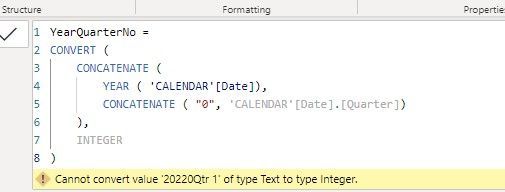
The first step did not work...
- Mark as New
- Bookmark
- Subscribe
- Mute
- Subscribe to RSS Feed
- Permalink
- Report Inappropriate Content
Maybe your are missing fullddate[quarter]
This is a calculated column as well:
quarter=QUARTER(fullddate[date])
Then it is used as one of the inputs in step1.
- Mark as New
- Bookmark
- Subscribe
- Mute
- Subscribe to RSS Feed
- Permalink
- Report Inappropriate Content
- Mark as New
- Bookmark
- Subscribe
- Mute
- Subscribe to RSS Feed
- Permalink
- Report Inappropriate Content
- Mark as New
- Bookmark
- Subscribe
- Mute
- Subscribe to RSS Feed
- Permalink
- Report Inappropriate Content
fullddate[quarter] in my formula is just number. 1,2,3,4 (without qtr string)
You can make it using a calculated column:
quarter=QUARTER(fullddate[date])
- Mark as New
- Bookmark
- Subscribe
- Mute
- Subscribe to RSS Feed
- Permalink
- Report Inappropriate Content
Hi @rdwhite ,
Follow Steps Below (Creating Calculated Columns) assuming my date table name is FullDDate:
1-Create Calculated Column:
YearQuarterNo =
CONVERT (
CONCATENATE (
YEAR ( FullDDate[Date] ),
CONCATENATE ( "0", FullDDate[Quarter] )
),
INTEGER
)
RANKX (
FullDDate,
FullDDate[YearQuarterNo],
FullDDate[YearQuarterNo],
ASC,
DENSE
)
IF (
FullDDate[YearQuarterIndex]
= CALCULATE (
MIN ( FullDDate[YearQuarterIndex] ) - 1,
FILTER ( FullDDate, FullDDate[Date] = TODAY () )
),
"YES",
"NO"
)
- Mark as New
- Bookmark
- Subscribe
- Mute
- Subscribe to RSS Feed
- Permalink
- Report Inappropriate Content
Thanks for stepping through this with me. I had even resulted to ChatGPT...

Helpful resources

Power BI Monthly Update - November 2025
Check out the November 2025 Power BI update to learn about new features.

Fabric Data Days
Advance your Data & AI career with 50 days of live learning, contests, hands-on challenges, study groups & certifications and more!

FabCon Atlanta 2026
Join us at FabCon Atlanta, March 16-20, for the ultimate Fabric, Power BI, AI and SQL community-led event. Save $200 with code FABCOMM.


