cancel
Showing results for 
Search instead for 
Did you mean: 

The Power BI Data Visualization World Championships is back! Get ahead of the game and start preparing now! Learn more

Reply
Dicko
Helper II
Helper II

DAX: calculate difference between date/times with conditions

Hi,

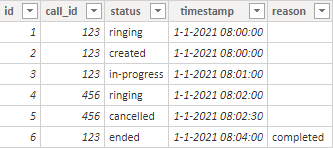
I have data of telephone calls with details of each call.


Dicko_0-1631010001044.png


Now I need to calculate the duration of each call if the reason is completed.

So for the call with call_id 123 the duration is 4 minutes.


I have no idea where to start ...
I really would like to learn how to do this.

1 ACCEPTED SOLUTION
Fowmy
Super User
Super User

@Dicko 

Add the following code as a new column to your table:

Difference = 

VAR __ID = Table2[call_id]
VAR __TIME = Table2[timestamp]
RETURN

IF(
    Table2[reason] = "completed",
    DATEDIFF(
        CALCULATE(
            min(Table2[timestamp]),
            Table2[call_id] = __ID,
            Table2[timestamp] < __TIME,
            REMOVEFILTERS(Table2)
        ),
        __TIME,
        MINUTE
    )
)

Fowmy_0-1631011934817.png


Did I answer your question? Mark my post as a solution! and hit thumbs up


Subscribe and learn Power BI from these videos

Website LinkedIn PBI User Group

View solution in original post

2 REPLIES 2
Fowmy
Super User
Super User

@Dicko 

Add the following code as a new column to your table:

Difference = 

VAR __ID = Table2[call_id]
VAR __TIME = Table2[timestamp]
RETURN

IF(
    Table2[reason] = "completed",
    DATEDIFF(
        CALCULATE(
            min(Table2[timestamp]),
            Table2[call_id] = __ID,
            Table2[timestamp] < __TIME,
            REMOVEFILTERS(Table2)
        ),
        __TIME,
        MINUTE
    )
)

Fowmy_0-1631011934817.png


Did I answer your question? Mark my post as a solution! and hit thumbs up


Subscribe and learn Power BI from these videos

Website LinkedIn PBI User Group

Thanks! I learned something new 🙂

Helpful resources

Announcements
November Power BI Update Carousel

Power BI Monthly Update - November 2025

Check out the November 2025 Power BI update to learn about new features.

Fabric Data Days Carousel

Fabric Data Days

Advance your Data & AI career with 50 days of live learning, contests, hands-on challenges, study groups & certifications and more!

FabCon Atlanta 2026 carousel

FabCon Atlanta 2026

Join us at FabCon Atlanta, March 16-20, for the ultimate Fabric, Power BI, AI and SQL community-led event. Save $200 with code FABCOMM.

Top Solution Authors
Top Kudoed Authors