cancel
Showing results for 
Search instead for 
Did you mean: 

We've captured the moments from FabCon & SQLCon that everyone is talking about, and we are bringing them to the community, live and on-demand. Starts on April 14th. Register now

Reply
mshakir
Regular Visitor

DAX Time Patterns

I have to calculate Day no of month and Day no of quarter using dax help me please.

2 ACCEPTED SOLUTIONS
amitchandak
Super User
Super User

@mshakir , You have startofmonth and startofquarter

take date diff from this you will get month day and quarter day


STQ = startofquarter(Date[Date])

Day of Qtr = datediff(STQ ,Date[Date],DAY)

Share with Power BI Enthusiasts: Full Power BI Video (20 Hours) YouTube
Microsoft Fabric Series 60+ Videos YouTube
Microsoft Fabric Hindi End to End YouTube

View solution in original post

Anonymous
Not applicable

HI @mshakir,

You can direct create a new calculated column to use the 'day' function to extract the current day no of month. For 'day of quarter', you can refer to following calculated column formula:

DayofMonth=DAY('Calendar'[Date])
DayofQuarter =
VAR cQuarter =
    INT ( MONTH ( 'Calendar'[Date] ) / 3 )
        + IF (
            MONTH ( 'Calendar'[Date] ) < 3
                && MOD ( MONTH ( 'Calendar'[Date] ), 3 ) > 0,
            1,
            0
        )
RETURN
    COUNTROWS (
        CALENDAR (
            DATE ( YEAR ( 'Calendar'[Date] ), IF ( cQuarter > 1, ( cQuarter - 1 ) * 3, cQuarter ), 1 ),
            'Calendar'[Date]
        )
    )

Regards,

Xiaoxin Sheng

View solution in original post

4 REPLIES 4
amitchandak
Super User
Super User

@mshakir , You have startofmonth and startofquarter

take date diff from this you will get month day and quarter day


STQ = startofquarter(Date[Date])

Day of Qtr = datediff(STQ ,Date[Date],DAY)

Share with Power BI Enthusiasts: Full Power BI Video (20 Hours) YouTube
Microsoft Fabric Series 60+ Videos YouTube
Microsoft Fabric Hindi End to End YouTube
az38
Community Champion
Community Champion

Hi @mshakir 


Quarter No = QUARTER(Table[Date])
Day No = DAY(Table[Date])


https://docs.microsoft.com/en-us/dax/quarter-function-dax

https://docs.microsoft.com/en-us/dax/day-function-dax


do not hesitate to give a kudo to useful posts and mark solutions as solution
LinkedIn

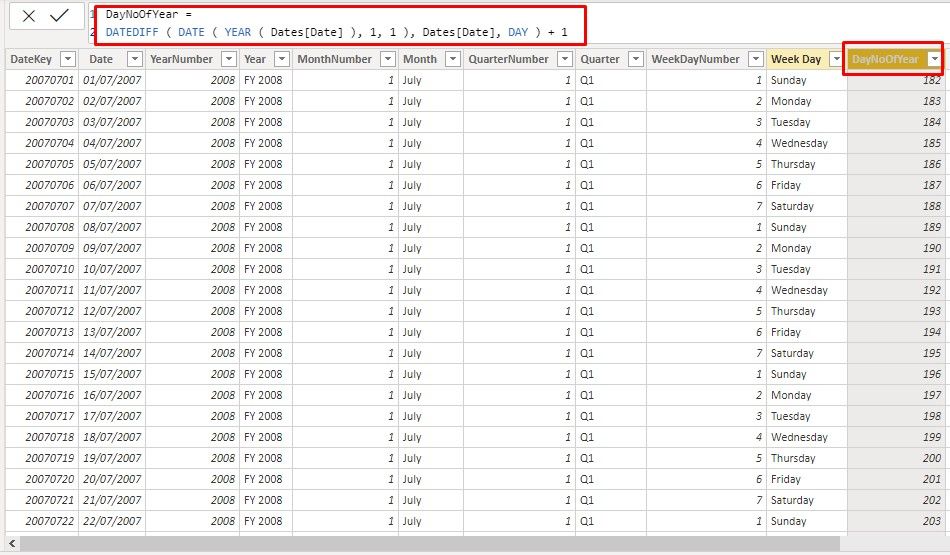
This is the date table and my perspective is to calculate columns (DayNoOfQuarter and DayNoOfMonth) same like DayNoOfYear as given in screenshot. i need Day Number for both Quarter and Month neither the Quarter Number nor the Month Number


DAX.jpg

Anonymous
Not applicable

HI @mshakir,

You can direct create a new calculated column to use the 'day' function to extract the current day no of month. For 'day of quarter', you can refer to following calculated column formula:

DayofMonth=DAY('Calendar'[Date])
DayofQuarter =
VAR cQuarter =
    INT ( MONTH ( 'Calendar'[Date] ) / 3 )
        + IF (
            MONTH ( 'Calendar'[Date] ) < 3
                && MOD ( MONTH ( 'Calendar'[Date] ), 3 ) > 0,
            1,
            0
        )
RETURN
    COUNTROWS (
        CALENDAR (
            DATE ( YEAR ( 'Calendar'[Date] ), IF ( cQuarter > 1, ( cQuarter - 1 ) * 3, cQuarter ), 1 ),
            'Calendar'[Date]
        )
    )

Regards,

Xiaoxin Sheng

Helpful resources

Announcements
New to Fabric survey Carousel

New to Fabric Survey

If you have recently started exploring Fabric, we'd love to hear how it's going. Your feedback can help with product improvements.

Power BI DataViz World Championships carousel

Power BI DataViz World Championships - June 2026

A new Power BI DataViz World Championship is coming this June! Don't miss out on submitting your entry.

Join our Fabric User Panel

Join our Fabric User Panel

Share feedback directly with Fabric product managers, participate in targeted research studies and influence the Fabric roadmap.

March Power BI Update Carousel

Power BI Community Update - March 2026

Check out the March 2026 Power BI update to learn about new features.