Don't miss your chance to take the Fabric Data Engineer (DP-700) exam on us!
Learn moreThe FabCon + SQLCon recap series starts April 14th at 8am Pacific. If you’re tracking where AI is going inside Fabric, this first session is a can't miss. Register now
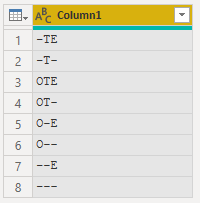
I have been searching for the DAX sort order, but I cannot find a reference. It doesn't appear to follow ASCII standards. I have a 3-character field where the first is O or not, the second is T or not, and the third is E or not. It is currently sorting this way (desc)
-TE
-T-
OTE
OT-
O-E
O--
--E
---
In ASCII, the tilda should sort after the letters, so I would like to use that, but it appears DAX is ignoring all non-alpha characters in the sort. What sort method is DAX using?
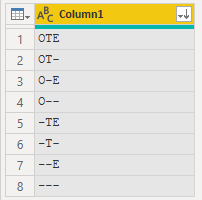
I want it to sort the characters after the letters so that my field is sorted (asc)
OTE
OT-
O-E
O--
-TE
-T-
--E
---
@sort
Solved! Go to Solution.
I would be surprised if the sort order was anything other than standard. You mention the tilda is not sorting correctly, but there are no tilda's in your example, eg ~
you can change the sort order with a sort column, but I doubt that would be a viable option in this case.
DAX appears to sort text the same as Excel, so hyphens and a few other characters are ignored 😞
(See here - I'm sure the official documentation is out there somewhere)
I would agree with @MattAllington or @ChrisMendoza 's suggestion of a helper column.
In addition to the methods already suggested, you could turn the original text into a hex string, which could be used as a Sort By column. Something like this:
let
Source = Table.FromRows(Json.Document(Binary.Decompress(Binary.FromText("i45W0g1xVYrVAdG6YNofyveH8XWhfF0IXxfK1wXxYwE=", BinaryEncoding.Base64), Compression.Deflate)), let _t = ((type nullable text) meta [Serialized.Text = true]) in type table [Code = _t]),
#"Changed Type" = Table.TransformColumnTypes(Source,{{"Code", type text}}),
#"Added Custom" = Table.AddColumn(#"Changed Type", "Sort Key", each Text.Combine(List.Transform(Text.ToList([Code]), each Number.ToText(Character.ToNumber(_),"x4"))), type text )
in
#"Added Custom"
DAX appears to sort text the same as Excel, so hyphens and a few other characters are ignored 😞
(See here - I'm sure the official documentation is out there somewhere)
I would agree with @MattAllington or @ChrisMendoza 's suggestion of a helper column.
In addition to the methods already suggested, you could turn the original text into a hex string, which could be used as a Sort By column. Something like this:
let
Source = Table.FromRows(Json.Document(Binary.Decompress(Binary.FromText("i45W0g1xVYrVAdG6YNofyveH8XWhfF0IXxfK1wXxYwE=", BinaryEncoding.Base64), Compression.Deflate)), let _t = ((type nullable text) meta [Serialized.Text = true]) in type table [Code = _t]),
#"Changed Type" = Table.TransformColumnTypes(Source,{{"Code", type text}}),
#"Added Custom" = Table.AddColumn(#"Changed Type", "Sort Key", each Text.Combine(List.Transform(Text.ToList([Code]), each Number.ToText(Character.ToNumber(_),"x4"))), type text )
in
#"Added Custom"
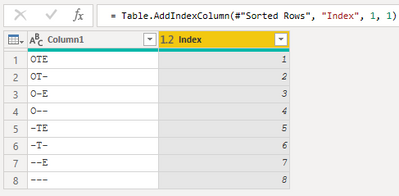
Power Query seems to sort as you intend (albeit DSC)
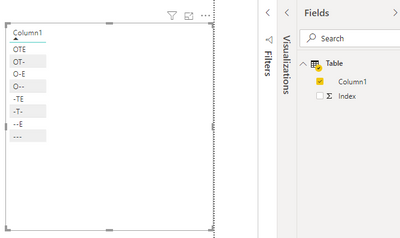
For the small sample I created an Index in PQ then sorted [Column1] by [Index] in Power BI
Proud to be a Super User!
I would be surprised if the sort order was anything other than standard. You mention the tilda is not sorting correctly, but there are no tilda's in your example, eg ~
you can change the sort order with a sort column, but I doubt that would be a viable option in this case.
Thank you. Yes, you are right that I typed the - rather than the ~ in my example. My bad. Regardless, even though tilda should sort after alpha, it doesn't in DAX/Excel. Oh well. Helper sort column here I come. Thank you!!!!
If you have recently started exploring Fabric, we'd love to hear how it's going. Your feedback can help with product improvements.
A new Power BI DataViz World Championship is coming this June! Don't miss out on submitting your entry.
Share feedback directly with Fabric product managers, participate in targeted research studies and influence the Fabric roadmap.
| User | Count |
|---|---|
| 51 | |
| 43 | |
| 39 | |
| 19 | |
| 19 |
| User | Count |
|---|---|
| 70 | |
| 69 | |
| 34 | |
| 33 | |
| 30 |