cancel
Showing results for 
Search instead for 
Did you mean: 

The Power BI Data Visualization World Championships is back! Get ahead of the game and start preparing now! Learn more

Reply
dkernen
Resolver II
Resolver II

DAX Sort Order

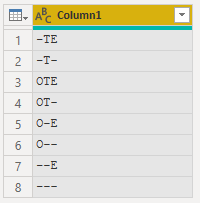
I have been searching for the DAX sort order, but I cannot find a reference.  It doesn't appear to follow ASCII standards.  I have a 3-character field where the first is O or not, the second is T or not, and the third is E or not.  It is currently sorting this way (desc)
-TE
-T-
OTE
OT-
O-E
O--
--E
---

In ASCII, the tilda should sort after the letters, so I would like to use that, but it appears DAX is ignoring all non-alpha characters in the sort.  What sort method is DAX using?  

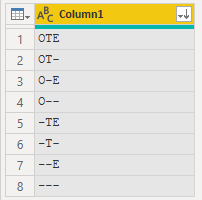
I want it to sort the characters after the letters so that my field is sorted (asc)
OTE
OT-
O-E
O--
-TE
-T-
--E
---
@sort

2 ACCEPTED SOLUTIONS
MattAllington
Community Champion
Community Champion

I would be surprised if the sort order was anything other than standard. You mention the tilda is not sorting correctly, but there are no tilda's in your example, eg ~

you can change the sort order with a sort column, but I doubt that would be a viable option in this case. 


* Matt is an 8 times Microsoft MVP (Power BI) and author of the Power BI Book Supercharge Power BI.
I will not give you bad advice, even if you unknowingly ask for it.

View solution in original post

OwenAuger
Super User
Super User

@dkernen 

DAX appears to sort text the same as Excel, so hyphens and a few other characters are ignored 😞

(See here - I'm sure the official documentation is out there somewhere)


I would agree with @MattAllington  or @ChrisMendoza 's suggestion of a helper column.


In addition to the methods already suggested, you could turn the original text into a hex string, which could be used as a Sort By column. Something like this:


let
    Source = Table.FromRows(Json.Document(Binary.Decompress(Binary.FromText("i45W0g1xVYrVAdG6YNofyveH8XWhfF0IXxfK1wXxYwE=", BinaryEncoding.Base64), Compression.Deflate)), let _t = ((type nullable text) meta [Serialized.Text = true]) in type table [Code = _t]),
    #"Changed Type" = Table.TransformColumnTypes(Source,{{"Code", type text}}),
    #"Added Custom" = Table.AddColumn(#"Changed Type", "Sort Key", each Text.Combine(List.Transform(Text.ToList([Code]), each Number.ToText(Character.ToNumber(_),"x4"))), type text )
in
    #"Added Custom"

Owen Auger
Did I answer your question? Mark my post as a solution!
Blog
LinkedIn

View solution in original post

4 REPLIES 4
OwenAuger
Super User
Super User

@dkernen 

DAX appears to sort text the same as Excel, so hyphens and a few other characters are ignored 😞

(See here - I'm sure the official documentation is out there somewhere)


I would agree with @MattAllington  or @ChrisMendoza 's suggestion of a helper column.


In addition to the methods already suggested, you could turn the original text into a hex string, which could be used as a Sort By column. Something like this:


let
    Source = Table.FromRows(Json.Document(Binary.Decompress(Binary.FromText("i45W0g1xVYrVAdG6YNofyveH8XWhfF0IXxfK1wXxYwE=", BinaryEncoding.Base64), Compression.Deflate)), let _t = ((type nullable text) meta [Serialized.Text = true]) in type table [Code = _t]),
    #"Changed Type" = Table.TransformColumnTypes(Source,{{"Code", type text}}),
    #"Added Custom" = Table.AddColumn(#"Changed Type", "Sort Key", each Text.Combine(List.Transform(Text.ToList([Code]), each Number.ToText(Character.ToNumber(_),"x4"))), type text )
in
    #"Added Custom"

Owen Auger
Did I answer your question? Mark my post as a solution!
Blog
LinkedIn
ChrisMendoza
Resident Rockstar
Resident Rockstar

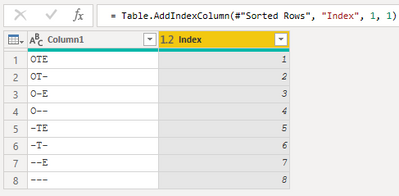
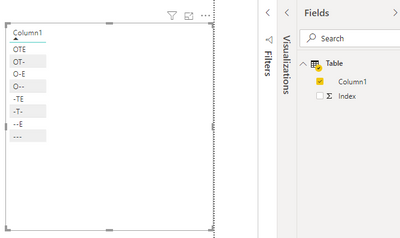
Power Query seems to sort as you intend (albeit DSC)

image.png image.png

For the small sample I created an Index in PQ then sorted [Column1] by [Index] in Power BI

image.pngimage.png


Did I answer your question? Mark my post as a solution!
Did my answers help arrive at a solution? Give it a kudos by clicking the Thumbs Up!

Proud to be a Super User!


MattAllington
Community Champion
Community Champion

I would be surprised if the sort order was anything other than standard. You mention the tilda is not sorting correctly, but there are no tilda's in your example, eg ~

you can change the sort order with a sort column, but I doubt that would be a viable option in this case. 


* Matt is an 8 times Microsoft MVP (Power BI) and author of the Power BI Book Supercharge Power BI.
I will not give you bad advice, even if you unknowingly ask for it.

Thank you.  Yes, you are right that I typed the - rather than the ~ in my example.  My bad.  Regardless, even though tilda should sort after alpha, it doesn't in DAX/Excel.  Oh well.  Helper sort column here I come.  Thank you!!!!

Helpful resources

Announcements
Power BI DataViz World Championships

Power BI Dataviz World Championships

The Power BI Data Visualization World Championships is back! Get ahead of the game and start preparing now!

December 2025 Power BI Update Carousel

Power BI Monthly Update - December 2025

Check out the December 2025 Power BI Holiday Recap!

FabCon Atlanta 2026 carousel

FabCon Atlanta 2026

Join us at FabCon Atlanta, March 16-20, for the ultimate Fabric, Power BI, AI and SQL community-led event. Save $200 with code FABCOMM.