Don't miss your chance to take the Fabric Data Engineer (DP-600) exam for FREE! Find out how by attending the DP-600 session on April 23rd (pacific time), live or on-demand.
Learn moreNext up in the FabCon + SQLCon recap series: The roadmap for Microsoft SQL and Maximizing Developer experiences in Fabric. All sessions are available on-demand after the live show. Register now
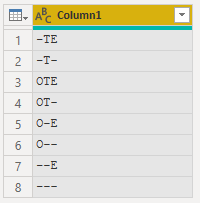
I have been searching for the DAX sort order, but I cannot find a reference. It doesn't appear to follow ASCII standards. I have a 3-character field where the first is O or not, the second is T or not, and the third is E or not. It is currently sorting this way (desc)
-TE
-T-
OTE
OT-
O-E
O--
--E
---
In ASCII, the tilda should sort after the letters, so I would like to use that, but it appears DAX is ignoring all non-alpha characters in the sort. What sort method is DAX using?
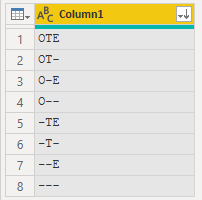
I want it to sort the characters after the letters so that my field is sorted (asc)
OTE
OT-
O-E
O--
-TE
-T-
--E
---
@sort
Solved! Go to Solution.
I would be surprised if the sort order was anything other than standard. You mention the tilda is not sorting correctly, but there are no tilda's in your example, eg ~
you can change the sort order with a sort column, but I doubt that would be a viable option in this case.
DAX appears to sort text the same as Excel, so hyphens and a few other characters are ignored 😞
(See here - I'm sure the official documentation is out there somewhere)
I would agree with @MattAllington or @ChrisMendoza 's suggestion of a helper column.
In addition to the methods already suggested, you could turn the original text into a hex string, which could be used as a Sort By column. Something like this:
let
Source = Table.FromRows(Json.Document(Binary.Decompress(Binary.FromText("i45W0g1xVYrVAdG6YNofyveH8XWhfF0IXxfK1wXxYwE=", BinaryEncoding.Base64), Compression.Deflate)), let _t = ((type nullable text) meta [Serialized.Text = true]) in type table [Code = _t]),
#"Changed Type" = Table.TransformColumnTypes(Source,{{"Code", type text}}),
#"Added Custom" = Table.AddColumn(#"Changed Type", "Sort Key", each Text.Combine(List.Transform(Text.ToList([Code]), each Number.ToText(Character.ToNumber(_),"x4"))), type text )
in
#"Added Custom"
DAX appears to sort text the same as Excel, so hyphens and a few other characters are ignored 😞
(See here - I'm sure the official documentation is out there somewhere)
I would agree with @MattAllington or @ChrisMendoza 's suggestion of a helper column.
In addition to the methods already suggested, you could turn the original text into a hex string, which could be used as a Sort By column. Something like this:
let
Source = Table.FromRows(Json.Document(Binary.Decompress(Binary.FromText("i45W0g1xVYrVAdG6YNofyveH8XWhfF0IXxfK1wXxYwE=", BinaryEncoding.Base64), Compression.Deflate)), let _t = ((type nullable text) meta [Serialized.Text = true]) in type table [Code = _t]),
#"Changed Type" = Table.TransformColumnTypes(Source,{{"Code", type text}}),
#"Added Custom" = Table.AddColumn(#"Changed Type", "Sort Key", each Text.Combine(List.Transform(Text.ToList([Code]), each Number.ToText(Character.ToNumber(_),"x4"))), type text )
in
#"Added Custom"
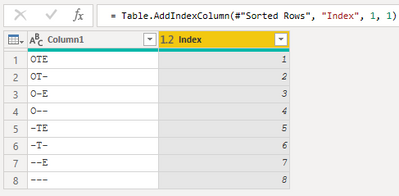
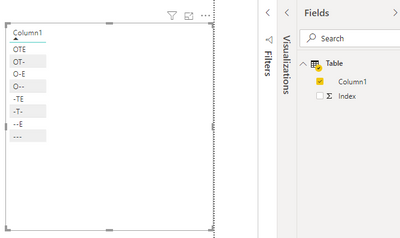
Power Query seems to sort as you intend (albeit DSC)
For the small sample I created an Index in PQ then sorted [Column1] by [Index] in Power BI
Proud to be a Super User!
I would be surprised if the sort order was anything other than standard. You mention the tilda is not sorting correctly, but there are no tilda's in your example, eg ~
you can change the sort order with a sort column, but I doubt that would be a viable option in this case.
Thank you. Yes, you are right that I typed the - rather than the ~ in my example. My bad. Regardless, even though tilda should sort after alpha, it doesn't in DAX/Excel. Oh well. Helper sort column here I come. Thank you!!!!
If you have recently started exploring Fabric, we'd love to hear how it's going. Your feedback can help with product improvements.
A new Power BI DataViz World Championship is coming this June! Don't miss out on submitting your entry.
Experience the highlights from FabCon & SQLCon, available live and on-demand starting April 14th.
| User | Count |
|---|---|
| 48 | |
| 40 | |
| 37 | |
| 20 | |
| 15 |
| User | Count |
|---|---|
| 70 | |
| 67 | |
| 32 | |
| 27 | |
| 25 |