Join us at FabCon Atlanta from March 16 - 20, 2026, for the ultimate Fabric, Power BI, AI and SQL community-led event. Save $200 with code FABCOMM.
Register now!The Power BI Data Visualization World Championships is back! Get ahead of the game and start preparing now! Learn more
Hi
Been struggling on this one, and got a lot of the way there with CALCULATE, SUM, SUMX, FILTER etc however need to turn to the experts now.
Costing a set of items as they roll through production process across different material types. W -> GB -> DH -> BB -> FP. Need associated costs from each stage to roll up under relevant types
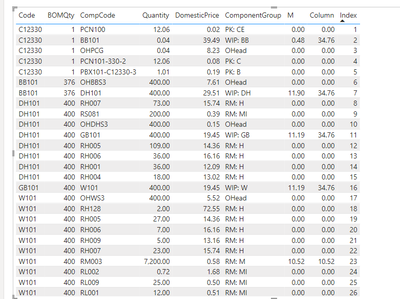
Here is my excel output and what i am trying to recreate in DAX:
| Code | BOMQty | CompCode | Quantity | DomesticPrice | ComponentGroup | M |
| C12330 | 1 | PCN100 | 12.06 | 0.0155 | PK: CE | 0 |
| C12330 | 1 | BB101 | 0.0403 | 39.4918 | WIP: BB | 0.47972434 |
| C12330 | 1 | OHPCG | 0.0396 | 8.228 | OHead | 0 |
| C12330 | 1 | PCN101-330-2 | 12.06 | 0.0775 | PK: C | 0 |
| C12330 | 1 | PBX101-C12330-3 | 1.0108 | 0.1941 | PK: B | 0 |
| BB101 | 376 | OHBBS3 | 400 | 7.609 | OHead | 0 |
| BB101 | 376 | DH101 | 400 | 29.5133 | WIP: DH | 11.90382979 |
| DH101 | 400 | RH007 | 73 | 15.74238272 | RM: H | 0 |
| DH101 | 400 | RS081 | 200 | 0.385 | RM: MI | 0 |
| DH101 | 400 | OHDHS3 | 400 | 0.147 | OHead | 0 |
| DH101 | 400 | GB101 | 400 | 19.4502 | WIP: GB | 11.1896 |
| DH101 | 400 | RH005 | 109 | 14.3639368 | RM: H | 0 |
| DH101 | 400 | RH006 | 36 | 16.16145414 | RM: H | 0 |
| DH101 | 400 | RH001 | 36 | 12.09092375 | RM: H | 0 |
| DH101 | 400 | RH004 | 18 | 13.01789457 | RM: H | 0 |
| GB101 | 400 | W101 | 400 | 19.4502 | WIP: W | 11.1896 |
| W101 | 400 | OHWS3 | 400 | 5.52 | OHead | 0 |
| W101 | 400 | RH128 | 2 | 72.54554248 | RM: H | 0 |
| W101 | 400 | RH005 | 27 | 14.3639368 | RM: H | 0 |
| W101 | 400 | RH006 | 7 | 16.16145414 | RM: H | 0 |
| W101 | 400 | RH009 | 5 | 13.16298565 | RM: H | 0 |
| W101 | 400 | RH007 | 23 | 15.74238272 | RM: H | 0 |
| W101 | 400 | RM003 | 7200 | 0.5847 | RM: M | 10.5246 |
| W101 | 400 | RL002 | 0.72 | 1.68 | RM: MI | 0 |
| W101 | 400 | RL009 | 25 | 0.495 | RM: MI | 0 |
| W101 | 400 | RL001 | 12 | 0.514 | RM: MI | 0 |
| W101 | 400 | CH081 | 1.2 | 18.59 | RM: MI | 0 |
| W101 | 400 | RL006 | 0.07 | 14.6 | RM: MI | 0 |
| W101 | 400 | RM027 | 350 | 0.76 | RM: M | 0.665 |
Aiming to recreate the M column in PBI - formula within current cell is:
=IF(F2="RM: M",(E2*D2)/B2,IF(OR(LEFT(F2,2)="FP",LEFT(F2,3)="WIP"),SUMIF(A:A,C2,G:G)*(D2/B2),0))
Basically if Group = RM: M - do calulcation - this is fine, the bit i am having trouble with is the second part:
IF(OR(LEFT(F2,2)="FP",LEFT(F2,3)="WIP"),SUMIF(A:A,C2,G:G)*(D2/B2),0)
If Group begins either FP or WIP sumif column G (labelled M) based on item in column C from criteria in A then perform said calculation.
I can seem to get it for one level up as in i can work from GB and will sum for W but for DH and beyond it returns 0 - any help appreciated
Solved! Go to Solution.
Hi @TonyBarron ,
I have created a simple sample, please refer to my pbix file to see if it helps you.
Create a column.
Column =
VAR _edb = ( 'Table'[DomesticPrice] * 'Table'[Quantity] ) / 'Table'[BOMQty]
VAR _leftf =
LEFT ( 'Table'[ComponentGroup], 2 )
VAR _leftf3 =
LEFT ( 'Table'[ComponentGroup], 3 )
VAR _sumif =
CALCULATE (
SUM ( 'Table'[M] ),
FILTER ( 'Table', 'Table'[CompCode] IN VALUES ( 'Table'[Code] ) )
)
RETURN
IF (
'Table'[ComponentGroup] = "RM: M",
_edb,
IF ( _leftf = " FP" || _leftf3 = "WIP", _sumif, 0 )
)
How to Get Your Question Answered Quickly
If it does not help, please provide more details with your desired output and pbix file without privacy information (or some sample data) .
Best Regards
Community Support Team _ Rongtie
If this post helps, then please consider Accept it as the solution to help the other members find it more quickly.
Hi @TonyBarron ,
I have created a simple sample, please refer to my pbix file to see if it helps you.
Create a column.
Column =
VAR _edb = ( 'Table'[DomesticPrice] * 'Table'[Quantity] ) / 'Table'[BOMQty]
VAR _leftf =
LEFT ( 'Table'[ComponentGroup], 2 )
VAR _leftf3 =
LEFT ( 'Table'[ComponentGroup], 3 )
VAR _sumif =
CALCULATE (
SUM ( 'Table'[M] ),
FILTER ( 'Table', 'Table'[CompCode] IN VALUES ( 'Table'[Code] ) )
)
RETURN
IF (
'Table'[ComponentGroup] = "RM: M",
_edb,
IF ( _leftf = " FP" || _leftf3 = "WIP", _sumif, 0 )
)
How to Get Your Question Answered Quickly
If it does not help, please provide more details with your desired output and pbix file without privacy information (or some sample data) .
Best Regards
Community Support Team _ Rongtie
If this post helps, then please consider Accept it as the solution to help the other members find it more quickly.
@TonyBarron , Try if this can help
M Column =
VAR _CompCode = [CompCode]
VAR _Group = [ComponentGroup]
VAR _BOMQty = [BOMQty]
VAR _DomesticPrice = [DomesticPrice]
VAR _Quantity = [Quantity]
VAR Code = [Code]
VAR RM_M_Calculation = IF(LEFT(_Group, 6) = "RM: M", (_DomesticPrice * _Quantity) / _BOMQty, BLANK())
VAR WIP_FP_Calculation =
IF(
OR(LEFT(_Group, 2) = "FP", LEFT(_Group, 3) = "WIP"),
CALCULATE(
SUM('Table'[M Column]),
FILTER(
'Table',
'Table'[Code] = _CompCode
)
) * (_Quantity / _BOMQty),
BLANK()
)
RETURN IF(RM_M_Calculation <> BLANK(), RM_M_Calculation, WIP_FP_Calculation)
The Power BI Data Visualization World Championships is back! Get ahead of the game and start preparing now!
| User | Count |
|---|---|
| 38 | |
| 38 | |
| 37 | |
| 28 | |
| 28 |
| User | Count |
|---|---|
| 124 | |
| 89 | |
| 73 | |
| 66 | |
| 65 |