Join us at FabCon Atlanta from March 16 - 20, 2026, for the ultimate Fabric, Power BI, AI and SQL community-led event. Save $200 with code FABCOMM.
Register now!The Power BI Data Visualization World Championships is back! Get ahead of the game and start preparing now! Learn more
Hello,
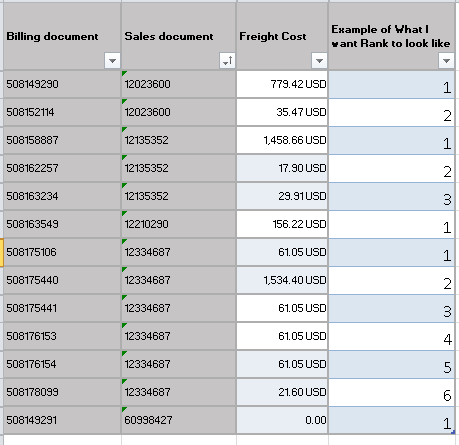
I am new to PowerPivot and am struggling to accompish what I am trying to do. I have a data set and I am trying to identify the total freight cost for all billing documents after the first shipment (lowest billing doc) by sales order.
I figured the easiest way to do this would be with a helper column and ranking my billing documents by Sales order and then calculating based off of a rank not equal to 1, but I can't figure out how to write this equation.
Can anybody offer any advice? On if there is a better way to do this or how to write a rank for billing Doc by Sales doc?
Solved! Go to Solution.
HI @Kmoore15
You could try adding this DAX column to your model
Rank = CALCULATE(
COUNTROWS('Table1'),
FILTER(
ALL(Table1),
'Table1'[Sales document] = EARLIER('Table1'[Sales document]) &&
'Table1'[Freight Cost] > EARLIER('Table1'[Freight Cost])
)
)+1
I want to provide another solution using the RANKX function which is more intuitive for the purpose of ranking.
Rank =
RANKX(
ALLSELECTED(Table1[Billing document]),
CALCULATE(SELECTEDVALUE(Table1[Freight Cost])),
,
DESC,
Skip
)
HI @Kmoore15
You could try adding this DAX column to your model
Rank = CALCULATE(
COUNTROWS('Table1'),
FILTER(
ALL(Table1),
'Table1'[Sales document] = EARLIER('Table1'[Sales document]) &&
'Table1'[Freight Cost] > EARLIER('Table1'[Freight Cost])
)
)+1
@Phil_Seamark your formula works but it seems to really hurt performance when you have a large amount of data with multiple different groups. I think there may be a more efficient way using RANKX. The team at SQLBI has a more in-depth explanation here for those interested. Essentially RANKX is optimized for performing these types of calculations
Rank =
RANKX (
FILTER (
'Table1',
Table1[Sales document] = EARLIER ( Table1[Sales document] )
),
Table1[Billing document],
, // leave value argument blank
ASC
)
I have a table with 250,000+ rows and 105 different groups (tracking price history for multiple different equities). The COUNTROWS method takes 30+ seconds and sometimes doesn't even have enough memory to compute, whereas RANKX takes 1-2 seconds.
The Power BI Data Visualization World Championships is back! Get ahead of the game and start preparing now!
| User | Count |
|---|---|
| 38 | |
| 35 | |
| 33 | |
| 32 | |
| 29 |
| User | Count |
|---|---|
| 134 | |
| 96 | |
| 78 | |
| 67 | |
| 65 |