Learn from the best! Meet the four finalists headed to the FINALS of the Power BI Dataviz World Championships! Register now
Hello,
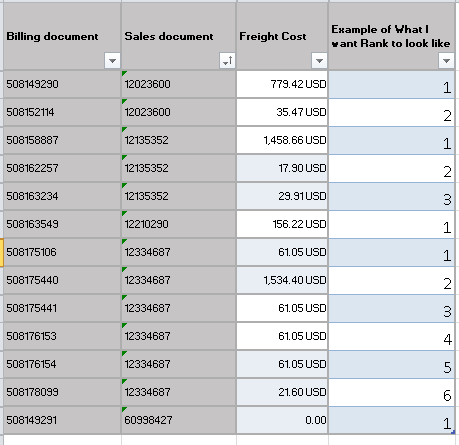
I am new to PowerPivot and am struggling to accompish what I am trying to do. I have a data set and I am trying to identify the total freight cost for all billing documents after the first shipment (lowest billing doc) by sales order.
I figured the easiest way to do this would be with a helper column and ranking my billing documents by Sales order and then calculating based off of a rank not equal to 1, but I can't figure out how to write this equation.
Can anybody offer any advice? On if there is a better way to do this or how to write a rank for billing Doc by Sales doc?
Solved! Go to Solution.
HI @Kmoore15
You could try adding this DAX column to your model
Rank = CALCULATE(
COUNTROWS('Table1'),
FILTER(
ALL(Table1),
'Table1'[Sales document] = EARLIER('Table1'[Sales document]) &&
'Table1'[Freight Cost] > EARLIER('Table1'[Freight Cost])
)
)+1
I want to provide another solution using the RANKX function which is more intuitive for the purpose of ranking.
Rank =
RANKX(
ALLSELECTED(Table1[Billing document]),
CALCULATE(SELECTEDVALUE(Table1[Freight Cost])),
,
DESC,
Skip
)
HI @Kmoore15
You could try adding this DAX column to your model
Rank = CALCULATE(
COUNTROWS('Table1'),
FILTER(
ALL(Table1),
'Table1'[Sales document] = EARLIER('Table1'[Sales document]) &&
'Table1'[Freight Cost] > EARLIER('Table1'[Freight Cost])
)
)+1
@Phil_Seamark your formula works but it seems to really hurt performance when you have a large amount of data with multiple different groups. I think there may be a more efficient way using RANKX. The team at SQLBI has a more in-depth explanation here for those interested. Essentially RANKX is optimized for performing these types of calculations
Rank =
RANKX (
FILTER (
'Table1',
Table1[Sales document] = EARLIER ( Table1[Sales document] )
),
Table1[Billing document],
, // leave value argument blank
ASC
)
I have a table with 250,000+ rows and 105 different groups (tracking price history for multiple different equities). The COUNTROWS method takes 30+ seconds and sometimes doesn't even have enough memory to compute, whereas RANKX takes 1-2 seconds.
A new Power BI DataViz World Championship is coming this June! Don't miss out on submitting your entry.
Share feedback directly with Fabric product managers, participate in targeted research studies and influence the Fabric roadmap.
| User | Count |
|---|---|
| 52 | |
| 34 | |
| 32 | |
| 17 | |
| 17 |
| User | Count |
|---|---|
| 61 | |
| 60 | |
| 39 | |
| 26 | |
| 24 |