Don't miss your chance to take exam DP-600 or DP-700 on us!
Request nowLearn from the best! Meet the four finalists headed to the FINALS of the Power BI Dataviz World Championships! Register now
Hi All,
I have a data set similar to the below example.
| On Hire Date | Off Hire Date | Hire Duration (Days) |
| 01/01/2020 | 10/01/2020 | 10 |
| 02/01/2020 | 10/01/2020 | 9 |
I want to create a DAX formula that will show me any rows that are above 10 days for instance.
Please can anyone help?
Many thanks,
E
Solved! Go to Solution.
Hi @Anonymous ,
Hi @Anonymous ,
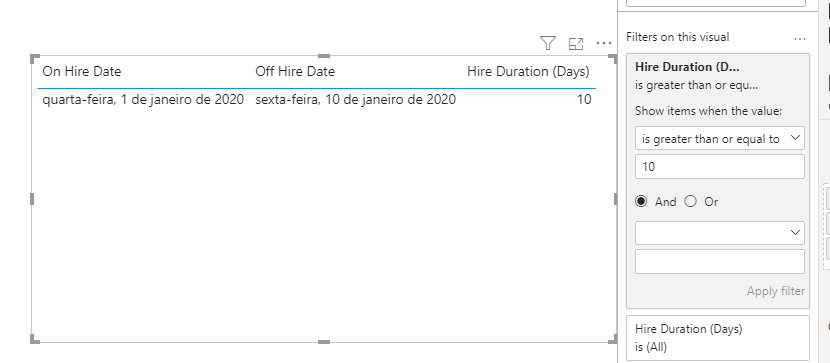
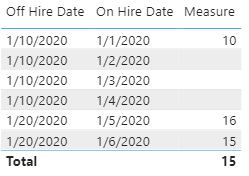
You could follow the way of @camargos88 to filter out in filter pane. Or you could use a IF function to implement it.
Please try this:
Measure =
var diff = DATEDIFF(MAX('Table'[On Hire Date]),MAX('Table'[Off Hire Date]),DAY)+1
return
IF(diff>=10, diff)
Hi @Anonymous ,
You could follow the way of @camargos88 to filter out in filter pane. Or you could use a IF function to implement it.
Please try this:
Measure =
var diff = DATEDIFF(MAX('Table'[On Hire Date]),MAX('Table'[Off Hire Date]),DAY)+1
return
IF(diff>=10, diff)
@Anonymous , refer if this can help
or datediff([On Hire Date],[Off Hire Date],day)+1
Share feedback directly with Fabric product managers, participate in targeted research studies and influence the Fabric roadmap.
Check out the February 2026 Power BI update to learn about new features.
| User | Count |
|---|---|
| 54 | |
| 47 | |
| 38 | |
| 16 | |
| 15 |
| User | Count |
|---|---|
| 82 | |
| 71 | |
| 38 | |
| 28 | |
| 25 |