cancel
Showing results for 
Search instead for 
Did you mean: 

Level up your Power BI skills this month - build one visual each week and tell better stories with data! Get started

Reply
Anonymous
Not applicable

DAX Query to filter correctly

 Hi all, 


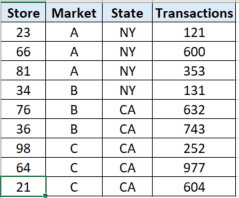
I have a table smilar to the attached snapshot. I need to create a metric that shows sum of market transactions (for a selected store) when I select a store in the slicer. 


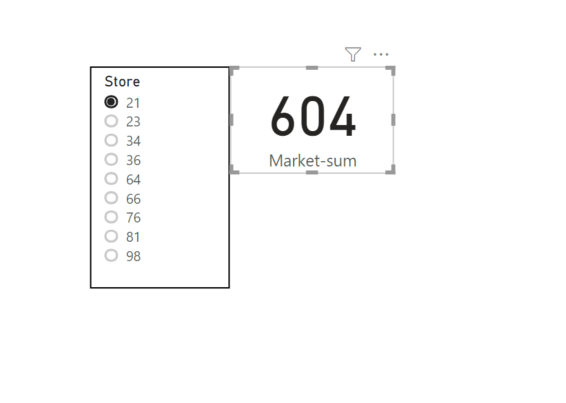
My problem is that when I select a store, Market-sum filetrs shows value of that store and not the entire market of that store. 


For example if I select store 21, answer should be 1829 and not 604. 

Capture.PNGCapture12.PNG

Thanks!


1 ACCEPTED SOLUTION

@Anonymous

Try this:

Market Sum =
CALCULATE (
    SUM ( 'Table'[Transaction] ),
    FILTER ( ALL ( 'Table' ), 'Table'[Market] = SELECTEDVALUE ( 'Table'[Market] ) )
)

Bless you!
Vivek

If it helps, please mark it as a solution
Congratulations would be a cherry on top 🙂

https://www.vivran.in/

Connect on LinkedIn

View solution in original post

4 REPLIES 4
Anonymous
Not applicable

Since store 21, belongs to Market C. Answer should be sum of Transactions of Market C: 1829


@Anonymous

Try this:

Market Sum =
CALCULATE (
    SUM ( 'Table'[Transaction] ),
    FILTER ( ALL ( 'Table' ), 'Table'[Market] = SELECTEDVALUE ( 'Table'[Market] ) )
)

Bless you!
Vivek

If it helps, please mark it as a solution
Congratulations would be a cherry on top 🙂

https://www.vivran.in/

Connect on LinkedIn

amitchandak
Super User
Super User

@Anonymous 

I think your data is not matching what you set. Filter 21 seems to be working correctly. Do you want sum of market or State?


Share with Power BI Enthusiasts: Full Power BI Video (20 Hours) YouTube
Microsoft Fabric Series 60+ Videos YouTube
Microsoft Fabric Hindi End to End YouTube
vivran22
Community Champion
Community Champion

Hello @Anonymous ,


Please share sample data file/more details around the existing data. The issue is not clear from the description.


Cheers!
Vivek

https://www.vivran.in/
Connect on LinkedIn


Helpful resources

Announcements
April Power BI Update Carousel

Power BI Monthly Update - April 2026

Check out the April 2026 Power BI update to learn about new features.

Fabric SQL PBI Data Days

Data Days 2026 coming soon!

Sign up to receive a private message when registration opens and key events begin.

New to Fabric survey Carousel

New to Fabric Survey

If you have recently started exploring Fabric, we'd love to hear how it's going. Your feedback can help with product improvements.

Power BI DataViz World Championships carousel

Power BI DataViz World Championships - June 2026

A new Power BI DataViz World Championship is coming this June! Don't miss out on submitting your entry.