Learn from the best! Meet the four finalists headed to the FINALS of the Power BI Dataviz World Championships! Register now
Hi all,
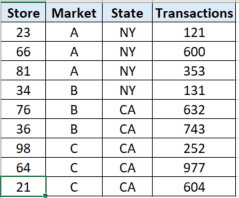
I have a table smilar to the attached snapshot. I need to create a metric that shows sum of market transactions (for a selected store) when I select a store in the slicer.
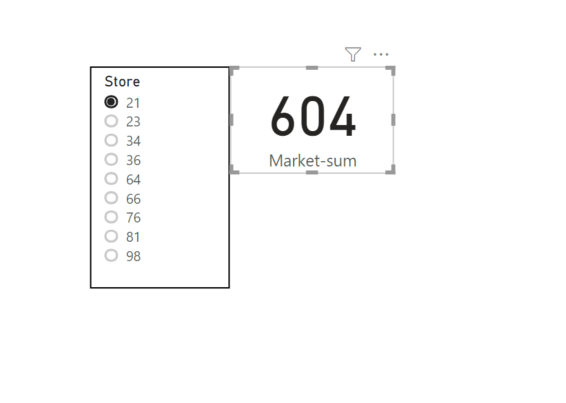
My problem is that when I select a store, Market-sum filetrs shows value of that store and not the entire market of that store.
For example if I select store 21, answer should be 1829 and not 604.
Thanks!
Solved! Go to Solution.
@Anonymous
Try this:
Market Sum =
CALCULATE (
SUM ( 'Table'[Transaction] ),
FILTER ( ALL ( 'Table' ), 'Table'[Market] = SELECTEDVALUE ( 'Table'[Market] ) )
)
Bless you!
Vivek
If it helps, please mark it as a solution
Congratulations would be a cherry on top 🙂
https://www.vivran.in/
Connect on LinkedIn
Since store 21, belongs to Market C. Answer should be sum of Transactions of Market C: 1829
@Anonymous
Try this:
Market Sum =
CALCULATE (
SUM ( 'Table'[Transaction] ),
FILTER ( ALL ( 'Table' ), 'Table'[Market] = SELECTEDVALUE ( 'Table'[Market] ) )
)
Bless you!
Vivek
If it helps, please mark it as a solution
Congratulations would be a cherry on top 🙂
https://www.vivran.in/
Connect on LinkedIn
Hello @Anonymous ,
Please share sample data file/more details around the existing data. The issue is not clear from the description.
Cheers!
Vivek
https://www.vivran.in/
Connect on LinkedIn
A new Power BI DataViz World Championship is coming this June! Don't miss out on submitting your entry.
Share feedback directly with Fabric product managers, participate in targeted research studies and influence the Fabric roadmap.
| User | Count |
|---|---|
| 45 | |
| 35 | |
| 30 | |
| 15 | |
| 15 |
| User | Count |
|---|---|
| 58 | |
| 56 | |
| 38 | |
| 21 | |
| 21 |