
Don't miss your chance to take the Fabric Data Engineer (DP-600) exam for FREE! Find out how by attending the DP-600 session on April 23rd (pacific time), live or on-demand.
Learn moreNext up in the FabCon + SQLCon recap series: The roadmap for Microsoft SQL and Maximizing Developer experiences in Fabric. All sessions are available on-demand after the live show. Register now
Hello there!
I would like to ask for help with writing a query in DAX. Here is what I am trying to do..
I will be reporting this Resource Capacity' equation on a weekly basis:
Number of Administrators (17) X Average Work Completed (12) = 204 multiply by fraction of weeks remaining in the year (XX / 52)
Can someone please help me write this? I got to the 204 part but not sure how to write the fraction of weeks remaining in the year.
Thank you so much, I appreciate the help!
Belle
Solved! Go to Solution.
Hi,
Write this masure to calculated Remaining weeks in year
Remaining weeks in year = calculate(min(Calendar[Weeks until end of year]),datesbetween(calendar[date],date(year(today()),12,31),date(year(today()),12,31)))-calculate(min(Calendar[Weeks until end of year]),datesbetween(calendar[date],today(),today()))+1
Use this measure in the denominator.
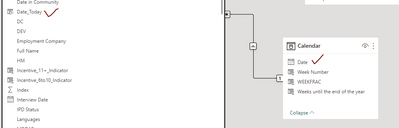
I also created a date field in my master table ('Date_Today') so I can link the Master table to the Calendar table by DATE field.
Hi,
Ensure that you have a Calendar Table with a week number column in your PBI file. Share the download link of the PBI file.
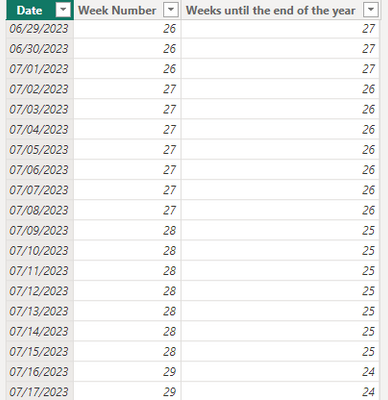
Hello there! So I got the calendar table built with a column of 'weeks remaining in the year':
Now I need to know how to incorporate this to build the metric:
Instead of dividing by 2, I need to multiply by fraction of weeks remaining in the year.
Hi,
Write this masure to calculated Remaining weeks in year
Remaining weeks in year = calculate(min(Calendar[Weeks until end of year]),datesbetween(calendar[date],date(year(today()),12,31),date(year(today()),12,31)))-calculate(min(Calendar[Weeks until end of year]),datesbetween(calendar[date],today(),today()))+1
Use this measure in the denominator.
If you have recently started exploring Fabric, we'd love to hear how it's going. Your feedback can help with product improvements.
A new Power BI DataViz World Championship is coming this June! Don't miss out on submitting your entry.
Share feedback directly with Fabric product managers, participate in targeted research studies and influence the Fabric roadmap.
| User | Count |
|---|---|
| 48 | |
| 45 | |
| 41 | |
| 20 | |
| 17 |
| User | Count |
|---|---|
| 69 | |
| 63 | |
| 32 | |
| 31 | |
| 25 |