
Join us at FabCon Atlanta from March 16 - 20, 2026, for the ultimate Fabric, Power BI, AI and SQL community-led event. Save $200 with code FABCOMM.
Register now!The Power BI Data Visualization World Championships is back! Get ahead of the game and start preparing now! Learn more
Hello there!
I would like to ask for help with writing a query in DAX. Here is what I am trying to do..
I will be reporting this Resource Capacity' equation on a weekly basis:
Number of Administrators (17) X Average Work Completed (12) = 204 multiply by fraction of weeks remaining in the year (XX / 52)
Can someone please help me write this? I got to the 204 part but not sure how to write the fraction of weeks remaining in the year.
Thank you so much, I appreciate the help!
Belle
Solved! Go to Solution.
Hi,
Write this masure to calculated Remaining weeks in year
Remaining weeks in year = calculate(min(Calendar[Weeks until end of year]),datesbetween(calendar[date],date(year(today()),12,31),date(year(today()),12,31)))-calculate(min(Calendar[Weeks until end of year]),datesbetween(calendar[date],today(),today()))+1
Use this measure in the denominator.
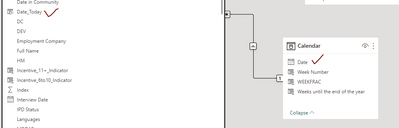
I also created a date field in my master table ('Date_Today') so I can link the Master table to the Calendar table by DATE field.
Hi,
Ensure that you have a Calendar Table with a week number column in your PBI file. Share the download link of the PBI file.
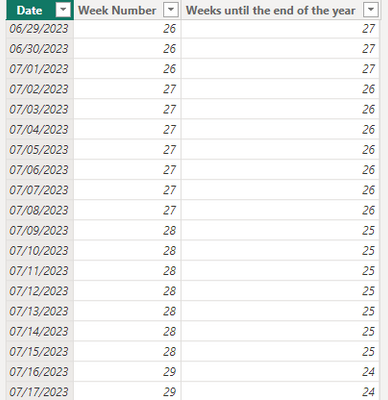
Hello there! So I got the calendar table built with a column of 'weeks remaining in the year':
Now I need to know how to incorporate this to build the metric:
Instead of dividing by 2, I need to multiply by fraction of weeks remaining in the year.
Hi,
Write this masure to calculated Remaining weeks in year
Remaining weeks in year = calculate(min(Calendar[Weeks until end of year]),datesbetween(calendar[date],date(year(today()),12,31),date(year(today()),12,31)))-calculate(min(Calendar[Weeks until end of year]),datesbetween(calendar[date],today(),today()))+1
Use this measure in the denominator.
The Power BI Data Visualization World Championships is back! Get ahead of the game and start preparing now!
| User | Count |
|---|---|
| 39 | |
| 37 | |
| 33 | |
| 32 | |
| 29 |
| User | Count |
|---|---|
| 133 | |
| 88 | |
| 85 | |
| 68 | |
| 64 |