cancel
Showing results for 
Search instead for 
Did you mean: 

July 28 - August 9 | Final Round of the Power BI Dataviz World Championships. This is your chance. Learn more

Reply
Anonymous
Not applicable

DAX Perfromance Issue

Hi All,


I m using below measures to get Top 20% from vendor list.

Top_20%_Vendor = IF (ISBLANK ( [Invoiced] ),BLANK (),IF ([Ranking]< ( CALCULATE ( [Unique_Vendor], ALL ( f6MonthSpend ) ) * 0.2 ),[Invoiced],BLANK ()))


Then i m using below measure to get Top N  from above 20% list.


Ranking = IF (HASONEVALUE ( f6MonthSpend[Vendor Name] ),RANKX ( ALL ( f6MonthSpend[Vendor Name] ), [Invoiced],, DESC ))
TopN = SWITCH (TRUE (),[SelectedTOPNValue] = 0, [Invoiced],[Ranking] <= [SelectedTOPNValue], [Invoiced])


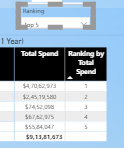
Issue : It takes around 1 min to get Top N .


image.png


2 REPLIES 2
v-deddai1-msft
Community Support
Community Support

Hi @Anonymous ,


Would you please try to use IF instead of switch in your TOPN?


TopN =
IF (
    [SelectedTOPNValue] = 0,
    [Invoiced],
    IF ( [Ranking] <= [SelectedTOPNValue], [Invoiced] )
)


If this post helps, then please consider Accept it as the solution to help the other members find it more quickly.


Best Regards,

Dedmon Dai

lbendlin
Super User
Super User

please provide sample data in usable format

Helpful resources

Announcements
Fabric Community Sticker Design Challenge Barcelona Carousel

Fabric Community Sticker Challenge - Barcelona 2026

If you love stickers, then you will definitely want to check out our community sticker challenge, Barcelona edition!

July Power BI Update Carousel

Power BI Monthly Update - July 2026

Check out the July 2026 Power BI update to learn about new features.

Power BI DataViz World Championships carousel

Power BI DataViz World Championships - June 2026

A new Power BI DataViz World Championship is coming this June! Don't miss out on submitting your entry.

Top Solution Authors