cancel
Showing results for 
Search instead for 
Did you mean: 

The Power BI Data Visualization World Championships is back! Get ahead of the game and start preparing now! Learn more

Reply
syasmin25
Helper V
Helper V

DAX Measure

Hello, 

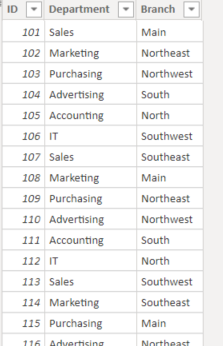
I have come across an issue and was wondering if there is a way around it. I am providing a sample of the date here with a few columns. 
tbruh.PNG
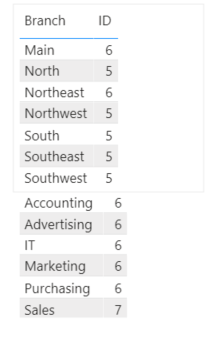
If I want to show a table that would show the count of IDs by Branch and Departments in the same table other than Matrix (The actual data has a lot of differents types of columns such as gender, etc.), is there a way I can put them all together instead of stacking one down another like the following picture?
Any kind of help will be appreciated.tbruh.PNG

1 ACCEPTED SOLUTION
dax
Community Support
Community Support

Hi @syasmin25 , 

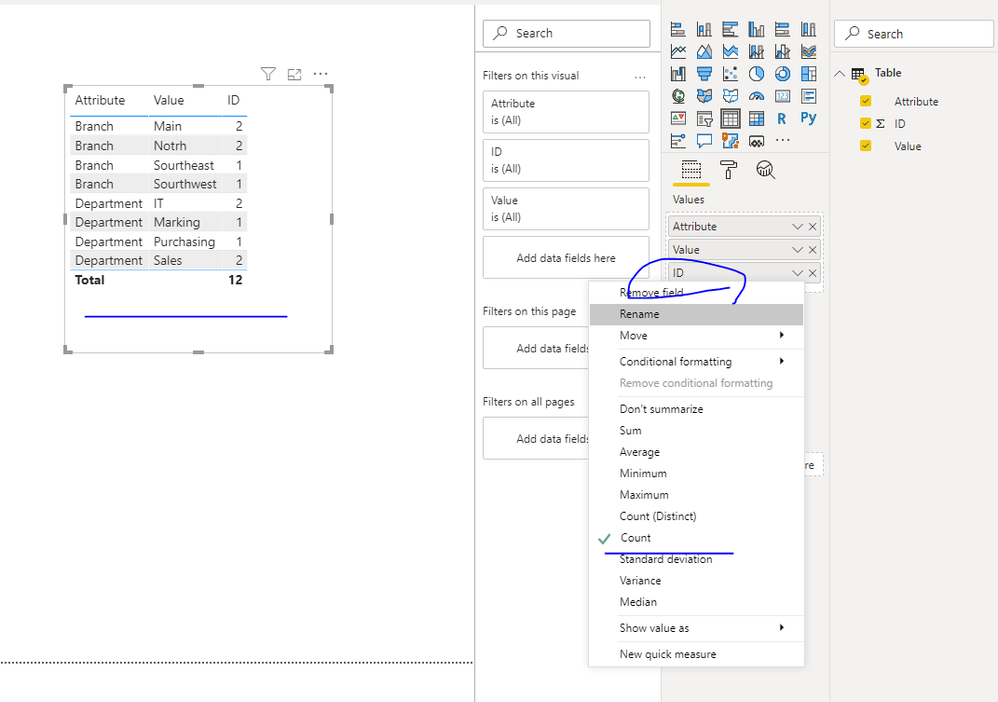
You could choose [Branch] and [Department] columns ,  try "unpivot column" , then use this in Table like below

let
    Source = Table.FromRows(Json.Document(Binary.Decompress(Binary.FromText("i45WMjQwVNJRCk7MSS0G0r6JmXlKsTogYSMwtyg7My8dyPLLLynKgMoYA/kBpUXJGYnFmJImQL5nCMjI/NKikozUxOISqIwpkj0QyfJUuKQZTBvEBbEA", BinaryEncoding.Base64), Compression.Deflate)), let _t = ((type text) meta [Serialized.Text = true]) in type table [ID = _t, Department = _t, Branch = _t]),
    #"Changed Type" = Table.TransformColumnTypes(Source,{{"ID", Int64.Type}, {"Department", type text}, {"Branch", type text}}),
    #"Unpivoted Columns" = Table.UnpivotOtherColumns(#"Changed Type", {"ID"}, "Attribute", "Value")
in
    #"Unpivoted Columns"

 719.PNG

Best Regards,
Zoe Zhi

If this post helps, then please consider Accept it as the solution to help the other members find it more quickly.

View solution in original post

3 REPLIES 3
dax
Community Support
Community Support

Hi @syasmin25 , 

You could choose [Branch] and [Department] columns ,  try "unpivot column" , then use this in Table like below

let
    Source = Table.FromRows(Json.Document(Binary.Decompress(Binary.FromText("i45WMjQwVNJRCk7MSS0G0r6JmXlKsTogYSMwtyg7My8dyPLLLynKgMoYA/kBpUXJGYnFmJImQL5nCMjI/NKikozUxOISqIwpkj0QyfJUuKQZTBvEBbEA", BinaryEncoding.Base64), Compression.Deflate)), let _t = ((type text) meta [Serialized.Text = true]) in type table [ID = _t, Department = _t, Branch = _t]),
    #"Changed Type" = Table.TransformColumnTypes(Source,{{"ID", Int64.Type}, {"Department", type text}, {"Branch", type text}}),
    #"Unpivoted Columns" = Table.UnpivotOtherColumns(#"Changed Type", {"ID"}, "Attribute", "Value")
in
    #"Unpivoted Columns"

 719.PNG

Best Regards,
Zoe Zhi

If this post helps, then please consider Accept it as the solution to help the other members find it more quickly.

Hello, 


I have come across an issue. So, If I am tracking ID from different sectors of the industry. So, lets say I industry produces toilet papers (lets call it "T.Paper.example") and another part of it produces meats (lets call it "meat.co.example"). And I would have the same visual as you are showing below just another column that would say "Meat.co.example" if the data Attribute/Value is from there or "T.Paper.example". And suppose there are duplicates and certain measures I would like to apply. When I bring in the measures, my attributes/values only shows data half the data ( so here, it would just be data from the Branch column, the Department column's rows disappears.)

amitchandak
Super User
Super User

@syasmin25 , this will group in table visual. Unless you can create some kind of row number with of rank on based on department and try

For Rank Refer these links
https://radacad.com/how-to-use-rankx-in-dax-part-2-of-3-calculated-measures
https://radacad.com/how-to-use-rankx-in-dax-part-1-of-3-calculated-columns -- This one should help in Rank
https://radacad.com/how-to-use-rankx-in-dax-part-3-of-3-the-finale -- How to break ties -- check this one
https://community.powerbi.com/t5/Community-Blog/Dynamic-TopN-made-easy-with-What-If-Parameter/ba-p/3...


Try to create the rank of the department under branch (category/subcategory Rank) and use that in visual to without summarization

Share with Power BI Enthusiasts: Full Power BI Video (20 Hours) YouTube
Microsoft Fabric Series 60+ Videos YouTube
Microsoft Fabric Hindi End to End YouTube

Helpful resources

Announcements
Power BI DataViz World Championships

Power BI Dataviz World Championships

The Power BI Data Visualization World Championships is back! Get ahead of the game and start preparing now!

December 2025 Power BI Update Carousel

Power BI Monthly Update - December 2025

Check out the December 2025 Power BI Holiday Recap!

FabCon Atlanta 2026 carousel

FabCon Atlanta 2026

Join us at FabCon Atlanta, March 16-20, for the ultimate Fabric, Power BI, AI and SQL community-led event. Save $200 with code FABCOMM.

Top Solution Authors