
cancel
Showing results for 
Search instead for 
Did you mean: 

View all the Fabric Data Days sessions on demand. View schedule

Reply
Vijay08V
Helper III
Helper III

DAX Measure to find Distinct Category where Error Rate has increased

Hi ,

I need some help with DAX measure. I have sample table with different categories with Error rate for Quarter 1 and Quarter 2. I want to find distinct count of Categories where the Error rate has increased from last quarter to current quarter. 


Sample Data :


YearQTRCategoryError Rate
20231A20%
20231B10%
20231C15%
20231D5%
20231E10%
20232A10%
20232B20%
20232C30%
20232D10%
20232E5%


In above sample data Category B,C and D has error rate increased from Q1 to Q2. The expected output here would be 3.

1 ACCEPTED SOLUTION
rubayatyasmin
Super User
Super User

@Vijay08V hi,


here is the DAX,


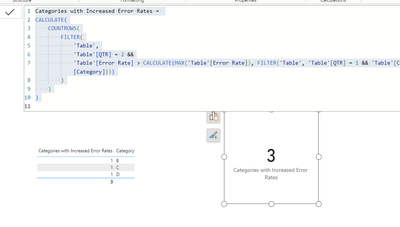
Categories with Increased Error Rates =
CALCULATE(
    COUNTROWS(
        FILTER(
            'Table',
            'Table'[QTR] = 2 &&
            'Table'[Error Rate] > CALCULATE(MAX('Table'[Error Rate]), FILTER('Table', 'Table'[QTR] = 1 && 'Table'[Category] = EARLIER('Table'[Category])))
        )
    )
)
 
output: 
rubayatyasmin_0-1697019718348.png

rubayatyasmin_0-1689517080227.png


Did I answer your question? Mark my post as a solution!super-user-logo

Proud to be a Super User!


View solution in original post

2 REPLIES 2
ThxAlot
Super User
Super User

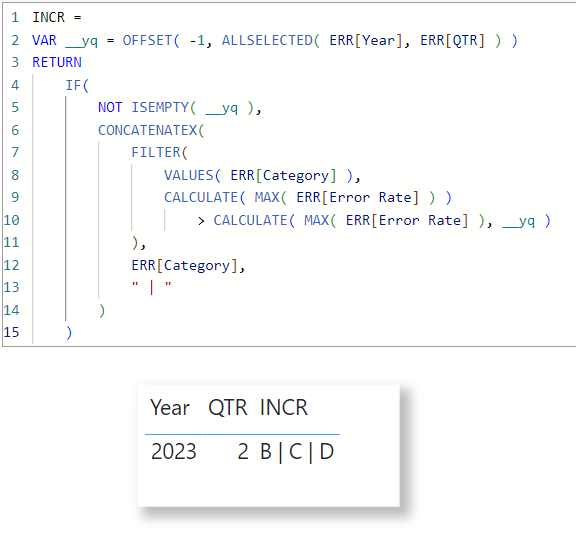
A simple use case of DAX Window function.

Err Incr.pbix


ThxAlot_0-1697021856268.png


Expertise = List.Accumulate(


        {Days as from Today},


        {Skills and Knowledge},


        (Current, Everyday) => Current & Day.LearnAndPractise(Everyday)


)


rubayatyasmin
Super User
Super User

@Vijay08V hi,


here is the DAX,


Categories with Increased Error Rates =
CALCULATE(
    COUNTROWS(
        FILTER(
            'Table',
            'Table'[QTR] = 2 &&
            'Table'[Error Rate] > CALCULATE(MAX('Table'[Error Rate]), FILTER('Table', 'Table'[QTR] = 1 && 'Table'[Category] = EARLIER('Table'[Category])))
        )
    )
)
 
output: 
rubayatyasmin_0-1697019718348.png

rubayatyasmin_0-1689517080227.png


Did I answer your question? Mark my post as a solution!super-user-logo

Proud to be a Super User!


Helpful resources

Announcements
November Power BI Update Carousel

Power BI Monthly Update - November 2025

Check out the November 2025 Power BI update to learn about new features.

Fabric Data Days Carousel

Fabric Data Days

Advance your Data & AI career with 50 days of live learning, contests, hands-on challenges, study groups & certifications and more!

FabCon Atlanta 2026 carousel

FabCon Atlanta 2026

Join us at FabCon Atlanta, March 16-20, for the ultimate Fabric, Power BI, AI and SQL community-led event. Save $200 with code FABCOMM.

Top Solution Authors
Top Kudoed Authors