cancel
Showing results for 
Search instead for 
Did you mean: 

The Power BI Data Visualization World Championships is back! Get ahead of the game and start preparing now! Learn more

Reply
Anonymous
Not applicable

DAX: How to control matrix detail level?

Hi,


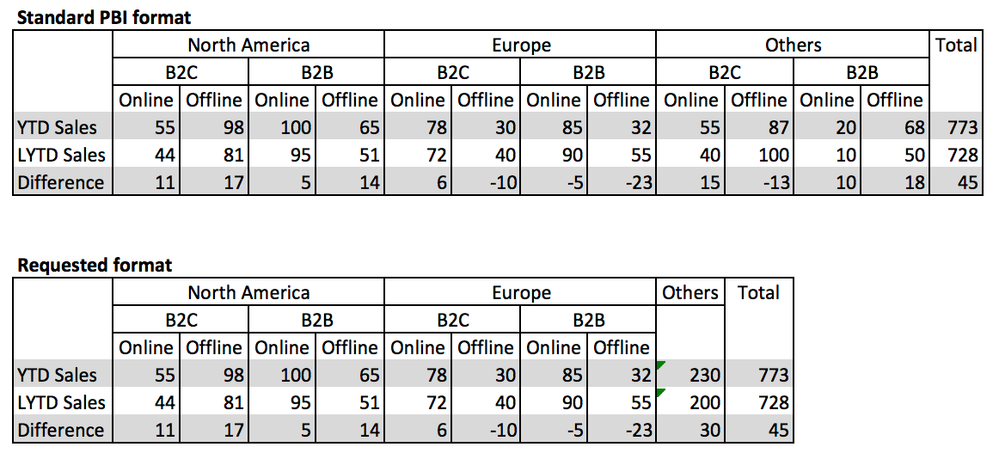
I have a request for the current Matrix, where I would like to control the aggregation level of individuel parts of the matrix.


Currently if I filter down on three levels, the matrix will do this for all groups of data in the matrix, but I only want the matrix to do it for specific parts of the matrix, and only show the first aggregated level in my "Others" group.


Example of PBI today and my requested format:
Screen Shot 2017-10-03 at 09.34.25.png


Is it possible to achive this in dax?


I know this is related to the matrix collapse/expand button idea, but I need a workaround asap:

https://ideas.powerbi.com/forums/265200-power-bi-ideas/suggestions/9207006-matrix-collapse-expand-bu...


Currently my solution has been to make 3 seperate matrix, with one for North America / Europe, and then a second and third for "Others" and "Total" where I would hide the measure description. Kinda works but seems like a mess.

1 REPLY 1
Anonymous
Not applicable

@Anonymous,

Please take a look at the following similar thread about how to add total of specific group in Matrix.

https://community.powerbi.com/t5/Desktop/Adding-a-custom-total-Row-and-Total-Column-for-matrix/td-p/200540

Regards,
Lydia

Helpful resources

Announcements
Power BI DataViz World Championships

Power BI Dataviz World Championships

The Power BI Data Visualization World Championships is back! Get ahead of the game and start preparing now!

December 2025 Power BI Update Carousel

Power BI Monthly Update - December 2025

Check out the December 2025 Power BI Holiday Recap!

FabCon Atlanta 2026 carousel

FabCon Atlanta 2026

Join us at FabCon Atlanta, March 16-20, for the ultimate Fabric, Power BI, AI and SQL community-led event. Save $200 with code FABCOMM.