cancel
Showing results for 
Search instead for 
Did you mean: 

The Power BI Data Visualization World Championships is back! Get ahead of the game and start preparing now! Learn more

Reply
Anonymous
Not applicable

DAX Help

Please help guys

Days of Inventory in Hand (DIH) =  Average Inventory / Average daily Net Sales.


Now how to arrive average inventory:


From the selected date by user say 04.06.2020, go backward and check inventory value on 04.06.20, 04.05.20…………….. 04.07.19 (12 months)

Add all twelve months inventory and divide it by 12 so that you will get average inventory.


Average daily net sales =  say selected date 04.06.20 then ( Net sales from 04.07.19 to 04.06.20 (12 months) divide it by 12)                   

1 ACCEPTED SOLUTION
Anonymous
Not applicable

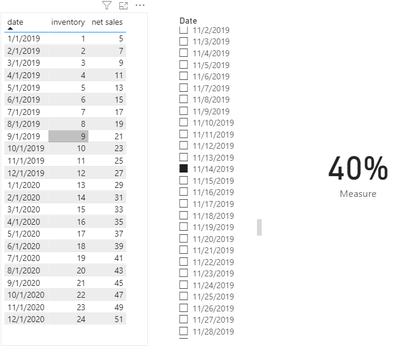
Hi @Anonymous ,


You will need a calendar table.

CALENDAR = CALENDAR(MIN('Table'[date]),MAX('Table'[date]))

Measure =
CALCULATE (
    AVERAGE ( 'Table'[inventory] ),
    FILTER (
        'Table',
        'Table'[date] <= SELECTEDVALUE ( 'CALENDAR'[Date] )
            && 'Table'[date] >= EDATE ( SELECTEDVALUE ( 'CALENDAR'[Date] ), -12 )
    )
)
    / CALCULATE (
        AVERAGE ( 'Table'[net sales] ),
        FILTER (
            'Table',
            'Table'[date] <= SELECTEDVALUE ( 'CALENDAR'[Date] )
                && 'Table'[date] >= EDATE ( SELECTEDVALUE ( 'CALENDAR'[Date] ), -12 )
        )
    )

 1.PNG


Best Regards,

Jay


Community Support Team _ Jay Wang

If this post helps, then please consider Accept it as the solution to help the other members find it more quickly.

View solution in original post

3 REPLIES 3
Anonymous
Not applicable

Hi @Anonymous ,


You will need a calendar table.

CALENDAR = CALENDAR(MIN('Table'[date]),MAX('Table'[date]))

Measure =
CALCULATE (
    AVERAGE ( 'Table'[inventory] ),
    FILTER (
        'Table',
        'Table'[date] <= SELECTEDVALUE ( 'CALENDAR'[Date] )
            && 'Table'[date] >= EDATE ( SELECTEDVALUE ( 'CALENDAR'[Date] ), -12 )
    )
)
    / CALCULATE (
        AVERAGE ( 'Table'[net sales] ),
        FILTER (
            'Table',
            'Table'[date] <= SELECTEDVALUE ( 'CALENDAR'[Date] )
                && 'Table'[date] >= EDATE ( SELECTEDVALUE ( 'CALENDAR'[Date] ), -12 )
        )
    )

 1.PNG


Best Regards,

Jay


Community Support Team _ Jay Wang

If this post helps, then please consider Accept it as the solution to help the other members find it more quickly.

amitchandak
Super User
Super User

@Anonymous , With date table you should be able to get rolling like

Rolling 12 = CALCULATE(sum(Sales[Net Sales]),DATESINPERIOD('Date'[Date],max('Date'[Date]),-12,MONTH)) 

Or
last 12 month = 
var _max = today() 
// or  // maxx(allselected('Date'),[date]) 
var _min = date(year(_max)-1,month(_max),Day(_max))
return
CALCULATE(Sum('Table'[Column]),filter(all('Date'),'Date'[Date]<=_max && 'Date'[Date]>=_min))


To get the best of the time intelligence function. Make sure you have a date calendar and it has been marked as the date in model view. Also, join it with the date column of your fact/s. Refer :
https://radacad.com/creating-calendar-table-in-power-bi-using-dax-functions
https://www.archerpoint.com/blog/Posts/creating-date-table-power-bi
https://www.sqlbi.com/articles/creating-a-simple-date-table-in-dax/

See if my webinar on Time Intelligence can help: https://community.powerbi.com/t5/Webinars-and-Video-Gallery/PowerBI-Time-Intelligence-Calendar-WTD-YTD-LYTD-Week-Over-Week/m-p/1051626#M184


Appreciate your Kudos.

Share with Power BI Enthusiasts: Full Power BI Video (20 Hours) YouTube
Microsoft Fabric Series 60+ Videos YouTube
Microsoft Fabric Hindi End to End YouTube
Anonymous
Not applicable

But  here my requirement is different

Helpful resources

Announcements
Power BI DataViz World Championships

Power BI Dataviz World Championships

The Power BI Data Visualization World Championships is back! Get ahead of the game and start preparing now!

December 2025 Power BI Update Carousel

Power BI Monthly Update - December 2025

Check out the December 2025 Power BI Holiday Recap!

FabCon Atlanta 2026 carousel

FabCon Atlanta 2026

Join us at FabCon Atlanta, March 16-20, for the ultimate Fabric, Power BI, AI and SQL community-led event. Save $200 with code FABCOMM.