This is best Fabric, Power BI, SQL and AI community event. How do we know? The last event sold out! Save €200 with code FABCMTY200.
Register nowA new Data Days event is coming soon! This time we’re going bigger than ever. Fabric, Power BI, SQL, AI and more. Don't miss out.
Hi! Need your help with DAX troubleshooting. Right now, I am clueless.
So, in Analysis Services I have used the Additonal Connection Parameters to add CUSTOMDATA(), where I want to pass a JSON list of values.
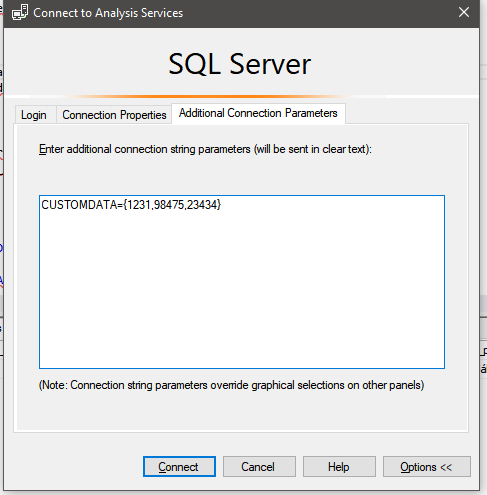
This does not work, and I get the following error:
A table expression for the argument was expected, but a string or numeric expression was used
When I try to troubleshoot this and work around it; i use the following with no issues at all - this works fine.
EVALUATE
FILTER
('v_pact_d_reseller_customer',
'v_pact_d_reseller_customer'[Id] IN {20087,20088,20089}
)
But when I try this, it does not work.
EVALUATE
FILTER
('v_pact_d_reseller_customer',
'v_pact_d_reseller_customer'[Id] IN CUSTOMDATA()
)
From my perspective, they should return the same values. What am I doing wrong?
Thanks!
Hi @Anonymous ,
As stated in this article, the CustomData feature only works for models that lie in Azure Analysis Services, and it only works in Connect live mode. Unlike users and roles, the Custom data feature can't be set inside a .pbix file.
Best regards,
Yuliana Gu
Hi @v-yulgu-msft, and thanks for your answer. I am using Azure AS and Live Connection - sorry for not mentioning that. As you can see from the screenshot, I am trying to set it in SQL Server Management Studio.
Any solution in sight ? I'm strugeling with this as well
Sign up to receive a private message when registration opens and key events begin.
If you have recently started exploring Fabric, we'd love to hear how it's going. Your feedback can help with product improvements.
| User | Count |
|---|---|
| 33 | |
| 26 | |
| 21 | |
| 20 | |
| 15 |
| User | Count |
|---|---|
| 63 | |
| 43 | |
| 28 | |
| 24 | |
| 22 |