Join us at FabCon Atlanta from March 16 - 20, 2026, for the ultimate Fabric, Power BI, AI and SQL community-led event. Save $200 with code FABCOMM.
Register now!The Power BI Data Visualization World Championships is back! Get ahead of the game and start preparing now! Learn more
Hi,
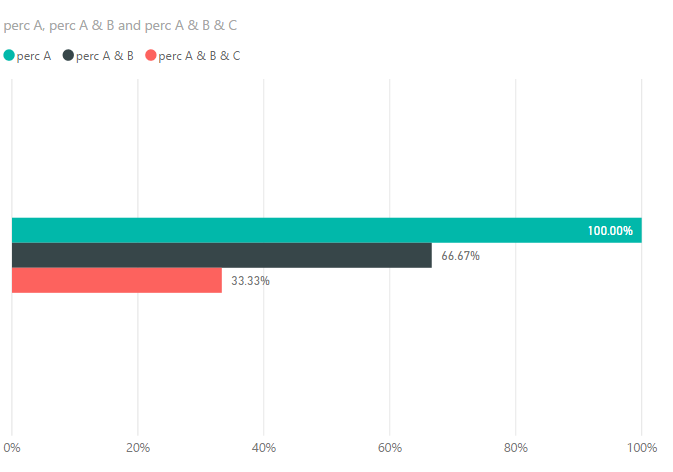
I have a requirement to create a trend(in %) for the repeat offenders who clicked in campaigns.
Eg: A, B, C are three campaigns and are three different tables.There is a column called "Clicked" which has value Yes/No.
My requirement is to show the trend line where
1)the first bar in the trend graph should represent the user clicks from Campaign A. and the value of A should be running total
2)Second bar in the trend graph should represent the user common clicks from A & B and
3) third bar should give thecommon clicks of A&B &C.
so on..
Note: the percentage of each bar should be individual not the % of grand total.
Say, 2nd bar must be calculated as clicks from A & B divided by total clicks from A..
I tried merging the tables, but loosing the data, Please Help!!
Solved! Go to Solution.
@Pinky0404 wrote:
Hi,
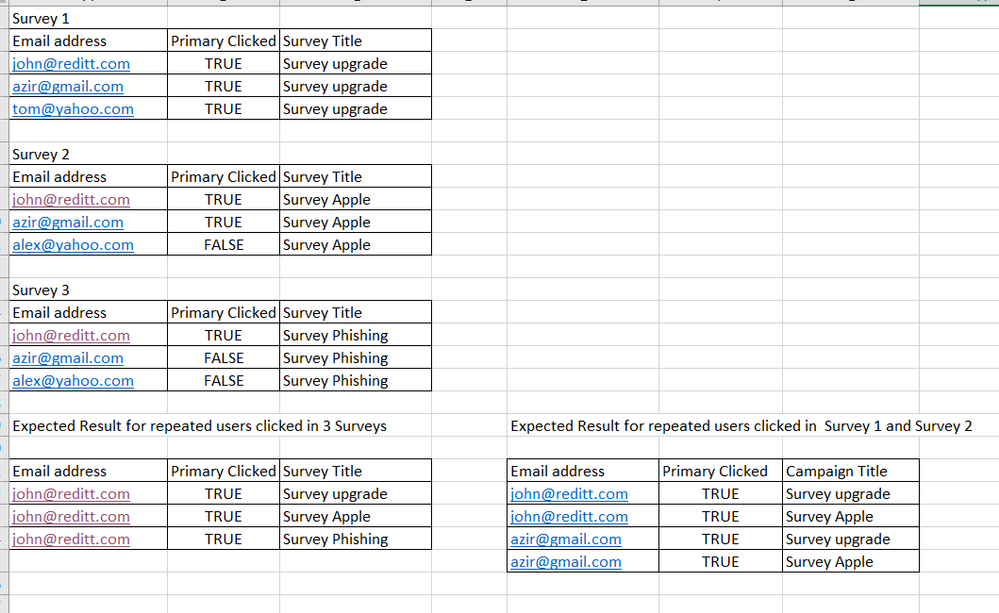
Here is the sample data set .
You need to union those 3 tables
Surveys = UNION(Survey1,Survey2,Survey3)
Then create measures as
perc A & B & C =
VAR summizedTbl =
SUMMARIZE (
FILTER ( Surveys, Surveys[Primary Clicked] = TRUE ),
Surveys[Email address],
"CNT", DISTINCTCOUNT ( Surveys[Survey Title] )
)
RETURN
DIVIDE (
COUNTROWS ( FILTER ( summizedTbl, [CNT] = 3 ) ),
DISTINCTCOUNT ( Surveys[Email address] )
)
perc A & B =
VAR summizedTbl =
SUMMARIZE (
FILTER ( Surveys, Surveys[Primary Clicked] = TRUE &&(Surveys[Survey Title]="Survey upgrade"||Surveys[Survey Title]="Survey Apple") ),
Surveys[Email address],
"CNT", DISTINCTCOUNT ( Surveys[Survey Title] )
)
RETURN
DIVIDE (
COUNTROWS ( FILTER ( summizedTbl, [CNT] = 2 ) ),
DISTINCTCOUNT ( Surveys[Email address] )
)
perc A =
DIVIDE (
COUNTROWS ( FILTER ( Surveys, Surveys[Primary Clicked] = TRUE &&(Surveys[Survey Title]="Survey upgrade" ) )),
DISTINCTCOUNT ( Surveys[Email address] )
)
See more details in the attached pbix file.
@Pinky0404 wrote:
Hi,
I have a requirement to create a trend(in %) for the repeat offenders who clicked in campaigns.
Eg: A, B, C are three campaigns and are three different tables.There is a column called "Clicked" which has value Yes/No.
My requirement is to show the trend line where
1)the first bar in the trend graph should represent the user clicks from Campaign A. and the value of A should be running total
2)Second bar in the trend graph should represent the user common clicks from A & B and
3) third bar should give thecommon clicks of A&B &C.
so on..
Note: the percentage of each bar should be individual not the % of grand total.
Say, 2nd bar must be calculated as clicks from A & B divided by total clicks from A..
I tried merging the tables, but loosing the data, Please Help!!
You may have to create extra auxiliary tables. Could you post sample data of those 3 tables and expected output?
Hi,
Here is the sample data set .
@Pinky0404 wrote:
Hi,
Here is the sample data set .
You need to union those 3 tables
Surveys = UNION(Survey1,Survey2,Survey3)
Then create measures as
perc A & B & C =
VAR summizedTbl =
SUMMARIZE (
FILTER ( Surveys, Surveys[Primary Clicked] = TRUE ),
Surveys[Email address],
"CNT", DISTINCTCOUNT ( Surveys[Survey Title] )
)
RETURN
DIVIDE (
COUNTROWS ( FILTER ( summizedTbl, [CNT] = 3 ) ),
DISTINCTCOUNT ( Surveys[Email address] )
)
perc A & B =
VAR summizedTbl =
SUMMARIZE (
FILTER ( Surveys, Surveys[Primary Clicked] = TRUE &&(Surveys[Survey Title]="Survey upgrade"||Surveys[Survey Title]="Survey Apple") ),
Surveys[Email address],
"CNT", DISTINCTCOUNT ( Surveys[Survey Title] )
)
RETURN
DIVIDE (
COUNTROWS ( FILTER ( summizedTbl, [CNT] = 2 ) ),
DISTINCTCOUNT ( Surveys[Email address] )
)
perc A =
DIVIDE (
COUNTROWS ( FILTER ( Surveys, Surveys[Primary Clicked] = TRUE &&(Surveys[Survey Title]="Survey upgrade" ) )),
DISTINCTCOUNT ( Surveys[Email address] )
)
See more details in the attached pbix file.
Thanks alot. Appreciate your help.
The Power BI Data Visualization World Championships is back! Get ahead of the game and start preparing now!
| User | Count |
|---|---|
| 38 | |
| 37 | |
| 34 | |
| 31 | |
| 27 |
| User | Count |
|---|---|
| 136 | |
| 99 | |
| 73 | |
| 66 | |
| 65 |