Learn from the best! Meet the four finalists headed to the FINALS of the Power BI Dataviz World Championships! Register now
Hi,
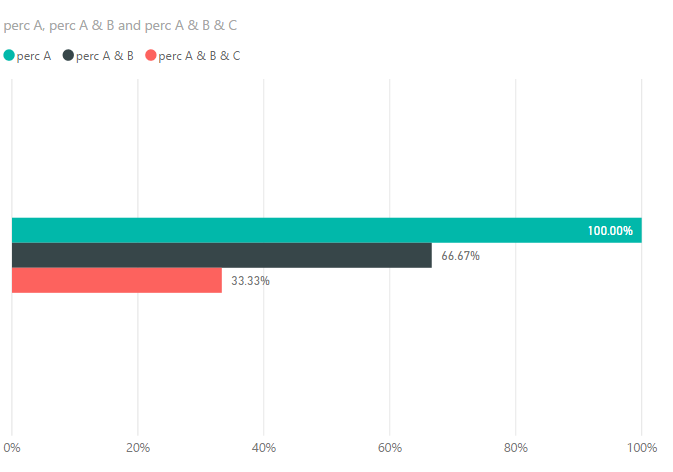
I have a requirement to create a trend(in %) for the repeat offenders who clicked in campaigns.
Eg: A, B, C are three campaigns and are three different tables.There is a column called "Clicked" which has value Yes/No.
My requirement is to show the trend line where
1)the first bar in the trend graph should represent the user clicks from Campaign A. and the value of A should be running total
2)Second bar in the trend graph should represent the user common clicks from A & B and
3) third bar should give thecommon clicks of A&B &C.
so on..
Note: the percentage of each bar should be individual not the % of grand total.
Say, 2nd bar must be calculated as clicks from A & B divided by total clicks from A..
I tried merging the tables, but loosing the data, Please Help!!
Solved! Go to Solution.
@Pinky0404 wrote:
Hi,
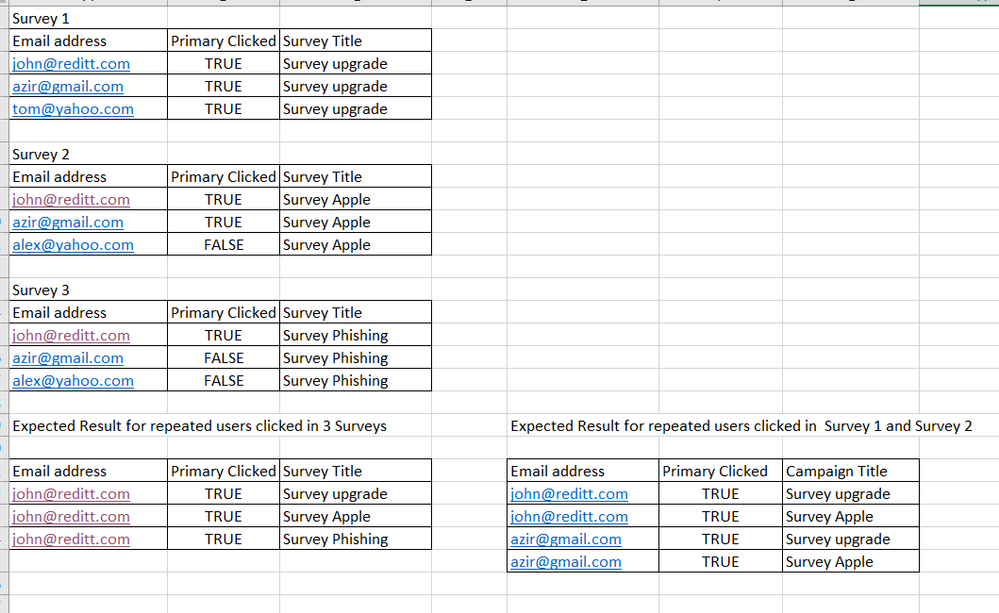
Here is the sample data set .
You need to union those 3 tables
Surveys = UNION(Survey1,Survey2,Survey3)
Then create measures as
perc A & B & C =
VAR summizedTbl =
SUMMARIZE (
FILTER ( Surveys, Surveys[Primary Clicked] = TRUE ),
Surveys[Email address],
"CNT", DISTINCTCOUNT ( Surveys[Survey Title] )
)
RETURN
DIVIDE (
COUNTROWS ( FILTER ( summizedTbl, [CNT] = 3 ) ),
DISTINCTCOUNT ( Surveys[Email address] )
)
perc A & B =
VAR summizedTbl =
SUMMARIZE (
FILTER ( Surveys, Surveys[Primary Clicked] = TRUE &&(Surveys[Survey Title]="Survey upgrade"||Surveys[Survey Title]="Survey Apple") ),
Surveys[Email address],
"CNT", DISTINCTCOUNT ( Surveys[Survey Title] )
)
RETURN
DIVIDE (
COUNTROWS ( FILTER ( summizedTbl, [CNT] = 2 ) ),
DISTINCTCOUNT ( Surveys[Email address] )
)
perc A =
DIVIDE (
COUNTROWS ( FILTER ( Surveys, Surveys[Primary Clicked] = TRUE &&(Surveys[Survey Title]="Survey upgrade" ) )),
DISTINCTCOUNT ( Surveys[Email address] )
)
See more details in the attached pbix file.
@Pinky0404 wrote:
Hi,
I have a requirement to create a trend(in %) for the repeat offenders who clicked in campaigns.
Eg: A, B, C are three campaigns and are three different tables.There is a column called "Clicked" which has value Yes/No.
My requirement is to show the trend line where
1)the first bar in the trend graph should represent the user clicks from Campaign A. and the value of A should be running total
2)Second bar in the trend graph should represent the user common clicks from A & B and
3) third bar should give thecommon clicks of A&B &C.
so on..
Note: the percentage of each bar should be individual not the % of grand total.
Say, 2nd bar must be calculated as clicks from A & B divided by total clicks from A..
I tried merging the tables, but loosing the data, Please Help!!
You may have to create extra auxiliary tables. Could you post sample data of those 3 tables and expected output?
Hi,
Here is the sample data set .
@Pinky0404 wrote:
Hi,
Here is the sample data set .
You need to union those 3 tables
Surveys = UNION(Survey1,Survey2,Survey3)
Then create measures as
perc A & B & C =
VAR summizedTbl =
SUMMARIZE (
FILTER ( Surveys, Surveys[Primary Clicked] = TRUE ),
Surveys[Email address],
"CNT", DISTINCTCOUNT ( Surveys[Survey Title] )
)
RETURN
DIVIDE (
COUNTROWS ( FILTER ( summizedTbl, [CNT] = 3 ) ),
DISTINCTCOUNT ( Surveys[Email address] )
)
perc A & B =
VAR summizedTbl =
SUMMARIZE (
FILTER ( Surveys, Surveys[Primary Clicked] = TRUE &&(Surveys[Survey Title]="Survey upgrade"||Surveys[Survey Title]="Survey Apple") ),
Surveys[Email address],
"CNT", DISTINCTCOUNT ( Surveys[Survey Title] )
)
RETURN
DIVIDE (
COUNTROWS ( FILTER ( summizedTbl, [CNT] = 2 ) ),
DISTINCTCOUNT ( Surveys[Email address] )
)
perc A =
DIVIDE (
COUNTROWS ( FILTER ( Surveys, Surveys[Primary Clicked] = TRUE &&(Surveys[Survey Title]="Survey upgrade" ) )),
DISTINCTCOUNT ( Surveys[Email address] )
)
See more details in the attached pbix file.
Thanks alot. Appreciate your help.
| User | Count |
|---|---|
| 43 | |
| 35 | |
| 26 | |
| 16 | |
| 14 |
| User | Count |
|---|---|
| 64 | |
| 56 | |
| 40 | |
| 21 | |
| 20 |