cancel
Showing results for 
Search instead for 
Did you mean: 

We've captured the moments from FabCon & SQLCon that everyone is talking about, and we are bringing them to the community, live and on-demand. Starts on April 14th. Register now

Reply
Sowmiya
Helper III
Helper III

DAX Formula


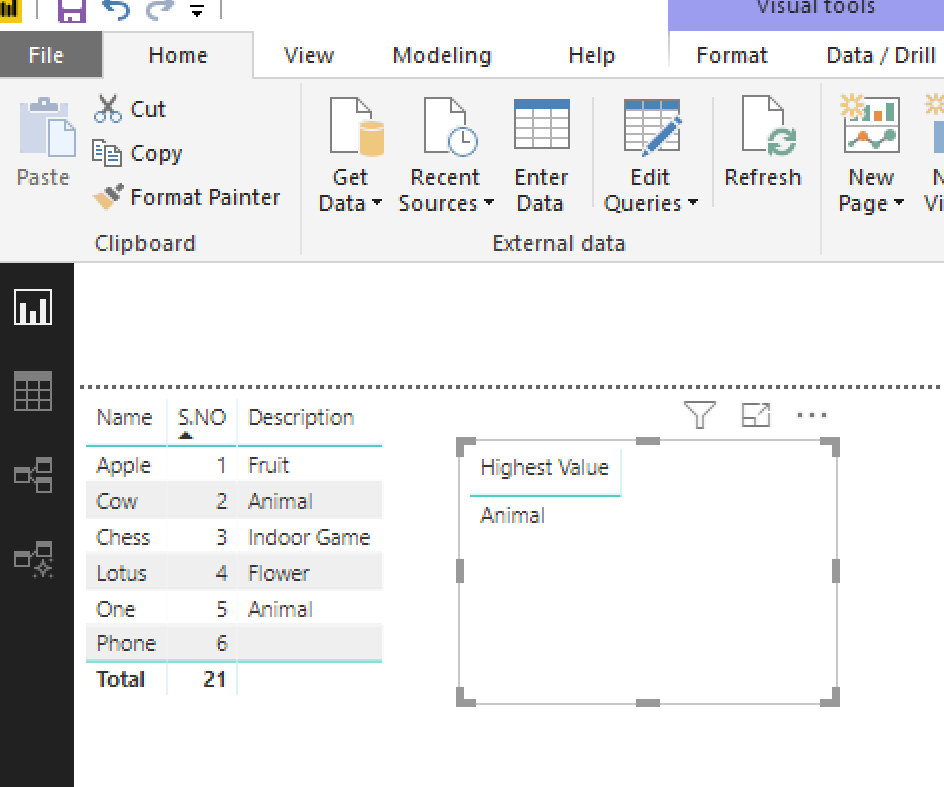
Screenshot.pngHi Community,
Help me with DAX that returns the Largest S.NO's Corresponding Description but Description must be nonblank.
In the Screenshot, DAX must return Animal. S.NO - 6 is Largest but Description is Blank so excluding the blank, S.NO 5 is large and so Animal must be the answer.


Thanks in Advance,
Sowmiya.

1 ACCEPTED SOLUTION
themistoklis
Community Champion
Community Champion

@Sowmiya


This will give you the highest value:


Highest Value = LOOKUPVALUE('Table'[Description],'Table'[S.NO],CALCULATE(MAX('Table'[S.NO]), 'Table'[Description] <>""))

image.pngI


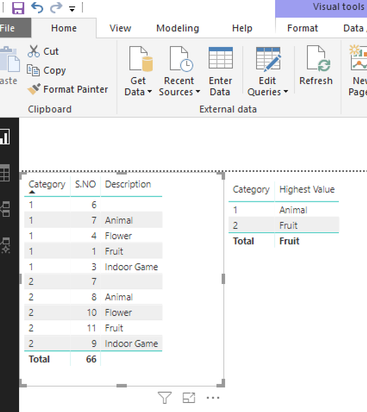
It also works when you have multiple categories. Image below:

image.png


View solution in original post

2 REPLIES 2
themistoklis
Community Champion
Community Champion

@Sowmiya


This will give you the highest value:


Highest Value = LOOKUPVALUE('Table'[Description],'Table'[S.NO],CALCULATE(MAX('Table'[S.NO]), 'Table'[Description] <>""))

image.pngI


It also works when you have multiple categories. Image below:

image.png


CR
Resolver II
Resolver II

Hi @Sowmiya


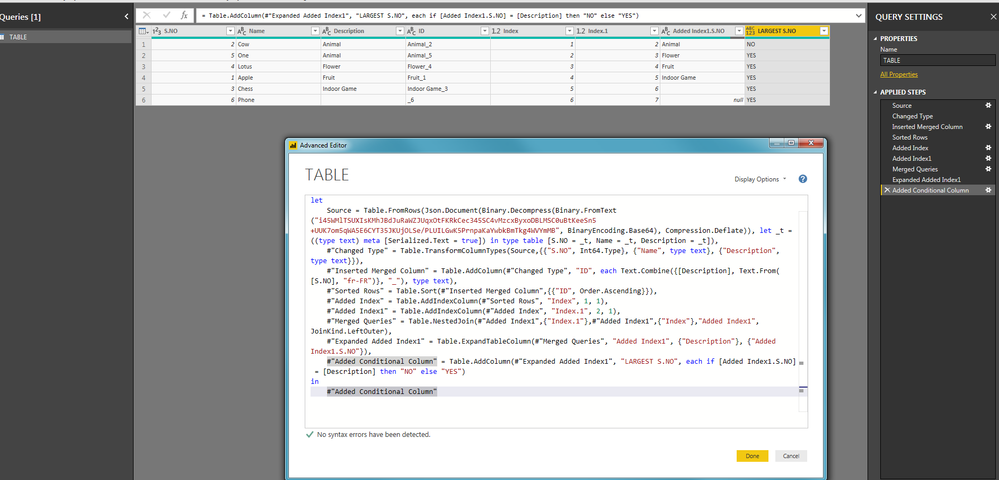
In your Query editor, you can use that code (you just need to customize the source or just to start from the lines you need, such as Inserted Merged Columns).


let
    Source = Table.FromRows(Json.Document(Binary.Decompress(Binary.FromText("i45WMlTSUXIsKMhJBdJuRaWZJUqxOtFKRkCec345SC4vMzcxByxoDBLMSC0uBtKeeSn5+UUK7om5qWA5E6CYT35JKUjOLSe/PLUILGwK5PrnpaKaYwbkBmTkg4WVYmMB", BinaryEncoding.Base64), Compression.Deflate)), let _t = ((type text) meta [Serialized.Text = true]) in type table [S.NO = _t, Name = _t, Description = _t]),
    #"Changed Type" = Table.TransformColumnTypes(Source,{{"S.NO", Int64.Type}, {"Name", type text}, {"Description", type text}}),
    #"Inserted Merged Column" = Table.AddColumn(#"Changed Type", "ID", each Text.Combine({[Description], Text.From([S.NO], "fr-FR")}, "_"), type text),
    #"Sorted Rows" = Table.Sort(#"Inserted Merged Column",{{"ID", Order.Ascending}}),
    #"Added Index" = Table.AddIndexColumn(#"Sorted Rows", "Index", 1, 1),
    #"Added Index1" = Table.AddIndexColumn(#"Added Index", "Index.1", 2, 1),
    #"Merged Queries" = Table.NestedJoin(#"Added Index1",{"Index.1"},#"Added Index1",{"Index"},"Added Index1",JoinKind.LeftOuter),
    #"Expanded Added Index1" = Table.ExpandTableColumn(#"Merged Queries", "Added Index1", {"Description"}, {"Added Index1.S.NO"}),
    #"Added Conditional Column" = Table.AddColumn(#"Expanded Added Index1", "LARGEST S.NO", each if [Added Index1.S.NO] = [Description] then "NO" else "YES")
in
    #"Added Conditional Column"

After having sort on the new ID column (concatenation of Description ad S.NO), I added 2 indexes to make a Merge Queries inside the same table (as PowerBi is working by line, not by cell, I cheat with double indexes to display the ClientID value from the next line). Then, I just need to add a calculated column saying that => IF Description from next line is the same as the current Description then display NO else YES.
 

1.png


Regards,

CR

Helpful resources

Announcements
New to Fabric survey Carousel

New to Fabric Survey

If you have recently started exploring Fabric, we'd love to hear how it's going. Your feedback can help with product improvements.

Power BI DataViz World Championships carousel

Power BI DataViz World Championships - June 2026

A new Power BI DataViz World Championship is coming this June! Don't miss out on submitting your entry.

Join our Fabric User Panel

Join our Fabric User Panel

Share feedback directly with Fabric product managers, participate in targeted research studies and influence the Fabric roadmap.

March Power BI Update Carousel

Power BI Community Update - March 2026

Check out the March 2026 Power BI update to learn about new features.