cancel
Showing results for 
Search instead for 
Did you mean: 

July 28 - August 9 | Final Round of the Power BI Dataviz World Championships. This is your chance. Learn more

Reply
Ykankam
Helper I
Helper I

DAX Formula

Hi All,

How do I write a DAX formula to calculate the date difference between two columns. The calculate column should be name OnTime and if true should be Y, if not, N.
The difference should be in minutes. There's a fix target value which is 30 minutes divided by 1440 (number of minutes in a day)

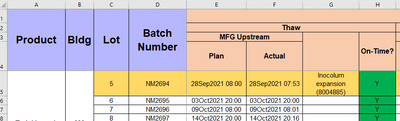
See the formula in excel below

=IF(ISBLANK(F5),"",IF(ABS((F5-E5)<(Targets!$E$4/1440)),"Y","N"))


Ykankam_1-1689694404012.png


1 ACCEPTED SOLUTION
Anonymous
Not applicable

Hi @Ykankam ,

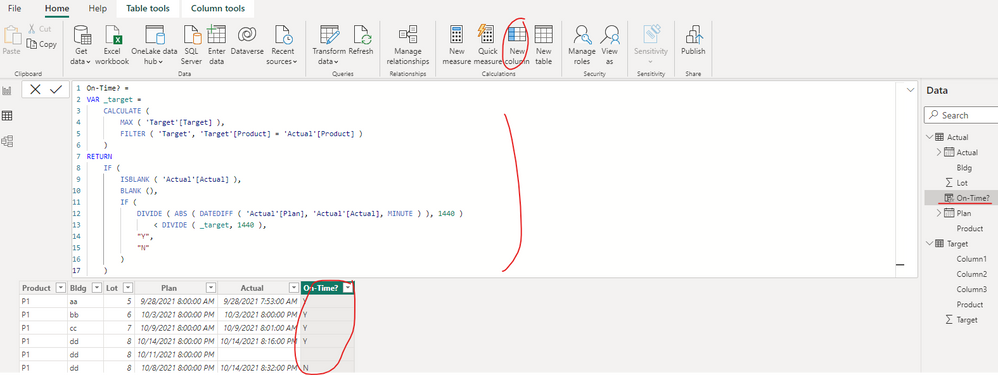
You can create a calculated column as below to get it, please find the details in the attachment.

On-Time? =
VAR _target =
    CALCULATE (
        MAX ( 'Target'[Target] ),
        FILTER ( 'Target', 'Target'[Product] = 'Actual'[Product] )
    )
RETURN
    IF (
        ISBLANK ( 'Actual'[Actual] ),
        BLANK (),
        IF (
            DIVIDE ( ABS ( DATEDIFF ( 'Actual'[Plan], 'Actual'[Actual], MINUTE ) ), 1440 )
                < DIVIDE ( _target, 1440 ),
            "Y",
            "N"
        )
    )

vyiruanmsft_0-1689823384304.png

Best Regards

View solution in original post

1 REPLY 1
Anonymous
Not applicable

Hi @Ykankam ,

You can create a calculated column as below to get it, please find the details in the attachment.

On-Time? =
VAR _target =
    CALCULATE (
        MAX ( 'Target'[Target] ),
        FILTER ( 'Target', 'Target'[Product] = 'Actual'[Product] )
    )
RETURN
    IF (
        ISBLANK ( 'Actual'[Actual] ),
        BLANK (),
        IF (
            DIVIDE ( ABS ( DATEDIFF ( 'Actual'[Plan], 'Actual'[Actual], MINUTE ) ), 1440 )
                < DIVIDE ( _target, 1440 ),
            "Y",
            "N"
        )
    )

vyiruanmsft_0-1689823384304.png

Best Regards

Helpful resources

Announcements
FabCon and SQLCon Barcelona 2026

FabCon & SQLCon – Barcelona 2026

Join us in Barcelona for FabCon and SQLCon, the Fabric, Power BI, SQL, and AI community event. Save €200 with code FABCMTY200.

Fabric Community Sticker Design Challenge Barcelona Carousel

Fabric Community Sticker Challenge - Barcelona 2026

If you love stickers, then you will definitely want to check out our community sticker challenge, Barcelona edition!

July Power BI Update Carousel

Power BI Monthly Update - July 2026

Check out the July 2026 Power BI update to learn about new features.

Power BI DataViz World Championships carousel

Power BI DataViz World Championships - June 2026

A new Power BI DataViz World Championship is coming this June! Don't miss out on submitting your entry.

Top Solution Authors