FabCon is coming to Atlanta
Join us at FabCon Atlanta from March 16 - 20, 2026, for the ultimate Fabric, Power BI, AI and SQL community-led event. Save $200 with code FABCOMM.
Register now!- Power BI forums
- Get Help with Power BI
- Desktop
- Service
- Report Server
- Power Query
- Mobile Apps
- Developer
- DAX Commands and Tips
- Custom Visuals Development Discussion
- Health and Life Sciences
- Power BI Spanish forums
- Translated Spanish Desktop
- Training and Consulting
- Instructor Led Training
- Dashboard in a Day for Women, by Women
- Galleries
- Data Stories Gallery
- Themes Gallery
- Contests Gallery
- QuickViz Gallery
- Quick Measures Gallery
- Visual Calculations Gallery
- Notebook Gallery
- Translytical Task Flow Gallery
- TMDL Gallery
- R Script Showcase
- Webinars and Video Gallery
- Ideas
- Custom Visuals Ideas (read-only)
- Issues
- Issues
- Events
- Upcoming Events
The Power BI Data Visualization World Championships is back! Get ahead of the game and start preparing now! Learn more
- Power BI forums
- Forums
- Get Help with Power BI
- Desktop
- Re: DAX Formula for subtracting
- Subscribe to RSS Feed
- Mark Topic as New
- Mark Topic as Read
- Float this Topic for Current User
- Bookmark
- Subscribe
- Printer Friendly Page


- Mark as New
- Bookmark
- Subscribe
- Mute
- Subscribe to RSS Feed
- Permalink
- Report Inappropriate Content
DAX Formula for subtracting
Hello All,
I have been trying to figure the following out for the last 2 days without any luck,
Basiclly what iam trying to achieve is
Client - has allocated 10 hours a month
4 hrs worth of work is generated
10-4hrs = 6 hrs remain
The following is what iam working with;
* Direct Query SQL

1. Create a dax formula to combine hours spent on a "client"
SLAHrsCalculatedPerClient = sla[MeasureTotalTimespentOrg]
2. Attempted to make another measure to minus the caculated time (but it doesnt show up)
SLAHrsMinusFromAllocated = sla[MeasureTotalTimespentOrg]- "SLA HOURS"
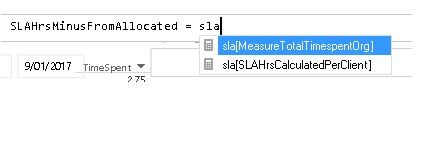
however if i manually type the following it minus's the correct amount
SLAHrsCalculatedPerClient = sla[MeasureTotalTimespentOrg]-5
Am i overlooking something with the above, or just not going about it the right way entirely?
i have tried looking at a few other ways of doing this without luck, I hope enough information is provided


- Mark as New
- Bookmark
- Subscribe
- Mute
- Subscribe to RSS Feed
- Permalink
- Report Inappropriate Content
So for presenting the data would you have customers on the rows then 3 measures in the values
[SLAHours], [TimeSpent], [TimeRemain]
Where
[SLAHours] = SUM(sla[**Name of Prepaid Hours Column**])
[TimeSpentBase] = Sum(**TableName**[**Name of Time Spent Column**])
[TimeSpent] = DIVIDE( [TimeSpentBase], [NumeratorSwitch])
[TimeRemain] = [SLAHours] - [TimeSpent]
**Indicates you need to chose the correct Table / Column name
- Mark as New
- Bookmark
- Subscribe
- Mute
- Subscribe to RSS Feed
- Permalink
- Report Inappropriate Content
Hello,
Thanks for working with me throguh this, but it doesnt look like i can do what i need it to do through graphs
https://community.powerbi.com/t5/Desktop/Make-a-column-not-sum-count/td-p/24672
this is the issue im faced with and from reading it does not seem like there is a fix or solution yet, i have tried to change to decimal number, text, whole number
im going to try and look for a custom graph and see if i can do it with that!
- Mark as New
- Bookmark
- Subscribe
- Mute
- Subscribe to RSS Feed
- Permalink
- Report Inappropriate Content
SLAHours = Sum(sla[SLA Hours])
- Problem is i cant add this up because the "SLA HOURS" is a set number which is set and differs (ie: some might be 10 hours, some 20)
ie: Client A has - 10 hrs
Client B has - 20 Hrs
When i sum it up- it just adds the "SLA Hours" up and gives me a number of 30


- Mark as New
- Bookmark
- Subscribe
- Mute
- Subscribe to RSS Feed
- Permalink
- Report Inappropriate Content
Hi @Wise1,
In addition, use the formula below to create a measure, and show it with the Client id on the report should also work.
SLAHrsCalculatedPerClient = SUMX ( sla, sla[MeasureTotalTimespentOrg] - sla[SLA Hours] )
Regards
- Mark as New
- Bookmark
- Subscribe
- Mute
- Subscribe to RSS Feed
- Permalink
- Report Inappropriate Content

Thanks for replying, it does not seem to work with the method above, but works when i do it with only lets say [SLA Hours]
- Mark as New
- Bookmark
- Subscribe
- Mute
- Subscribe to RSS Feed
- Permalink
- Report Inappropriate Content
Hi @Wise1,
You can use the SUM function in DQ mode if you go to Options -> DirectQuery and enable "Allow unrestricted measures in DirectQuery mode".

Regards
- Mark as New
- Bookmark
- Subscribe
- Mute
- Subscribe to RSS Feed
- Permalink
- Report Inappropriate Content
Just thought i would reply so people dont think i have forgotten about this thread
Still trying to pull it together, but getting closer! thanks everyone for their input so far!
- Mark as New
- Bookmark
- Subscribe
- Mute
- Subscribe to RSS Feed
- Permalink
- Report Inappropriate Content
But then when you put that in a table against client it should show you the total SLA hours by client
- Mark as New
- Bookmark
- Subscribe
- Mute
- Subscribe to RSS Feed
- Permalink
- Report Inappropriate Content
Hello,
Apologies for delay in reply - was driving back from interstate location
- The formula works (and minus's the hours) but it first Adds the specified hours allocated to the client
so ive setup 2 as a test
ClientA - 20 hrs
ClientB - 10 Hrs
When i setup the dax to minus the hours it works (as you can see in picture)
Is there a possibility for a "straight conversion" so to speak to pick up the value in the cell and just convert it into a calculated form? (vlookup doesnt seem to want to work)

- Mark as New
- Bookmark
- Subscribe
- Mute
- Subscribe to RSS Feed
- Permalink
- Report Inappropriate Content
That approach won't work as you need to apply the VALUE function as a calculated column not as a measure
Will see if I can come up with an alternative
- Mark as New
- Bookmark
- Subscribe
- Mute
- Subscribe to RSS Feed
- Permalink
- Report Inappropriate Content
I think if you type [SLAHrsCalculatedPerClient] you will get what you need
By typing sla to begin with you are referencing a table column rather than a measure
To get a measure start with a [

Helpful resources

Power BI Dataviz World Championships
The Power BI Data Visualization World Championships is back! Get ahead of the game and start preparing now!

Power BI Monthly Update - December 2025
Check out the December 2025 Power BI Holiday Recap!

FabCon Atlanta 2026
Join us at FabCon Atlanta, March 16-20, for the ultimate Fabric, Power BI, AI and SQL community-led event. Save $200 with code FABCOMM.

| User | Count |
|---|---|
| 39 | |
| 37 | |
| 33 | |
| 33 | |
| 29 |


| User | Count |
|---|---|
| 134 | |
| 96 | |
| 78 | |
| 67 | |
| 65 |


