cancel
Showing results for 
Search instead for 
Did you mean: 

A new Data Days event is coming soon! This time we’re going bigger than ever. Fabric, Power BI, SQL, AI and more. Don't miss out.

Reply
Raivo_S
Frequent Visitor

DAX Filter on same Table

Hello,

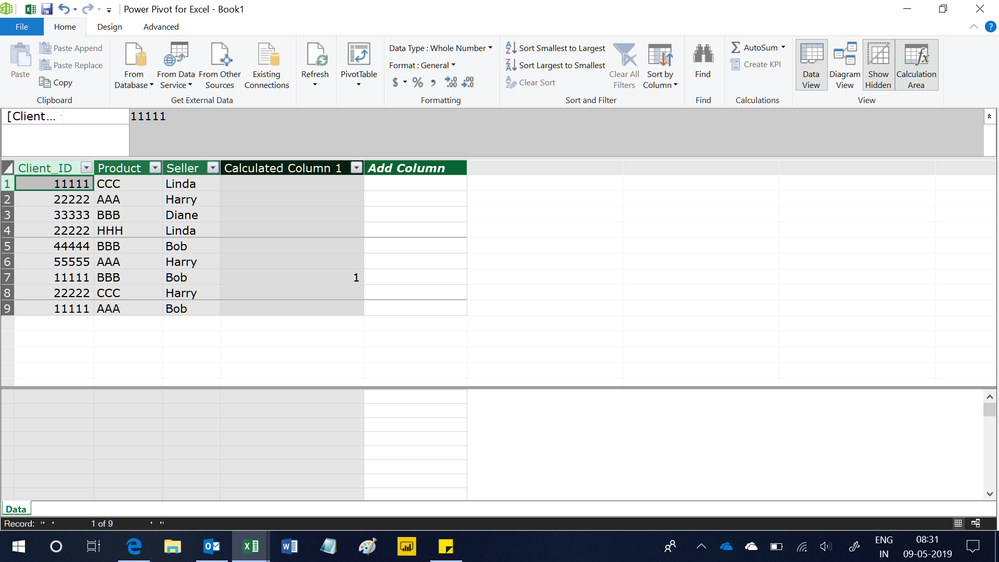
I am struggling to create to create formula, that would filter table based on values from the same table. I created this table of individual sales as an example:

Question.png

It shows client who bought product, product which he bought and seller, who sold it.

It will be wierd example, but lets say, that I want to mark those sales of product "BBB", where the same client has also bought product "AAA" from the same seller. It means that in my example only one row should be checked, but my formula checks all rows that contain product "BBB". I belive that my problem is in filters, but I don't know how to fix it. 

I would also appreciate if you could give me formula for a mesure, that would count clients, who match same criteria (has bought Product "BBB" and "AAA" from the same seller). It is for another similar problem, where I don't really want to create another collumn.


Thank you in advance!

1 ACCEPTED SOLUTION
Ashish_Mathur
Super User
Super User

Hi,

This calculated column formula works

=if(Data[Product]="BBB",CALCULATE(COUNTROWS(Data),FILTER(Data,Data[Client_ID]=EARLIER(Data[Client_ID])&&Data[Product]="AAA"&&Data[Seller]=EARLIER(Data[Seller]))),BLANK())

Untitled.png


Regards,
Ashish Mathur
http://www.ashishmathur.com
https://www.linkedin.com/in/excelenthusiasts/

View solution in original post

2 REPLIES 2
Ashish_Mathur
Super User
Super User

Hi,

This calculated column formula works

=if(Data[Product]="BBB",CALCULATE(COUNTROWS(Data),FILTER(Data,Data[Client_ID]=EARLIER(Data[Client_ID])&&Data[Product]="AAA"&&Data[Seller]=EARLIER(Data[Seller]))),BLANK())

Untitled.png


Regards,
Ashish Mathur
http://www.ashishmathur.com
https://www.linkedin.com/in/excelenthusiasts/

It worked, thank you!

I tried to create those filters using function EARLIER previously but made a mistake in my formula. Just tried to write another one from the beginning and it worked perfectly!

I will leave this topic open until I make my Measure, then I will share my solution and close this topic. 

Helpful resources

Announcements
May Power BI Update Carousel

Power BI Monthly Update - May 2026

Check out the May 2026 Power BI update to learn about new features.

Fabric SQL PBI Data Days

Data Days 2026 coming soon!

Sign up to receive a private message when registration opens and key events begin.

New to Fabric survey Carousel

New to Fabric Survey

If you have recently started exploring Fabric, we'd love to hear how it's going. Your feedback can help with product improvements.

Power BI DataViz World Championships carousel

Power BI DataViz World Championships - June 2026

A new Power BI DataViz World Championship is coming this June! Don't miss out on submitting your entry.