Hi
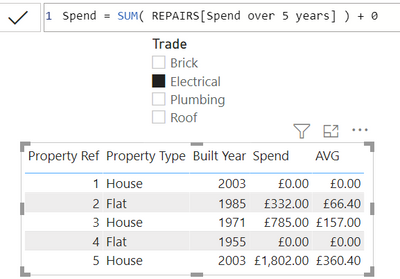
I am trying to visualise the average repairs spend for all properties in a visual table. I would like to still see the property that have no repairs. Also when I filter the types of repairs. I still which to see all the properties and only the avg spend result change
hope I have explained that ok
I have a model that contains 2 tables. Tabe 1 = Properties. In the example below there are 5 properties (one property per row)
| Property Ref | Property Type | Built Year |
| 1 | House | 2003 |
| 2 | Flat | 1985 |
| 3 | House | 1971 |
| 4 | Flat | 1955 |
| 5 | House | 2003 |
Table 2 = Repairs (Many repairs per property)
| Property Ref | Trade | Spend over 5 years |
| 1 | Plumbing | £1,010 |
| 1 | Brick | £802 |
| 2 | Electrical | £332 |
| 2 | Roof | £744 |
| 2 | Plumbing | £982 |
| 2 | Plumbing | £624 |
| 3 | Brick | £1,026 |
| 3 | Electrical | £785 |
| 3 | Plumbing | £892 |
| 5 | Brick | £977 |
| 5 | Brick | £47 |
| 5 | Plumbing | £1,142 |
| 5 | Electrical | £687 |
| 5 | Electrical | £1,115 |
| 5 | Brick | £480 |
I have 2 measures
Spend := SUM(Repairs[Spend over 5 years])
Average Spend =AVERAGEX(VALUES(Property'[Property Ref] ),
DIVIDE([Spend],5)) // Avg spend over 5 years
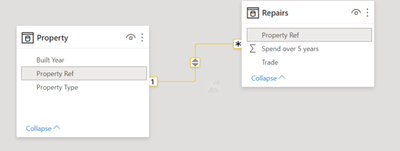
The model looks like this
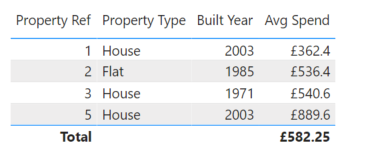
The first issue is when I display the results in a visual table the property that has no repairs / spend information is missing (Property Ref 4) I need to see this row but with £0
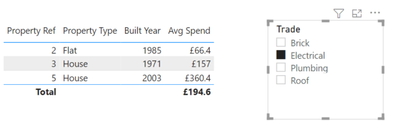
The second issue is that when I filter the table visual by Trade (Repairs table) the properties that do not contain repairs with this type of trade dissapear.
What I would expect to see firstly would be this
| Property Ref | Property Type | Built Year | Spend | Average Spend |
| 1 | House | 2003 | £1,812 | £362.40 |
| 2 | Flat | 1985 | £2,682 | £536.40 |
| 3 | House | 1971 | £2,703 | £540.60 |
| 4 | Flat | 1955 | | |
| 5 | House | 2003 | £4,448 | £889.60 |
And when I filter by trade I would expect to see this
| Property Ref | Property Type | Built Year | Spend | Average Spend |
| 1 | House | 2003 | | |
| 2 | Flat | 1985 | £332 | £66.4 |
| 3 | House | 1971 | £785 | £157 |
| 4 | Flat | 1955 | | |
| 5 | House | 2003 | £1802 | £360.4 |
thanks
Richard