Join us in Barcelona for FabCon and SQLCon, September 28 - October 1, 2026.
This is best Fabric, Power BI, SQL and AI community event. How do we know? The last event sold out! Save €200 with code FABCMTY200.
Register now- Power BI forums
- Get Help with Power BI
- Desktop
- Service
- Report Server
- Power Query
- Mobile Apps
- Developer
- DAX Commands and Tips
- Custom Visuals Development Discussion
- Health and Life Sciences
- Power BI Spanish forums
- Translated Spanish Desktop
- Training and Consulting
- Instructor Led Training
- Dashboard in a Day for Women, by Women
- Galleries
- Data Stories Gallery
- Themes Gallery
- Contests Gallery
- QuickViz Gallery
- Quick Measures Gallery
- Visual Calculations Gallery
- Fabric Apps Gallery
- Notebook Gallery
- Translytical Task Flow Gallery
- TMDL Gallery
- R Script Showcase
- Webinars and Video Gallery
- Ideas
- Custom Visuals Ideas (read-only)
- Issues
- Issues
- Events
- Upcoming Events
The Fabric community is now in read-only for platform upgrade. Learn more
- Power BI forums
- Forums
- Get Help with Power BI
- Desktop
- Re: DAX AddColumns
- Subscribe to RSS Feed
- Mark Topic as New
- Mark Topic as Read
- Float this Topic for Current User
- Bookmark
- Subscribe
- Printer Friendly Page

- Mark as New
- Bookmark
- Subscribe
- Mute
- Subscribe to RSS Feed
- Permalink
DAX AddColumns
Hi All,
I have the following Dax expression used within a SSRS report
evaluate
(CalculateTable
(ETO
,filter (values('Company'[ParentCompanyCode]) ,pathcontains( substitute( substitute( substitute( @CompanyCode, "{ ", "") , " }", "") , ",", "|") ,'Company'[ParentCompanyCode]))
,filter (values('Company'[BrandID]) ,pathcontains( substitute( substitute( substitute( @BrandID, "{ ", "") , " }", "") , ",", "|") ,'Company'[BrandID]))
, 'ETO'[Activity] = @Activity
, 'Date'[DateValue] >= datevalue(@DateFrom)
, 'Date'[DateValue] <= datevalue(@DateTo)
))
All it does is return a bunch of columns and rows filtered by some parameters so as to display some data in a table.
I am trying to add a column from the Company table which has a relationship to the ETO table by the column 'CompanySection'
As I am new to Dax I am not sure how to do this. I tried this - adding in the bolded line
evaluate
(CalculateTable
(ETO
,filter (values('Company'[ParentCompanyCode]) ,pathcontains( substitute( substitute( substitute( @CompanyCode, "{ ", "") , " }", "") , ",", "|") ,'Company'[ParentCompanyCode]))
,filter (values('Company'[BrandID]) ,pathcontains( substitute( substitute( substitute( @BrandID, "{ ", "") , " }", "") , ",", "|") ,'Company'[BrandID]))
, 'ETO'[Activity] = @Activity
, 'Date'[DateValue] >= datevalue(@DateFrom)
, 'Date'[DateValue] <= datevalue(@DateTo)
,addcolumns('Company', "CompanyName", Company[Company])
))
and it accepted the syntax of the query however the column did not populated in the dataset
Thanks
Anthony
Solved! Go to Solution.


- Mark as New
- Bookmark
- Subscribe
- Mute
- Subscribe to RSS Feed
- Permalink
Looks to me like you have your ADDCOLUMNS in the wrong place. It looks like you are using it as a filter, rather than appending on a genuine column to the result
I'd say it should look more like this
EVALUATE
 ADDCOLUMNS ( (
    CALCULATETABLE (
        ETO,
        FILTER (
            VALUES ( 'Company'[ParentCompanyCode] ),
            PATHCONTAINS (
                SUBSTITUTE (
                    SUBSTITUTE ( SUBSTITUTE ( @CompanyCode, "{ ", "" ), " }", "" ),
                    ",",
                    "|"
                ),
                'Company'[ParentCompanyCode]
            )
        ),
        FILTER (
            VALUES ( 'Company'[BrandID] ),
            PATHCONTAINS (
                SUBSTITUTE (
                    SUBSTITUTE ( SUBSTITUTE ( @BrandID, "{ ", "" ), " }", "" ),
                    ",",
                    "|"
                ),
                'Company'[BrandID]
            )
        ),
        'ETO'[Activity] = @Activity,
        'Date'[DateValue] >= DATEVALUE ( @DateFrom ),
        'Date'[DateValue] <= DATEVALUE ( @DateTo ),

    )
) 'Company', "CompanyName", Company[Company] )
I might have the brackets wrong as it's much easier to test with a dataset.
I'd expect to also have to use either RELATED() or RELATEDTABLE() to get the data to appear as well.
- Mark as New
- Bookmark
- Subscribe
- Mute
- Subscribe to RSS Feed
- Permalink
Looks to me like you have your ADDCOLUMNS in the wrong place. It looks like you are using it as a filter, rather than appending on a genuine column to the result
I'd say it should look more like this
EVALUATE
 ADDCOLUMNS ( (
    CALCULATETABLE (
        ETO,
        FILTER (
            VALUES ( 'Company'[ParentCompanyCode] ),
            PATHCONTAINS (
                SUBSTITUTE (
                    SUBSTITUTE ( SUBSTITUTE ( @CompanyCode, "{ ", "" ), " }", "" ),
                    ",",
                    "|"
                ),
                'Company'[ParentCompanyCode]
            )
        ),
        FILTER (
            VALUES ( 'Company'[BrandID] ),
            PATHCONTAINS (
                SUBSTITUTE (
                    SUBSTITUTE ( SUBSTITUTE ( @BrandID, "{ ", "" ), " }", "" ),
                    ",",
                    "|"
                ),
                'Company'[BrandID]
            )
        ),
        'ETO'[Activity] = @Activity,
        'Date'[DateValue] >= DATEVALUE ( @DateFrom ),
        'Date'[DateValue] <= DATEVALUE ( @DateTo ),

    )
) 'Company', "CompanyName", Company[Company] )
I might have the brackets wrong as it's much easier to test with a dataset.
I'd expect to also have to use either RELATED() or RELATEDTABLE() to get the data to appear as well.
- Mark as New
- Bookmark
- Subscribe
- Mute
- Subscribe to RSS Feed
- Permalink
Thanks Phil,
The Related function was also required
evaluate ( topN(10,
ADDCOLUMNS( 'ETO', "CompanyName", RELATED ('Company'[Company] ) )
))
Cheers
- Mark as New
- Bookmark
- Subscribe
- Mute
- Subscribe to RSS Feed
- Permalink
Hi @Anonymous,
Current, power bi dax formula not support directly use @ColumnName as the parameter, you need to use var function to defined(you can't use the undefined parameters at power bi side).
In addition, add columns function will create a new table, the new table doesn't contains the relationship to original table, so it not filtering on original table.
Regards,
Xiaoxin Sheng
- Mark as New
- Bookmark
- Subscribe
- Mute
- Subscribe to RSS Feed
- Permalink
Hi,
Perhaps if I explain differently. Using DAX how can I evaulate column from 2 tables within my model. My model has 3 tables called
ETO
Company
Date
I want all the columns from the ETO table which I can get with a simple Evaluate ETO
I also need 1 column from the Company table which is called CompanyName to be included. The relationship between ETO and Company table is on a column called CompanyCode
Cheers
Anthony
- Mark as New
- Bookmark
- Subscribe
- Mute
- Subscribe to RSS Feed
- Permalink
Hi @Anonymous,
Can you please share some sample data?
Regards,
Xiaoxin Sheng
- Mark as New
- Bookmark
- Subscribe
- Mute
- Subscribe to RSS Feed
- Permalink
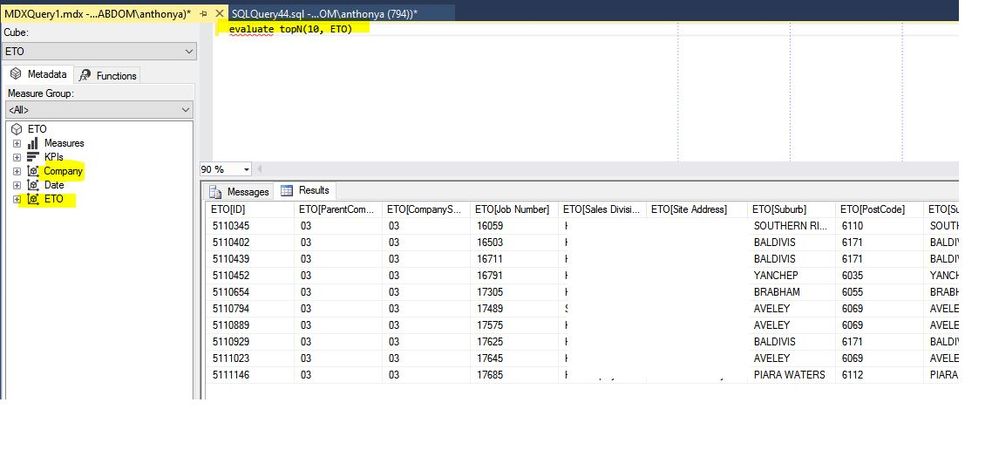
Hi,
Hopefully this screenshot will suffice. I am just running a DAX query in SSMS.
Helpful resources

FabCon & SQLCon – Barcelona 2026
Join us in Barcelona for FabCon and SQLCon, the Fabric, Power BI, SQL, and AI community event. Save €200 with code FABCMTY200.

Power BI DataViz World Championships - June 2026
A new Power BI DataViz World Championship is coming this June! Don't miss out on submitting your entry.

| User | Count |
|---|---|
| 23 | |
| 22 | |
| 14 | |
| 14 | |
| 13 |


| User | Count |
|---|---|
| 47 | |
| 39 | |
| 24 | |
| 20 | |
| 20 |


