Join us at FabCon Atlanta from March 16 - 20, 2026, for the ultimate Fabric, Power BI, AI and SQL community-led event. Save $200 with code FABCOMM.
Register now!Vote for your favorite vizzies from the Power BI Dataviz World Championship submissions. Vote now!
I keep getting errors with Date Diff. I need to find hours difference between Open Date and Resolved Date.
Each item does not have a Resolve Date, so I tried
"Resolution Time= IF('table'[Resolved Date] <> BLANK(), DATEDIFF('table'[Open Date], 'table'[Resolved Date], HOUR), 0)"
But still get errors.
Solved! Go to Solution.
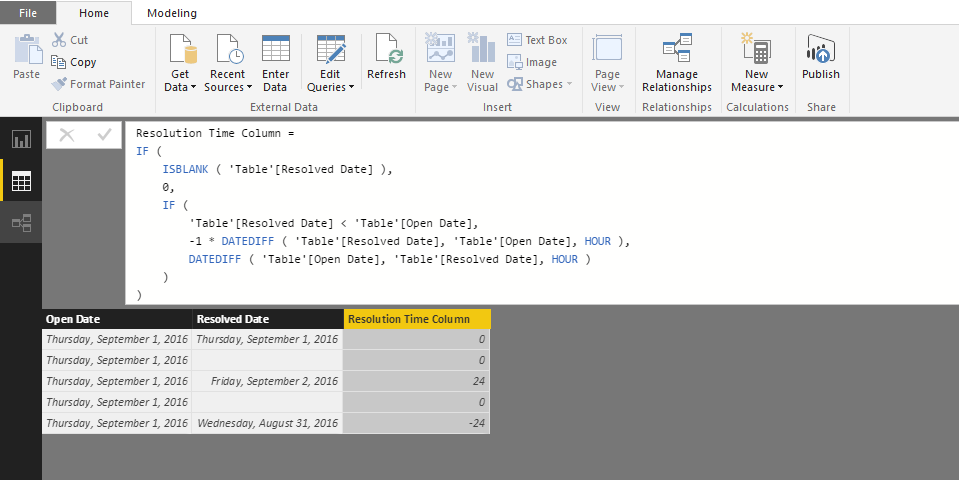
@bhmiller89 Try this formula as a column...
Resolution Time Column =
IF (
ISBLANK ( 'Table'[Resolved Date] ),
0,
IF (
'Table'[Resolved Date] < 'Table'[Open Date],
-1 * DATEDIFF ( 'Table'[Resolved Date], 'Table'[Open Date], HOUR ),
DATEDIFF ( 'Table'[Open Date], 'Table'[Resolved Date], HOUR )
)
)If this works you have some resolved dates that are prior to their respective open date.
Those will appear as negative numbers in the resolution column because of the * -1.
Hope this resolves the errors! ![]()
@bhmiller89 Try this formula as a column...
Resolution Time Column =
IF (
ISBLANK ( 'Table'[Resolved Date] ),
0,
IF (
'Table'[Resolved Date] < 'Table'[Open Date],
-1 * DATEDIFF ( 'Table'[Resolved Date], 'Table'[Open Date], HOUR ),
DATEDIFF ( 'Table'[Open Date], 'Table'[Resolved Date], HOUR )
)
)If this works you have some resolved dates that are prior to their respective open date.
Those will appear as negative numbers in the resolution column because of the * -1.
Hope this resolves the errors! ![]()
Vote for your favorite vizzies from the Power BI World Championship submissions!
If you love stickers, then you will definitely want to check out our Community Sticker Challenge!
Check out the January 2026 Power BI update to learn about new features.
| User | Count |
|---|---|
| 56 | |
| 53 | |
| 40 | |
| 17 | |
| 16 |
| User | Count |
|---|---|
| 116 | |
| 107 | |
| 42 | |
| 32 | |
| 26 |