This time we’re going bigger than ever. Fabric, Power BI, SQL, AI and more. We're covering it all. You won't want to miss it.
Learn moreDid you hear? There's a new SQL AI Developer certification (DP-800). Start preparing now and be one of the first to get certified. Register now
Hello,
I have a question about how to calculate datediff between rows. I have dataset like below:
| Trackingtocken | createdon |
| 1 | 01.08.2018 08:00 |
| 1 | 01.08.2018 08:01 |
| 1 | 01.08.2018 08:12 |
| 1 | 01.08.2018 08:14 |
| 1 | 01.08.2018 08:15 |
| 1 | 01.08.2018 10:31 |
What I need is a calculated column where datediff (MIN or HOUR) between each row is calculated (from the very beginning).
Something like the outcome below (based on my example):
| Datediff |
0 1 11 2 1 .... |
Could you please help me with that?
Regards
Magomed.
Solved! Go to Solution.
HI, @Magomed
After my test, you could do these follow my steps as below:
Step1:
Add a group rank column
group rank = RANKX(FILTER(Table1,Table1[Trackingtocken]=EARLIER(Table1[Trackingtocken])),Table1[createdon],,ASC)
Step2:
Use EARLIER Function add a datediff column
Datediff = DATEDIFF(CALCULATE(MAX(Table1[createdon]),FILTER(Table1,Table1[Trackingtocken]=EARLIER(Table1[Trackingtocken])&&Table1[group rank]=EARLIER(Table1[group rank])-1)),Table1[createdon],MINUTE)
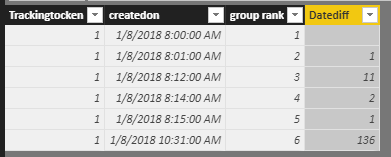
Result:
here is pbix, please try it.
https://www.dropbox.com/s/0v0qnnue9j1hvyx/DATEDIFF%20between%20Rows.pbix?dl=0
Best Regards,
Lin
HI, @Magomed
After my test, you could do these follow my steps as below:
Step1:
Add a group rank column
group rank = RANKX(FILTER(Table1,Table1[Trackingtocken]=EARLIER(Table1[Trackingtocken])),Table1[createdon],,ASC)
Step2:
Use EARLIER Function add a datediff column
Datediff = DATEDIFF(CALCULATE(MAX(Table1[createdon]),FILTER(Table1,Table1[Trackingtocken]=EARLIER(Table1[Trackingtocken])&&Table1[group rank]=EARLIER(Table1[group rank])-1)),Table1[createdon],MINUTE)
Result:
here is pbix, please try it.
https://www.dropbox.com/s/0v0qnnue9j1hvyx/DATEDIFF%20between%20Rows.pbix?dl=0
Best Regards,
Lin
Hi Lin,
Thank you very much, it worked for me :).
Regards
Magomed.
See my article on Mean Time Before Failure (MTBF) which uses EARLIER: http://community.powerbi.com/t5/Community-Blog/Mean-Time-Between-Failure-MTBF-and-Power-BI/ba-p/3395...
Hi Greg,
Thanks a lot! I will test your approach.
Regards
Magomed.
Check out the April 2026 Power BI update to learn about new features.
Sign up to receive a private message when registration opens and key events begin.
If you have recently started exploring Fabric, we'd love to hear how it's going. Your feedback can help with product improvements.
| User | Count |
|---|---|
| 34 | |
| 32 | |
| 25 | |
| 21 | |
| 16 |
| User | Count |
|---|---|
| 61 | |
| 49 | |
| 28 | |
| 23 | |
| 23 |