Get certified for free when you join Fabric Data Days 2026 and dive into Fabric, Power BI, SQL, AI, and other essential data skills.
Join nowData Days is here! Join us now for 60+ days of learning, challenges, and connection. Learn more
Hello,
I have a question about how to calculate datediff between rows. I have dataset like below:
| Trackingtocken | createdon |
| 1 | 01.08.2018 08:00 |
| 1 | 01.08.2018 08:01 |
| 1 | 01.08.2018 08:12 |
| 1 | 01.08.2018 08:14 |
| 1 | 01.08.2018 08:15 |
| 1 | 01.08.2018 10:31 |
What I need is a calculated column where datediff (MIN or HOUR) between each row is calculated (from the very beginning).
Something like the outcome below (based on my example):
| Datediff |
0 1 11 2 1 .... |
Could you please help me with that?
Regards
Magomed.
Solved! Go to Solution.
HI, @Magomed
After my test, you could do these follow my steps as below:
Step1:
Add a group rank column
group rank = RANKX(FILTER(Table1,Table1[Trackingtocken]=EARLIER(Table1[Trackingtocken])),Table1[createdon],,ASC)
Step2:
Use EARLIER Function add a datediff column
Datediff = DATEDIFF(CALCULATE(MAX(Table1[createdon]),FILTER(Table1,Table1[Trackingtocken]=EARLIER(Table1[Trackingtocken])&&Table1[group rank]=EARLIER(Table1[group rank])-1)),Table1[createdon],MINUTE)
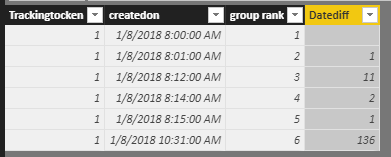
Result:
here is pbix, please try it.
https://www.dropbox.com/s/0v0qnnue9j1hvyx/DATEDIFF%20between%20Rows.pbix?dl=0
Best Regards,
Lin
HI, @Magomed
After my test, you could do these follow my steps as below:
Step1:
Add a group rank column
group rank = RANKX(FILTER(Table1,Table1[Trackingtocken]=EARLIER(Table1[Trackingtocken])),Table1[createdon],,ASC)
Step2:
Use EARLIER Function add a datediff column
Datediff = DATEDIFF(CALCULATE(MAX(Table1[createdon]),FILTER(Table1,Table1[Trackingtocken]=EARLIER(Table1[Trackingtocken])&&Table1[group rank]=EARLIER(Table1[group rank])-1)),Table1[createdon],MINUTE)
Result:
here is pbix, please try it.
https://www.dropbox.com/s/0v0qnnue9j1hvyx/DATEDIFF%20between%20Rows.pbix?dl=0
Best Regards,
Lin
Hi Lin,
Thank you very much, it worked for me :).
Regards
Magomed.
See my article on Mean Time Before Failure (MTBF) which uses EARLIER: http://community.powerbi.com/t5/Community-Blog/Mean-Time-Between-Failure-MTBF-and-Power-BI/ba-p/3395...
Hi Greg,
Thanks a lot! I will test your approach.
Regards
Magomed.
Don't miss out on Data Days, June 15 through August 7. Learn Fabric, Power BI, SQL, AI and more.
Check out the May 2026 Power BI update to learn about new features.
| User | Count |
|---|---|
| 23 | |
| 21 | |
| 20 | |
| 17 | |
| 13 |
| User | Count |
|---|---|
| 58 | |
| 51 | |
| 37 | |
| 30 | |
| 26 |