cancel
Showing results for 
Search instead for 
Did you mean: 

Get Fabric certified for FREE! Don't miss your chance! Learn more

Reply
Anonymous
Not applicable

DATEADD

Hi All,


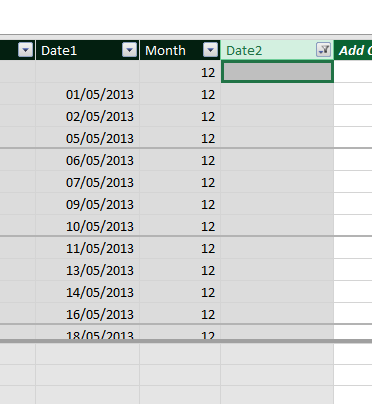
I have this table

Capture.PNG

I'm trying to reduce Date1 by the Month column and return the results in Date2.


I'm using the formula;


=dateadd(Resign_Append[Date1],-Resign_Append[Month],MONTH)


I have no idea why I'm getting values in some rows of Date2 and not in others (as above).


Any ideas?


Thanks in advance


1 ACCEPTED SOLUTION
Anonymous
Not applicable

@PMF99 ,

Here is the formula in DAX: 

New Date DAX = 
VAR _year = YEAR ( Resign_Append[Date1] ) 
VAR _month = MONTH ( Resign_Append[Date1] )
VAR _day = DAY ( Resign_Append[Date1] ) 
VAR _monthToSubstract = Resign_Append[Month]
RETURN DATE ( _year, _month - _monthToSubstract, _day )

View solution in original post

3 REPLIES 3
Anonymous
Not applicable

@Anonymous,

DATEADD is a time intelligence function that returns a table, so you will get the incorrect results. You use Date.AddMonths() function in Power Query to substract the month from your date.


Thanks NickNg.


Any idea how do perform this calculation in DAX as I have multiple queries in my model?

Anonymous
Not applicable

@PMF99 ,

Here is the formula in DAX: 

New Date DAX = 
VAR _year = YEAR ( Resign_Append[Date1] ) 
VAR _month = MONTH ( Resign_Append[Date1] )
VAR _day = DAY ( Resign_Append[Date1] ) 
VAR _monthToSubstract = Resign_Append[Month]
RETURN DATE ( _year, _month - _monthToSubstract, _day )

Helpful resources

Announcements
Join our Fabric User Panel

Join our Fabric User Panel

Share feedback directly with Fabric product managers, participate in targeted research studies and influence the Fabric roadmap.

FabCon Atlanta 2026 carousel

FabCon Atlanta 2026

Join us at FabCon Atlanta, March 16-20, for the ultimate Fabric, Power BI, AI and SQL community-led event. Save $200 with code FABCOMM.